


 +972 52-548-6969


time to read 1 min | 36 words
I played a bit with Expression Design and go this logo:

Update: Andy had some good suggestions:


I played a bit with Expression Design and go this logo:
Update: Andy had some good suggestions:
I don't like generated proxies for web services, they are generally ugly and not fun to work with. However, up until recently I believed that I had to deal with them if I wanted to use the async operations for web services. As it turn out, I was wrong.
We can actually define an WCF service interface like this:
[ServiceContract]
public interface IAsyncBus
{
	[OperationContract(AsyncPattern = true)]
	IAsyncResult BeginProcess(IMessage[] request, AsyncCallback callback, object asyncState);

	IMessage[] EndProcess(IAsyncResult result);
}
Now you can work with it using:
IAsyncBus bus = new ChannelFactory<IAsyncBus>().CreateChannel();
ar = bus.BeginProcess(...);
//do work
bus.EndProcess(ar);
The problem with that is that on the server side, I also have to do things in an async manner. This is sometimes appropriate, but it tends to be a major PITA for a lot of things.
As it turn out, we can solve the issue with aliasing. In the interface dll, we can define:
[ServiceContract]
public interface IBus
{
	[OperationContract]
	IMessage[] Process(IMessage[] request);
}

[ServiceContract(Name="IBus")]
public interface IAsyncBus
{
	[OperationContract(AsyncPattern = true)]
	IAsyncResult BeginProcess(IMessage[] request, AsyncCallback callback, object asyncState);
	IMessage[] EndProcess(IAsyncResult result);
}
Now, you can create an instance of IAsyncBus to communicate with IBus directory. On the server side, we implement IBus, and handle the message in a synchronous manner. Easy, simple, and doesn't require any proxies :-)
A week or so ago the NHibernate Users mailing list was created. In that time, in acquired 276 members and spawned some very interesting discussions.
Some nuggets from the list:
In the meantime, the ALT.Net mailing list has stabilized on ~650 members and roughly 1,700 messages per month:

Vladan Strigo made a really inspiring comment about code generation in the NH Users list.
I didn't want to use codesmith for that because it would de-OCP-fy me in my future efforts :)
That makes a lot of sense, and manages to touch on what bothers me the most with code gen as an architectural approach. It gives up a very important concept, and that affect a lot of the stuff that is dependant on that.
A few days ago there was a thread in the ALT.Net mailing list about the frequency of check ins.
Here is my opinion in this matter:
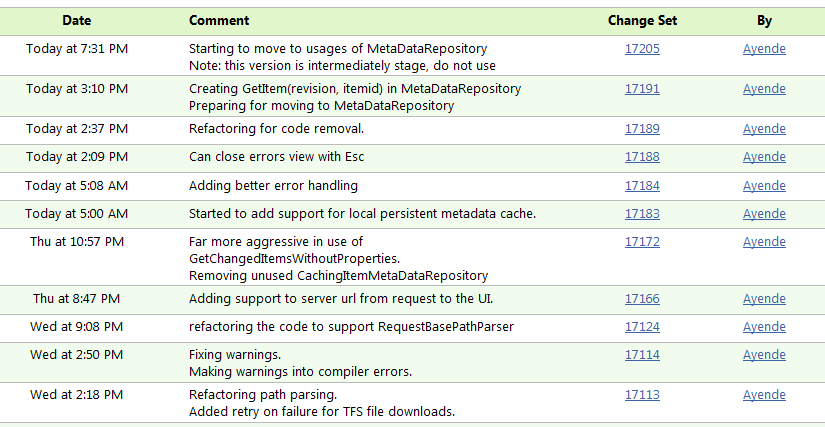
Is this one:

Following the recent profiling effort, I decided to put far more aggressive caching into SvnBridge.
I set it up so it would cache the full revision from TFS on any query, and then serve it from the cache. When I run it against the test server it worked beautifully. Then I had run into this issue:

I am pretty sure that this is not going to be an acceptable scenario. To be rather exact, I would find it acceptable if it was a one time cost, but the problem is that this is a cost that you have to pay per revision. And that is unacceptable. The major problem is that this uses the underlying QueryItems() method, which returns all of the results, including those from previous revisions. This means that on a busy server (like tfs03), the cost of doing such a query is high.
The number of files returned is actually pretty small (910 in this case), but I assume that it have to check all the files on the server for permission before it allows me to get them.
I wonder how Rhino Security would handle this situation, it wouldn't even get the data out of the DB, and the query enhancement is pretty light weight. I assume it would be pretty fast.
Anyway, this is obviously a bad approach. For now, I made it load only the path (and its descendants) that we need, this mean that we don't get the same benefit of preemptive caching and might talk to the server a bit too much. However, it turn out that the way SvnBridge and SVN makes requests in a way that make this style of caching work fairly well. We always ask for the directory before asking for the descendant, and we have fairly long conversations about the same revision, so that is good candidate.
That isn't optimal for big projects, with a lot of files and a lot of activity, however. Because the way I handle it now, we download the entire project metadata for each revision, that can be a lot for those kind of projects, and having to download them each and every time is a waste.
SvnBridge already contains a very smart piece of code (the UpdateDiffCalculator class) that can figure out the differences between two revisions and only get the items that it needs. The problem is that the caching layer is built mainly in order to support that class.
I think that I'll need to get a bit smarter about this in the future, but for now it seems to be doing the work very well.
The most highly rated request for SvnBridge was adding support for multiple TFS servers without having to run multiple instances of SvnBridge, which was a hassle.
Today I finished working on the implementation, and the UI got a new check box:

Funny, but this took almost three days to implement.
Yes, I don't do WinForms much, and I am pretty sure somewhere there is a way to do checkboxes, but I like writing code.*
What actually took a lot of time was working on the path routing inside SvnBridge, so it would send the proper response to the client, which would return it right back to it. The SVN WebDAV protocol is full of indirection, and that is not saying the least.
At any rate, this now works, and you can use a single instance.
Now, how do I do that? Well, using the Microsoft Mind Reading Patent technology, of course:

I mean, don't you know that telepathy enabled software is the next big thing?
Now, all you have to do is start SvnBridge, and you can access any TFS server in your possession.
Just issue this command to get the SvnBridge code:
svn checkout http://localhost:8081/tfs03.codeplex.com/SvnBridge
Note the tfs03.codeplex.com in the URL ? This has nothing to do with how we specify which server we use. I am using mind reading technology, I remind you.
If we want to specify a port, we will use:
svn checkout http://localhost:8081/my-team-system-server:8080/MyProject
SvnBridge will also auto detect http and https, so you don't have to worry about this.
* No, I didn't spend three days writing my CheckboxControl.
Another interesting challenge. Given the following API:
public interface IFileRepository
{
	void Save(IFile file);

	IFile[] GetFiles(string path, Recursion recursion);
}

public enum Recursion
{
	None,
	OneLevel,
	Full
}
And assuming that you are saving to a relational database, how are you going to build the GetFiles method?
Oh, and just to make things interesting, Save(IFile) may only perform a single SQL INSERT statement.
Given the following block of code:
if (presenter.GetServerUrlFromRequest!=null)
	GetServerUrlFromRequest.Checked = presenter.GetServerUrlFromRequest.Value;
else
	GetServerUrlFromRequest.Checked = true;
Resharper gave me the following advice:

And turned the code to this piece:
GetServerUrlFromRequest.Checked = !(presenter.GetServerUrlFromRequest!=null) ||
                                  presenter.GetServerUrlFromRequest.Value;
And while it has the same semantics, I actually had to dechiper the code to figure out what it was doing.
I choose to keep the old version.
No future posts left, oh my!