



 +972 52-548-6969



PropertySphere bot: understanding images
In the previous post, I talked about the PropertySphere Telegram bot (you can also watch the full video here). In this post, I want to show how we can make it even smarter. Take a look at the following chat screenshot:
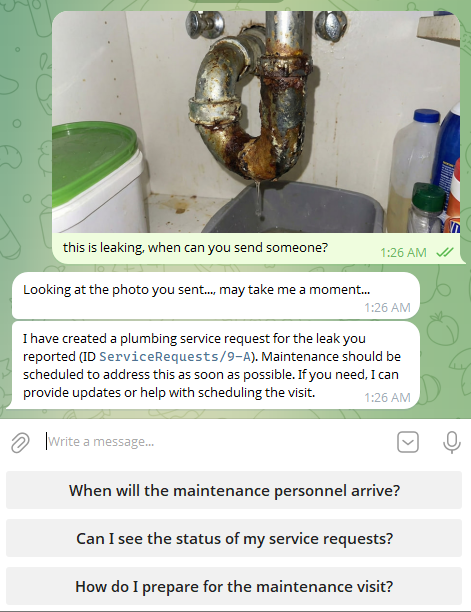
What is actually going on here? This small interaction showcases a number of RavenDB features, all at once. Let’s first focus on how Telegram hands us images. This is done using Photoor Document messages (depending on exactly how you send the message to Telegram).
The following code shows how we receive and store a photo from Telegram:
// Download the largest version of the photo from Telegram:
var ms = new MemoryStream();
var fileId = message.Photo.MaxBy(ps => ps.FileSize).FileId;
var file = await botClient.GetInfoAndDownloadFile(fileId, ms, cancellationToken);

// Create a Photo document to store metadata:
var photo = new Photo
{
    ConversationId = GetConversationId(chatId),
    Id = "photos/" + Guid.NewGuid().ToString("N"),
    RenterId = renter.Id,
    Caption = message.Caption ?? message.Text
};

// Store the image as an attachment on the document:
await session.StoreAsync(photo, cancellationToken);
ms.Position = 0;
session.Advanced.Attachments.Store(photo, "image.jpg", ms);
await session.SaveChangesAsync(cancellationToken);

// Notify the user that we're processing the image:
await botClient.SendMessage(
chatId,
       "Looking at the photo you sent..., may take me a moment...",
       cancellationToken
);
A Photo message in Telegram may contain multiple versions of the image in various resolutions. Here I’m simply selecting the best one by file size, downloading the image from Telegram’s servers to a memory stream, then I create a Photo document and add the image stream to it as an attachment.
We also tell the client to wait while we process the image, but there is no further code that does anything with it.
Gen AI & Attachment processing
We use a Gen AI task to actually process the image, handling it in the background since it may take a while and we want to keep the chat with the user open. That said, if you look at the actual screenshots, the entire conversation took under a minute.
Here is the actual Gen AI task definition for processing these photos:
var genAiTask = new GenAiConfiguration
{
    Name = "Image Description Generator",
    Identifier = TaskIdentifier,
    Collection = "Photos",
    Prompt = """
        You are an AI Assistant looking at photos from renters in
        rental property management, usually about some issue they have.
        Your task is to generate a concise and accurate description of what
        is depicted in the photo provided, so maintenance can help them.
        """,


    // Expected structure of the model's response:
    SampleObject = """
        {
            "Description": "Description of the image"
        }
        """,


    // Apply the generated description to the document:
    UpdateScript = "this.Description = $output.Description;",


    // Pass the caption and image to the model for processing:
    GenAiTransformation = new GenAiTransformation
    {
        Script = """
            ai.genContext({
                Caption: this.Caption
            }).withJpeg(loadAttachment("image.jpg"));
            """
    },
    ConnectionStringName = "Property Management AI Model"
};
What we are doing here is asking RavenDB to send the caption and image contents from each document in the Photos collection to the AI model, along with the given prompt. Then we ask it to explain in detail what is in the picture.
Here is an example of the results of this task after it completed. For reference, here is the full description of the image from the model:
A leaking metal pipe under a sink is dripping water into a bucket. There is water and stains on the wooden surface beneath the pipe, indicating ongoing leakage and potential water damage.

What model is required for this?
I’m using the
gpt-4.1-minimodel here; there is no need for anything beyond that. It is a multimodal model capable of handling both text and images, so it works great for our needs.You can read more about processing attachments with RavenDB’s Gen AI here.
We still need to close the loop, of course. The Gen AI task that processes the images is actually running in the background. How do we get the output of that from the database and into the chat?
To process that, we create a RavenDB Subscription to the Photos collection, which looks like this:
store.Subscriptions.Create(new SubscriptionCreationOptions
{
    Name = SubscriptionName,
    Query = """
        from "Photos"
        where Description != null
        """
});
This subscription is called by RavenDB whenever a document in the Photos collection is created or updated with the Description having a value. In other words, this will be triggered when the GenAI task updates the photo after it runs.
The actual handling of the subscription is done using the following code:
_documentStore.Subscriptions.GetSubscriptionWorker<Photo>("After Photos Analysis")
    .Run(async batch =>
    {
        using var session = batch.OpenAsyncSession();
        foreach (var item in batch.Items)
        {
            var renter = await session.LoadAsync<Renter>(
item.Result.RenterId!);
            await ProcessMessageAsync(_botClient, renter.TelegramChatId!,
                $"Uploaded an image with caption: {item.Result.Caption}\r\n" +
                $"Image description: {item.Result.Description}.",
                cancellationToken);
        }
    });
In other words, we run over the items in the subscription batch, and for each one, we emit a “fake” message as if it were sent by the user to the Telegram bot. Note that we aren’t invoking the RavenDB conversation directly, but instead reusing the Telegram message handling logic. This way, the reply from the model will go directly back into the users' chat.
You can see how that works in the screenshot above. It looks like the model looked at the image, and then it acted. In this case, it acted by creating a service request. We previously looked at charging a credit card, and now let’s see how we handle creating a service request by the model.
The AI Agent is defined with a CreateServiceRequest action, which looks like this:
Actions = [
    new AiAgentToolAction
    {
        Name = "CreateServiceRequest",
        Description = "Create a new service request for the renter's unit",
        ParametersSampleObject = JsonConvert.SerializeObject(
            new CreateServiceRequestArgs
            {
                    Type =         """
Maintenance | Repair | Plumbing | Electrical |
HVAC | Appliance | Community | Neighbors | Other
""",
            Description =         """
Detailed description of the issue with all
relevant context
"""
                })
    },
]
As a reminder, this is the description of the action that the model can invoke. Its actual handling is done when we create the conversation, like so:
conversation.Handle<PropertyAgent.CreateServiceRequestArgs>(
"CreateServiceRequest",
async args =>
{
    using var session = _documentStore.OpenAsyncSession();
    var unitId = renterUnits.FirstOrDefault();
    var propertyId = unitId?.Substring(0, unitId.LastIndexOf('/'));


    var serviceRequest = new ServiceRequest
    {
        RenterId = renter.Id!,
        UnitId = unitId,
        Type = args.Type,
        Description = args.Description,
        Status = "Open",
        OpenedAt = DateTime.UtcNow,
        PropertyId = propertyId
    };


    await session.StoreAsync(serviceRequest);
    await session.SaveChangesAsync();


    return $"Service request created ID `{serviceRequest.Id}` for your unit.";
});
In this case, there isn’t really much to do here, but hopefully this conveys the kind of code this allows you to write.
Summary
The PropertySphere sample application and its Telegram bot are interesting, mostly because of everything that isn’t here. We have a bot that has a pretty complex set of behaviors, but there isn’t a lot of complexity for us to deal with.
This behavior is emergent from the capabilities we entrusted to the model, and the kind of capabilities we give it. At the same time, I’m not trusting the model, but verifying that what it does is always within the scope of the user’s capabilities.
Extending what we have here to allow additional capabilities is easy. Consider adding the ability to get invoices directly from the Telegram interface, a great exercise in extending what you can do with the sample app.
There is also the full video where I walk you through all aspects of the sample application, and as always, we’d love to talk to you on Discord or in our GitHub discussions.
Comments
Comment preview