Oren Eini

CEO of RavenDB

a NoSQL Open Source Document Database

Get in touch with me:

oren@ravendb.net +972 52-548-6969

Posts: 7,640
|
Comments: 51,262
Privacy Policy · Terms
filter by tags archive
time to read 2 min | 347 words

One of the things that we have been doing lately was providing solutions for cloud hosted RavenDB. I am very proud to announce the public beta phase of RavenHQ, a cloud based, fully managed RavenDB service.

image

Currently it is available on AppHarbor only, and I must emphasis that this is still a beta, so you might run into some road bumps, but we have a really good team working on this.

Actually, here is an important detail, about this offering.

Hibernating Rhinos (the company who is actually doing the development of RavenDB) is at heart a development / consulting company. We didn’t want to try to break apart something good, so we setup a new company dedicated for running RavenDB on the cloud, RavenHQ.

Why do you care about this? Because it means that while the RavenDB development team is available for any problem that you might run into, RavenHQ is actually stuffed by people whose job is merely to make sure that all your databases are humming along nicely, and not a developer who is 15% of watching what is going on in that server somewhere on the cloud.

I collaborated in RavenHQ with Jonathan Matheus (NSeviceBus Committer and an all around cool guy) to create something that I feel will be really awesome.

As I said before, we are currently offering RavenHQ on App Harbor only, but we will soon open it for general registration. In the meantime, this is called beta for a reason.

It is hard to test cloud based stuff in a lab, so after we have made sure that everything works, the next step is to see if you can break it. I am assuming the worse at that you will manage to break it in all sorts of creative ways. Please give us a short amount of grace period to make sure that we can match our internal workings to how people are actually using us.

Have an awesome weekend!

time to read 6 min | 1084 words

Recently we added a really nice feature, boosting the results while indexing.

Boosting is a way to give documents or attributes in a document weights. Attribute level boosting is a way to tell RavenDB that a certain  attribute in a document is more important than the others, so it will show up higher in queries when other properties are involved in a query. A document level boosting means that a certain document is more important than another (when using multi maps).

Let us see a few examples where this is happening. The simplest scenario is when we have a multi field search, and we want one of the fields to be the more important one. For example, we decided that when you make a search for first name and last name, a match on the first name has higher relevance than a match on the last name. We can define this requirement with the following index:

public class Users_ByName : AbstractIndexCreationTask<User>
{
    public Users_ByName()
    {
        Map = users => from user in users
                       select new
                       {
                           FirstName = user.FirstName.Boost(3),
                           user.LastName
                       };
    }
}

And we can query the index using:

var matches = session.Query<User,UsersByName>()
      .Where(x=>x.FirstName == "Ayende" || x.LastName == "Eini")
      .ToList()

Assuming that we have a user with the first name “Ayende” and another user with the last name “Eini”, this will find both of them, but will rank the user with the name “Ayende” first.

Let us see another variant, we have a multi map index for users and accounts, both are searchable by name, but we want to ensure that accounts are more important than users. We can do that using the following index:

public class UsersAndAccounts : AbstractMultiMapIndexCreationTask
{
    public UsersAndAccounts()
    {
        AddMap<User>(users =>
                     from user in users
                     select new {Name = user.FirstName}
            );
        AddMap<Account>(accounts =>
                        from account in accounts
                        select new {account.Name}.Boost(3)
            );
    }
}

If we have query that has matches for users and accounts, this will make sure that the account comes first.

And finally, a really interesting use case is that based on the entity itself, you decide to rank it higher. For example, we want to rank customers that ordered a lot from us higher than other customers. We can do that using the following index:

public class Accounts_Search : AbstractIndexCreationTask<Account>
{
    public Accounts_Search()
    {
        Map = accounts =>
              from account in accounts
              select new
              {
                  account.Name
              }.Boost(account.TotalIncome > 10000 ? 3 : 1);
    }
}

This way, we get the more important customers first. And this is really one of those things that brings up the polish in the system, the things that makes the users sit up and take notice.

time to read 3 min | 451 words

When I started out, I pointed out that I truly dislike this type of architecture:

image

And I said that I much rather an architecture that has a far more limited set of abstractions, and I gave this example:

  1. Controllers
  2. Views
  3. Entities
  4. Commands
  5. Tasks
  6. Events
  7. Queries

That is all nice in theory, but let us talk in practice, shall we? How do we actually write code that actually uses this model?

Let us show some code that uses this type of code, this type, this is from the C# port of the same codebase, available here.

public class CargoAdminController : BaseController
{
  [AcceptVerbs(HttpVerbs.Post)]
  public ActionResult Register(
      [ModelBinder(typeof (RegistrationCommandBinder))] RegistrationCommand registrationCommand)
  {
      DateTime arrivalDeadlineDateTime = DateTime.ParseExact(registrationCommand.ArrivalDeadline, RegisterDateFormat,
                                                             CultureInfo.InvariantCulture);

      string trackingId = BookingServiceFacade.BookNewCargo(
          registrationCommand.OriginUnlocode, registrationCommand.DestinationUnlocode, arrivalDeadlineDateTime
          );

      return RedirectToAction(ShowActionName, new RouteValueDictionary(new {trackingId}));
  }
}

Does this looks good to you? Here is what is actually going on here.

image

You can click on this link look at what is going in here (and I removed some stuff for clarity’s sake.

This stuff is complex, more to the point, it doesn’t read naturally, it is hard to make a change without modifying a lot of code. This is scary.

We have a lot of abstractions here, services and repositories and facades and what not. (Mind, each of those thing is an independent abstraction, not a common one.)

In my next post, I’ll show how to refactor this to a much saner model.

time to read 3 min | 582 words

One of the major advantages of limiting the number of abstractions you have is that you end up with a lot less “infrastructure” code. This is in quote because a lot of the time I see this type of code doing things like this:

public class BookingServiceImpl : IBookingService  
{

  public override IList<Itinerary> RequestPossibleRoutesForCargo(TrackingId trackingId)
  {
    Cargo cargo = cargoRepository.Find(trackingId);

    if (cargo == null)
    {
      return new List<Itinerary>();
    }

    return routingService.FetchRoutesForSpecification(cargo.routeSpecification());
  }
  
}

I don’t want to see stuff like that. Instead, I want to be able to go into any piece of code and figure out by what it is what it must be doing. All my code follow fairly similar patterns, and the only differences that I have are actual business differences.

Here is the list of common abstractions that I gave before, this time, I am going to go over each one and explain it.

  1. Controllers – Stand at the edge of the system and manage interaction with the outside world. Can be MVC controllers, MVVM models, WCF Services.
  2. Views  - The actual UI logic that is being executed. Can be MVC views, XAML, or real UI code (you know, that old WinForms stuff Smile).
  3. Entities – Data that is being persisted.
  4. Commands – A packaged command to do something that will execute immediately. (Usually invoked by controllers).
  5. Tasks – A packaged execution that will be execute at a later point in time (usually async), after the current operation have completed.
  6. Events – Something that happened in the system that is interesting and require action. Common place for business logic and interaction.
  7. Queries – Packaged query to be executed immediately. Usually only fairly complex ones gets promoted to an actual query object.

There might be a few others in your system, but for the most part, you would see those types of things over and over and over again.

Oh, sure, you might have other things as well, but those should be rare. If you need to display things in multiple currency interacting with a currency service is something that you would need to often, by all means, make it easy to do (how you do that is usually not important), but the important thing to remember is that those sort of things are one off, and they should remain one off, not the way you structure the entire app.

The reason this is important is that once you have this common infrastructure and shape (for lack of a better word), you can start working in a very rapid pace, without being distracted, and making changes becomes easy. All of your architecture is going through the same central pipes, shifting where they are going is easy to do. You don’t have to drag a rigid system made of a lot of small individual pieces, after all.

time to read 3 min | 550 words

imageOn my last post, I outlined the major abstractions that I tend to use in my applications.

  1. Controllers
  2. Views
  3. Entities
  4. Commands
  5. Tasks
  6. Events
  7. Queries

I also said that I like Tasks much more than Commands and I’ll explain that in the future. When talking about tasks, I usually talk about something that is based on this code. This give us the ability to write code such as this:

public class AssignCargoToRoute : BackgroundTask
{
  public Itinerary Itinerary { get;set; }
  TrackingId TrackingId { get;set; }

  public override void Execute()
  {
    
  }
}

On the face of it, this is a very similar to what we have had before. So why am I so much in favor of tasks rather than commands?

Put simply, the promises that they make are different.  A command will execute immediately, this is good when we are encapsulating common or complex piece of logic. We give it a meaningful name and move on with our lives.

The problem is that in many cases, executing immediately is something that we don’t want. Why is that?

Well, what happen if this can take a while? What if this requires touching a remote resource (one that can’t take part of our transaction)? What happen if we want this to execute, but only if the entire operation have been successful? How do we handle errors? What happen when the scenario calls for a complex workflow? Can I partially succeed in what I am doing? Can you have a compensating action if some part fail? All of those scenarios basically boil down to “I don’t want to execute it now, I want the execution to be managed for me”.

Thing about the scenario that we actually have here. We need to assign a cargo to a route. But what does that means? In the trivial example, we do that by updating some data in our local database. But in real world scenario, something like that tends to be much more complex. We need to calculate shipping charges, check manifest, verify that we have all the proper permits, etc. All of that takes time, and usually collaboration with external systems.

For the most part, I find that real world systems requires a lot more tasks than commands. Mostly because it is actually rare to have complex interaction inside your own system. If you do, you have to be cautious that you aren’t adding too much complexity. It is the external interactions that tends to makes life… interesting.

This has implications on how we are building the system, because we don’t assume immediate execution and the temporal coupling that comes with it.

time to read 4 min | 629 words

Let us take a look at another part of the DDD sample application. This time, the booking service.

image

One thing that is really glaring at me is that we have a mix of both commands and queries in this interface. Also, just consider the name. It is a Booking service, but it doesn’t actually seem to have an actual meaning in the application itself. There is no entity named Booking, and except for the BookNewCargo, there is no mention of booking anywhere in the application.

You know what, maybe there is logic in the RequestPossibleRoutesForCargo that is actually meaningful beyond a simple query. Such as charging the customer for the calculation, or reserving space on the route that we selected, etc.

At any rate, I don’t like this service at all. In fact, any time that you have something that is called XyzService, you ought to suspect it.  Let me take this one step further. I don’t like that it is an interface, and I don’t like how it is composed. I don’t see it as an independent thing. Going further than that, I don’t really see a reason why we would need an interface here. You might have noticed what the title of this series is. I want to limit abstraction, and IBookingService is an abstraction, one that I don’t see any value in.

In most applications, I like to have a very small number of abstractions. Usually in the order of half a dozen to a dozen (top!). I usually think about them like this:

  1. Controllers
  2. Views
  3. Entities
  4. Commands
  5. Tasks
  6. Events
  7. Queries

Sometimes you have a few more, but those are the major ones. Controllers,Views and Entities are fairly obvious, I would imagine. But what about the rest?

Command is a package “thing” that happen immediately. Tasks are very like commands, except that they don’t have an explicit execution date and Events allow you to build smarts into the system. We have already seen how I handle events, in the previous posts in this series. And Queries should be fairly obvious as well.

Let us tackle Commands now, and then explain why they are bad later on.

When I said that I don’t want abstractions, I meant that I don’t want an interface and an implementation, and some way to connect the two, etc. I don’t really see a lot of value in that for the common case.

Let us break it apart into commands, which would give us this:

public class AssignCargoToRoute : Command
{
  public Itinerary Itinerary { get;set; }
  TrackingId TrackingId { get;set; }

  public override void Execute()
  {
    
  }
}

public class BookNewCargo : Command
{
  public UnLocode Origin {get;set;}
  public UnLocode Destination { get;set; }
  public DateTime ArrivalDeadline {get;set;}

  public TrackingId Result {get;set;}
  public override void Execute()
  {
    
  }
}

I am very fond in having a base class for those types of things. The base class provide me with the infrastructure support for the command in question.

In my next post, I’ll go over why I don’t like this approach, and discuss other ways to structure things so it is more suitable for an actual application.

time to read 4 min | 791 words

One of the things that I did, almost by accident, when we started Hibernating Rhinos was to create a CI server and a public daily build server. And every single successful build ended up in customer hands. That was awesome in many respects, it removed a lot of the “we have got to make a new release” pressure, because we were making new releases, sometimes multiple times a day.

When we started with RavenDB, it was obvious to me that this was what we were going to do with it as well, because the advantages to this approach as so clear. With RavenDB, we needed a two stage system, but still, every single build gets to the customer hands.

Awesome, great, outstanding, exceptional and other such synonyms. As long as you look at this from one angle, the one in which we are only concerned about the technical challenges of delivering software .The problem is that there are additional things to note here. Economic challenges.

Let us take the profiler as a good example. It was released in beta on the Jan 1, 2009, and since then we had 920 separate builds, adding a ton of new features, capabilities, improving performance, making things smoother and in general making it a better product.

That is over 3 years without a major release, mostly because we never had the need to do this, we kept delivering software on a day to day basis.

During that time, we delivered features such as viewing the result set, checking the query plan of a query (in all major databases), exporting the entire session to HTML so you can send it to your DBA, CI integration and so much more. It has been wonderful.

Except… this has one implications that I didn’t think of at the time. If you bought NH Prof on the 1st Jan, 2009 you got 3 years of product updates, for no additional costs. And unless we create a new major version, you can keep using the software, including all the updates and improvements, without paying.

That is great for the very early customers, but not so good for the people who need to eat so they can work on the profiler. Let us think about the implications of this a bit more, okay?

In order for us to actually make money, we have to:

  • keep expanding our one-off customer base, which is going to hit a limit at some point.
  • create a new version, getting the old customer to purchase the updates.

Seems simple, right? This is what most companies do, and how most software is sold. You get a license for version 1 and you buy a license for version 2.

So far, so good. But let us consider the implications of that. In order to get the old users to buy the new one, I have to put some really nice stuff in the next version. Which means that I have to do a lot of “secret” development because I can’t just release it on our usual continuous deployment mode. That sucks. And it also means that features that are already coded are actually disabled because we defer them to the next version.

So, the next version of the profilers is going to have to have some interesting features to get people to buy it. One of them is production profiling. It has actually been around for quite a while. It has simply been #ifdef’ed out of the product, because it is something that we keep for the next version.

I just checked, and I was acutely surprised by what I found. The initial work for production profiling was done in Jan 2010, it is working since then. I got side tracked with RavenDB so I never had the chance to actually complete the rest of the features for 2.x and release them all.

In mid 2010 we started experimenting with subscriptions. Instead of having a one time payment model, we moved to a pay as you go. So as long as you were using the profiler, you were paying for it, and in return, we provided all of those new features.

I have been thinking about this a lot lately. I strongly lean toward making the next version of the profiler (coming soon, and it will have a bunch of nice features) subscription only.

My current thinking it to allow two modes of buying the product. Monthly / yearly subscription and a one time fee that give you 18 months of usage (and doesn’t re-charge). That would allow us to keep producing software in incremental steps, without having to go away for a while and work in secret on big ticket features just so we can have enough stuff to put on “why you should buy 2.x” list.

I would appreciate any feedback that you may have.

time to read 5 min | 875 words

In my last post, I mentioned that this is actually an event processing system, so we might as well use actual event processing and see what we can gain out of this. I chose to use RX (reactive extensions), which can turn a series of events into a linq statement. This is incredibly powerful, and has some interesting implications when you combine this with your architecture. In particular, let us see what we can get when we set out to replace this with RX based event processing style.

image_thumb3_thumb_thumb

We can get to something like this very easily:

public class CargoProcessor : EventsProcessor
{
    public CargoProcessor()
    {
        On<Cargo>(cargos =>
            from cargo in cargos
            where cargo.Delivery.Misdirected
            select MisdirectedCargo(cargo)
            );

        On<Cargo>(cargos =>
            from cargo in cargos
            where cargo.Delivery.UnloadedAtDestination
            select CaroArrived(cargo)
        );
    }

    private object CaroArrived(Cargo cargo)
    {
        // handle event
        return null;
    }

    private object MisdirectedCargo(Cargo cargo)
    {
        // handle event
        return null;
    }
}

We use RX to handle the linq processing over the events, and in EventsProcessor we have very little code, probably just:

    public class EventsProcessor
    {
        private readonly List<Func<IObservable<object>, IObservable<object>>>  actions = new List<Func<IObservable<object>, IObservable<object>>>();

        protected void On<T>(Func<IObservable<T>, IObservable<object>> action)
        {
            actions.Add(observable => action(observable.OfType<T>()));
        }

        public void Execute(IObservable<object> observable)
        {
            foreach (var action in actions)
            {
                action(observable).Subscribe();
            }
        }
    }

Elsewhere in the code we setup the actual Obsersable that we pass to all the EventsProcessors. The major advantages that we have with this style is that we have a natural syntax to do selection on the events that interest us, including fairly complex one. We still have easy time of creating new EventsProcessors if we want, but because the code for defining the selection is so compact, we can usually put related stuff together, which is going to be very helpful for making sure that the codebase is readable.

And, naturally, this method extends itself to handling events of multiple types in the same place. For example, if we want to also handle the HandlingEvent, we can do it in place, because it is very much related to the Cargo, it seems.

time to read 1 min | 188 words

Here is how it works. I hate benchmarks, because they are very easily manipulated. Whenever I am testing performance stuff, I am posting numbers, but they are usually in reference to themselves (showing improvements).

That said…

Mark Rodseth .Net Technical Architect at Fortune Cookie in London, UK and he did a really interesting comparison between RavenDB & SQL Server. I feel good about posting this because Mark is a totally foreign agent (hm…. well, maybe not that Smile ) but he has no association with RavenDB or Hibernating Rhinos.
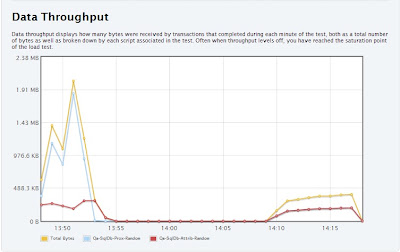
Also, this post really made my day.

Update: Mark posted more details on his test case.

Mark setup a load test for two identical applications, one using RavenDB, the other one using SQL Server. The results:

SQL Load Test
Transactions: 111,014 (Transaction = Single Get Request)
Failures: 110,286 (Any 500 or timeout)

And for RavenDB ?

RavenDB Load Test
Transactions: 145,554 (Transaction = Single Get Request)
Failures: 0 (Any 500 or timeout)

And now that is pretty cool.

time to read 4 min | 713 words

In my previous post, I spoke about ISP and how we can replace the following code with something that is easier to follow:

image_thumb3_thumb

I proposed something like:

public interface IHappenOn<T>
{
   void Inspect(T item);
}

Which would be invoked using:

container.ExecuteAll<IHappenOn<Cargo>>(i=>i.Inspect(cargo));

Or something like that.

Which lead us to the following code:

public class CargoArrived : IHappenedOn<Cargo>
{
  public void Inspect(Cargo cargo)
  {
    if(cargo.Delivery.UnloadedAtDestination == false)
      return;
      
    // handle event
  }
}

public class CargoMisdirected : IHappenedOn<Cargo>
{
  public void Inspect(Cargo cargo)
  {
    if(cargo.Delivery.Misdirected == false)
      return;
      
    // handle event
  }
}

public class CargoHandled : IHappenOn<HandlingEvent>
{
   // etc
}

public class EventRegistrationAttempt : IHappenedOn<HandlingEventRegistrationAttempt>
{
  // etc
}

But I don’t really like this code, to be perfectly frank. It seems to me like there isn’t really a good reason why CargoArrived and CargoMisdirected are located in different classes. It is likely that there is going to be a lot of commonalities between the different types of handling events on cargo. We might as well merge them together for now, giving us:

public class CargoHappened : IHappenedOn<Cargo>
{
  public void Inspect(Cargo cargo)
  {
    if(cargo.Delivery.UnloadedAtDestination)
      CargoArrived(cargo);
      
    
    if(cargo.Delivery.Misdirected)
      CargoMisdirected(cargo);
      
  }
  
  public void CargoArrived(Cargo cargo)
  {
    // handle event
  }
  
  public void CargoMisdirected(Cargo cargo)
  {
    //handle event
  }
}

This code put a lot of the cargo handling in one place, making it easier to follow and understand. At the same time, the architecture gives us the option to split it to different classes at any time. We aren’t going to end up with a God class for Cargo handling. But as long as it make sense, we can keep them together.

I like this style of event processing, but we can probably do better job at if if we actually used event processing semantics here. I’ll discuss that in my next post.

FUTURE POSTS

No future posts left, oh my!

RECENT SERIES

  1. API Design (10):
    29 Jan 2026 - Don't try to guess
  2. Recording (20):
    05 Dec 2025 - Build AI that understands your business
  3. Webinar (8):
    16 Sep 2025 - Building AI Agents in RavenDB
  4. RavenDB 7.1 (7):
    11 Jul 2025 - The Gen AI release
  5. Production postmorterm (2):
    11 Jun 2025 - The rookie server's untimely promotion
View all series

Syndication

Main feed ... ...
Comments feed   ... ...



