When building AI Agents, one of the challenges you have to deal with is the sheer amount of data that the agent may need to go through. A natural way to deal with that is not to hand the information directly to the model, but rather allow it to query for the information as it sees fit.
For example, in the case of a human resource assistant, we may want to expose the employer’s policies to the agent, so it can answer questions such as “What is the required holiday request time?”.
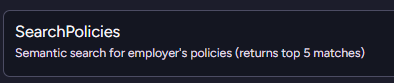
We can do that easily enough using the following agent-query mechanism:
If the agent needs to answer a question about a policy, it can use this tool to get the policies and find out what the answer is.
That works if you are a mom & pop shop, but what happens if you happen to be a big organization, with policies on everything from requesting time off to bringing your own device to modern slavery prohibition? Calling this tool is going to give all those policies to the model?
That is going to be incredibly expensive, since you have to burn through a lot of tokens that are simply not relevant to the problem at hand.
The next step is not to return all of the policies and filter them. We can do that using vector search and utilize the model’s understanding of the data to help us find exactly what we want.
That is much better, but a search for “confidentiality contract” will get you the Non-Disclosure Agreement as well as the processes for hiring a new employee when their current employer isn’t aware they are looking, etc.
That can still be a lot of text to go through. It isn’t as much as everything, but still a pretty heavy weight.
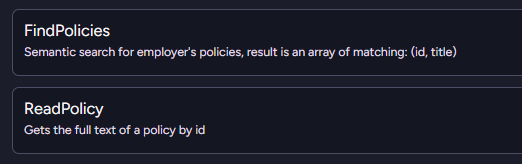
A nice alternative to this is to break it into two separate operations, as you can see below:
The model will first run the FindPolicies query to get the list of potential policies. It can then decide, based on their titles, which ones it is actually interested in reading the full text of.
You need to perform two tool calls in this case, but it actually ends up being both faster and cheaper in the end.
This is a surprisingly elegant solution, because it matches roughly how people think. No one is going to read a dozen books cover to cover to answer a question. We continuously narrow our scope until we find enough information to answer.
This approach gives your AI model the same capability to narrowly target the information it needs to answer the user’s query efficiently and quickly.
When using an AI model, one of the things that you need to pay attention to is the number of tokens you send to the model. They literally cost you money, so you have to balance the amount of data you send to the model against how much of it is relevant to what you want it to do.
That is especially important when you are building generic agents, which may be assigned a bunch of different tasks. The classic example is the human resources assistant, which may be tasked with checking your vacation days balance or called upon to get the current number of overtime hours that an employee has worked this month.
Let’s assume that we want to provide the model with a bit of context. We want to give the model all the recent HR tickets by the current employee. These can range from onboarding tasks to filling out the yearly evaluation, etc.
That sounds like it can give the model a big hand in understanding the state of the employee and what they want. Of course, that assumes the user is going to ask a question related to those issues.
What if they ask about the date of the next bank holiday? If we just unconditionally fed all the data to the model preemptively, that would be:
Quite confusing to the model, since it will have to sift through a lot of irrelevant data.
Pretty expensive, since we’re going to send a lot of data (and pay for it) to the model, which then has to ignore it.
Compounding effect as the user & the model keep the conversation going, with all this unneeded information weighing everything down.
A nice trick that can really help is to not expose the data directly, but rather provide it to the model as a set of actions it can invoke. In other words, when defining the agent, I don’t bother providing it with all the data it needs.
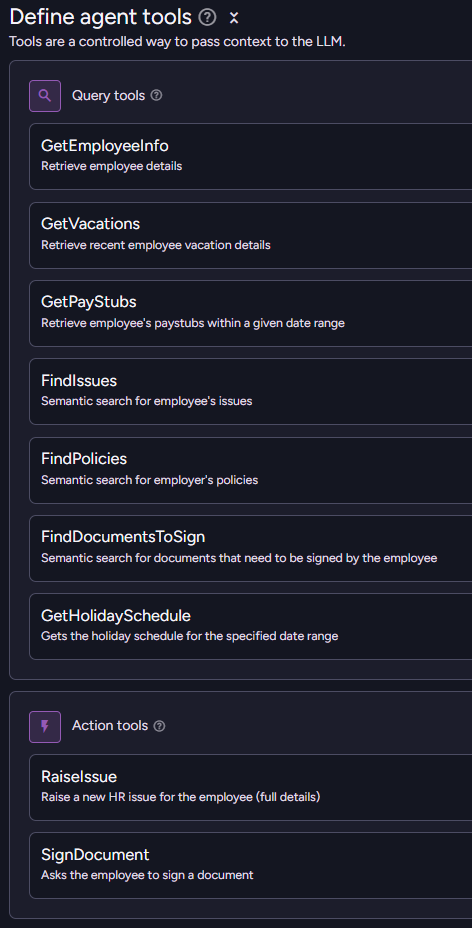
Rather, I provide the model a way to access the data. Here is what this looks like in RavenDB:
The agent is provided with a bunch of queries that it can call to find out various interesting details about the current employee. The end result is that the model will invoke those queries to get just the information it wants.
The overall number of tokens that we are going to consume will be greatly reduced, while the ability of the model to actually access relevant information is enhanced. We don’t need to go through stuff we don’t care about, after all.
This approach gives you a very focused model for the task at hand, and it is easy to extend the agent with additional information-retrieval capabilities.
Building an AI Agent in RavenDB is very much like defining a class, you define all the things that it can do, the initial prompt to the AI model, and you specify which parameters the agent requires. Like a class, you can create an instance of an AI agent by starting a new conversation with it. Each conversation is a separate instance of the agent, with different parameters, an initial user prompt, and its own history.
Here is a simple example of a non-trivial agent. For the purpose of this post, I want to focus on the parameters that we pass to the model.
var agent = new AiAgentConfiguration("shopping assistant",
config.ConnectionStringName,
"You are an AI agent of an online shop..."){
Parameters =[
new AiAgentParameter("lang",
"The language the model should respond with."),
new AiAgentParameter("currency", "Preferred currency for the user"),
new AiAgentParameter("customerId", null, sendToModel: false),
],
Queries =[ /* redacted... */ ],
Actions =[ /* redacted... */ ],
};
As you can see in the configuration, we define the lang and currency parameters as standard agent parameters. These are defined with a description for the model and are passed to the model when we create a new conversation.
But what about the customerId parameter? It is marked as sendToModel: false. What is the point of that? To understand this, you need to know a bit more about how RavenDB deals with the model, conversations, and memory.
Each conversation with the model is recorded using a conversation document, and part of this includes the parameters you pass to the conversation when you create it. In this case, we don’t need to pass the customerId parameter to the model; it doesn’t hold any meaning for the model and would just waste tokens.
The key is that you can query based on those parameters. For example, if you want to get all the conversations for a particular customer (to show them their conversation history), you can use the following query:
from "@conversations"
where Parameters.customerId =$customerId
This is also very useful when you have data that you genuinely don’t want to expose to the model but still want to attach to the conversation. You can set up a query that the model may call to get the most recent orders for a customer, and RavenDB will do that (using customerId) without letting the model actually see that value.
If you're at Microsoft Ignite or in the San Francisco area next week, I'd like to meet up.Feel free to reach out to discuss RavenDB, AI, architecture or anything else.
Hiring the right people is notoriously difficult.I have been personally involved in hiring decisions for about two decades, and it is an unpleasant process. You deal with an utterly overwhelming influx of applications, often from candidates using the “spray and pray” approach of applying to all jobs.
At one point, I got the resume of a divorce lawyer in response to a job posting for a backend engineer role. I was curious enough to follow up on that, and no, that lawyer didn’t want to change careers. He was interested in being a divorce lawyer. What kind of clients would want their divorce handled by a database company, I refrained from asking.
Companies often resort to expensive external agencies to sift through countless candidates.
In the age of AI and LLMs, is that still the case? This post will demonstrate how to build an intelligent candidate screening process using RavenDB and modern AI, enabling you to efficiently accept applications, match them to appropriate job postings, and make an initial go/no-go decision for your recruitment pipeline.
We’ll start our process by defining a couple of open positions:
Staff Engineer, Backend & DevOps
Senior Frontend Engineer (React/TypeScript/SaaS)
Here is what this looks like at the database level:
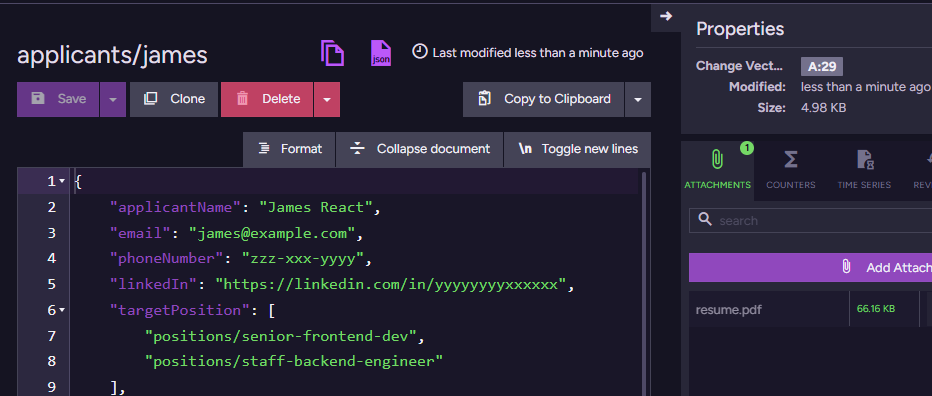
Now, let’s create a couple of applicants for those positions. We have James & Michael, and they look like this:
Note that we are not actually doing a lot here in terms of the data we ask the applicant to provide. We mostly gather the contact information and ask them to attach their resume. You can see the resume attachment in RavenDB Studio. In the above screenshot, it is in the right-hand Attachments pane of the document view.
Now we can use RavenDB’s new Gen AI attachments feature. I defined an OpenAI connection with gpt-4.1-mini and created a Gen AI task to read & understand the resume. I’m assuming that you’ve read my post about Gen AI in RavenDB, so I’ll skip going over the actual setup.
The key is that I’m applying the following context extraction script to the Applicants collection:
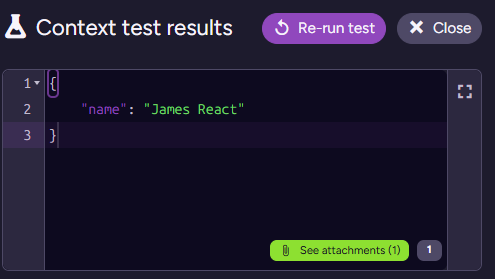
When I test this script on James’s document, I get:
Note that we have the attachment in the bottom right - that will also be provided to the model. So we can now write the following prompt for the model:
You are an HR data parsing specialist. Your task is to analyze the provided CV/resume content (from the PDF)
and extract the candidate's professional profile into the provided JSON schema.
In the requiredTechnologies object, every value within the arrays (languages, frameworks_libraries, etc.) must be a single,
distinct technology or concept. Do not use slashes (/), commas, semicolons, or parentheses () to combine items within a single string. Separate combined concepts into individual strings (e.g., "Ruby/Rails" becomes "Ruby", "Rails").
We also ask the model to respond with an object matching the following sample:
{"location":"The primary location or if interested in remote option (e.g., Pasadena, CA or Remote)","summary":"A concise overview of the candidate's history and key focus areas (e.g., Lead development of data-driven SaaS applications focusing on React, TypeScript, and Usability).","coreResponsibilities":["A list of the primary duties and contributions in previous roles."],"requiredTechnologies":{"languages":["Key programming and markup languages that the candidate has experience with."],"frameworks_libraries":["Essential UI, state management, testing, and styling libraries."],"tools_platforms":["Version control, cloud platforms, build tools, and project management systems."],"data_storage":["The database technologies the candidate is expected to work with."]}}
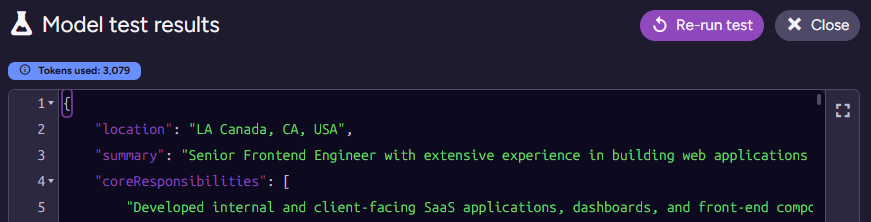
Testing this on James’s applicant document results in the following output:
I actually had to check where the model got the “LA Canada” issue. That shows up in the real resume PDF, and it is a real place. I triple-checked, because I was sure this was a hallucination at first ☺️.
The last thing we need to do is actually deal with the model’s output. We use an update script to apply the model’s output to the document. In this case, it is as simple as just storing it in the source document:
this.resume =$output;
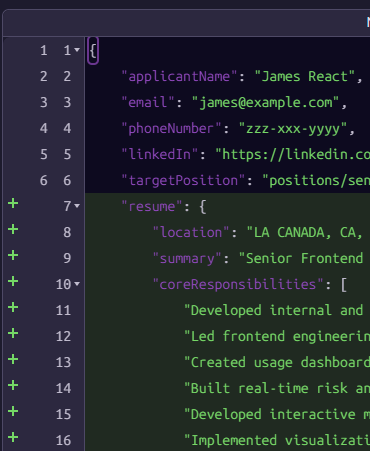
And here is what the output looks like:
Reminder: Gen AI tasks in RavenDB use a three-stage approach:
Context extraction script - gets data (and attachment) from the source document to provide to the model.
Prompt & Schema - instructions for the model, telling it what it should do with the provided context and how it should format the output.
Update script - takes the structured output from the model and applies it back to the source document.
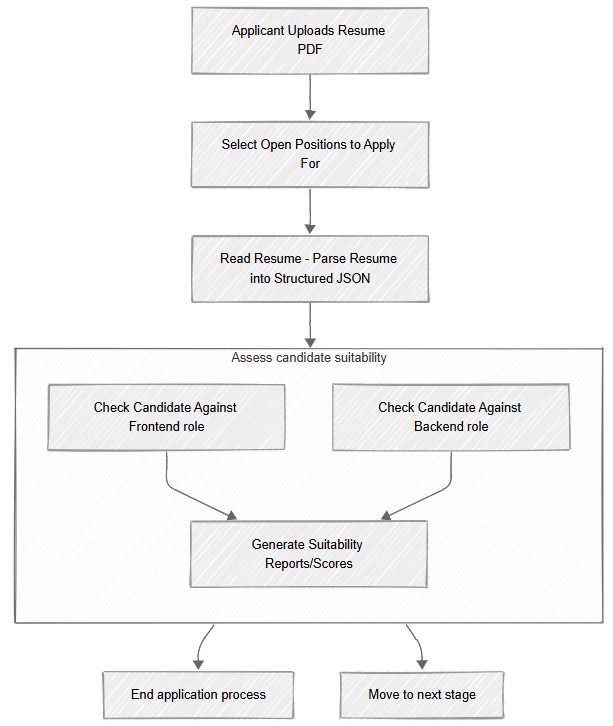
In our case, this process starts with the applicant uploading their CV, and then we have the Read Resume task running. This parses the PDF and puts the result in the document, which is great, but it is only part of the process.
We now have the resume contents in a structured format, but we need to evaluate the candidate’s suitability for all the positions they applied for. We are going to do that using the model again, with a new Gen AI task.
We start by defining the following context extraction script:
// wait until the resume (parsed CV) has been added to the documentif(!this.resume)return;for(const positionId of this.targetPosition){const position =load(positionId);if(!position)continue;
ai.genContext({
position,
positionId,
resume:this.resume
})}
Note that this relies on the resume field that we created in the previous task. In other words, we set things up in such a way that we run this task after the Read Resume task, but without needing to put them in an explicit pipeline or manage their execution order.
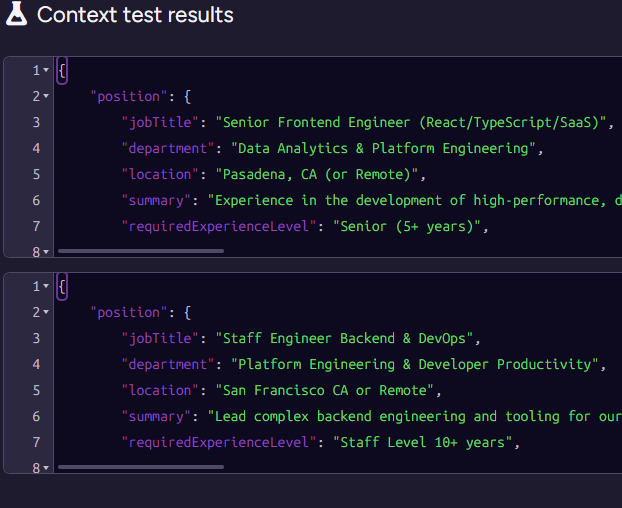
Next, note that we output multiple contexts for the same document. Here is what this looks like for James, we have two separate contexts, one for each position James applied for:
This is important because we want to process each position and resume independently. This avoids context leakage from one position to another. It also lets us process multiple positions for the same applicant concurrently.
Now, we need to tell the model what it is supposed to do:
You are a specialized HR Matching AI. Your task is to receive two structured JSON objects — one describing a Job Position and one
summarizing a Candidate Resume — and evaluate the suitability of the resume for the position.
Assess the overlap in jobTitle, summary,and coreResponsibilities. Does the candidate's career trajectory align with the role's needs(e.g., has matching experience required for a Senior Frontend role)?
Technical Match: Compare the technologies listed in the requiredTechnologies sections. Identify both direct matches(must-haves)andgaps(missing or weak areas). Consider substitutions such as js or ecmascript to javascript or node.js.
Evaluate if the candidate's experience level and domain expertise(e.g., SaaS, Data Analytics, Mapping Solutions) meet or exceed the requirements.
And the output schema that we want to get from the model is:
{"explanation":"Provide a detailed analysis here. Start by confirming the high-level match (e.g., 'The candidate is an excellent match because...'). Detail the strongest technical overlaps (e.g., React, TypeScript, Redux, experience with BI/SaaS). Note any minor mismatches or significant overqualifications (e.g., candidate's deep experience in older technologies like ASP.NET classic is not required but demonstrates full-stack versatility).","isSuitable":false}
Here I want to stop for a moment and talk about what exactly we are doing here. We could ask the model just to judge whether an applicant is suitable for a position and save a bit on the number of tokens we spend. However, getting just a yes/no response from the model is not something I recommend.
There are two primary reasons why we want the explanation field as well. First, it serves as a good check on the model itself. The order of properties matters in the output schema. We first ask the model to explain itself, then to render the verdict. That means it is going to be more focused.
The other reason is a bit more delicate. You may be required to provide an explanation to the applicant if you reject them. I won’t necessarily put this exact justification in the rejection letter to the applicant, but it is something that is quite important to retain in case you need to provide it later.
Going back to the task itself, we have the following update script:
Here we are doing something quite interesting. We extracted the positionId at the start of this process, and we are using it to associate the output from the model with the specific position we are currently evaluating.
Note that we are actually evaluating multiple positions for the same applicant at the same time, and we need to execute this update script for each of them. So we need to ensure that we don’t overwrite previous work.
I’m not mentioning this in detail because I covered it in my previous Gen AI post, but it is important to note that we have two tasks sourced from the same document. RavenDB knows how to handle the data being modified by both tasks without triggering an infinite loop. It seems like a small thing, but it is the sort of thing that not having to worry about really simplifies the whole process.
With these two tasks, we have now set up a complete pipeline for the initial processing of applicants to open positions. As you can see here:
This sort of process allows you to integrate into your system stuff that, until recently, looked like science fiction. A pipeline like the one above is not something you could just build before, but now you can spend a few hours and have this capability ready to deploy.
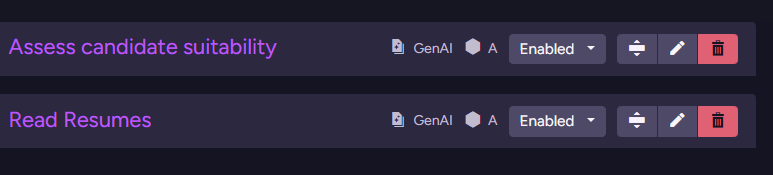
Here is what the tasks look like inside RavenDB:
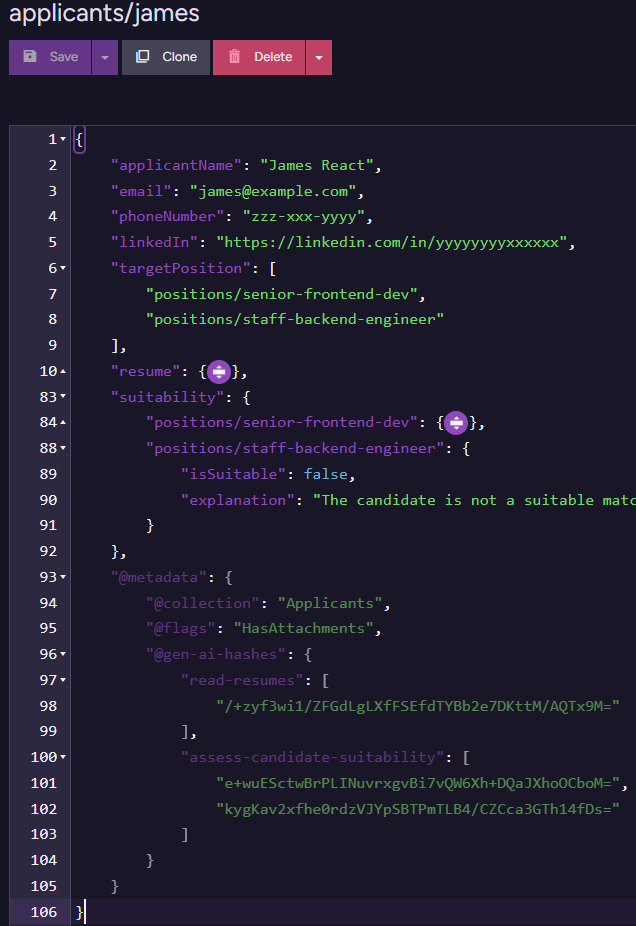
And the final applicant document after all of them have run is:
You can see the metadata for the two tasks (which we use to avoid going to the model again when we don’t have to), as well as the actual outputs of the model (resume, suitability fields).
A few more notes before we close this post. I chose to use two GenAI tasks here, one to read the resume and generate the structured output, and the second to actually evaluate the applicant’s suitability.
From a modeling perspective, it is easier to split this into distinct steps. You can ask the model to both read the resume and evaluate suitability in a single shot, but I find that it makes it harder to extend the system down the line.
Another reason you want to have different tasks for this is that you can use different models for each one. For example, reading the resume and extracting the structured output is something you can run on gpt-4.1-mini or gpt-5-nano, while evaluating applicant suitability can make use of a smarter model.
I’m really happy with the new RavenDB AI integration features. We got some early feedback that is really exciting, and I’m looking forward to seeing what you can do with them.
You might have noticed a theme going on in RavenDB. We care a lot about performance. The problem with optimizing performance is that sometimes you have a great idea, you implement it, the performance gains are there to be had - and then a test fails… and you realize that your great idea now needs to be 10 times more complex to handle a niche edge case.
We did a lot of work around optimizing the performance of RavenDB at the lowest levels for the next major release (8.0), and we got a persistently failing test that we started to look at.
Here is the failing message:
Restore with MaxReadOpsPerSecond = 1 should take more than '11' seconds, but it took '00:00:09.9628728'
The test in question is ShouldRespect_Option_MaxReadOpsPerSec_OnRestore, part of the MaxReadOpsPerSecOptionTests suite of tests. What it tests is that we can limit how fast RavenDB can restore a database.
The reason you want to do that is to avoid consuming too many system resources when performing a big operation. For example, I may want to restore a big database, but I don’t want to consume all the IOPS on the server, because there are additional databases running on it.
At any rate, we started to get test failures on this test. And a deeper investigation revealed something quite amusing. We made the entire system more efficient. In particular, we managed to reduce the size of the buffers used significantly, so we can push more data faster. It turns out that this is enough to break the test.
The fix was to reduce the actual time that we budget as the minimum viable time. And I have to say that this is one of those pull requests that lights a warm fire in my heart.
AI agents are only as powerful as their connection to data. In this session, Oren Eini, CEO and Co-Founder of RavenDB, demonstrates why the best place for AI agents to live is inside your database. Moderated by Ariel, Director of Product Marketing at RavenDB, the webinar explores how to eliminate orchestration complexity, keep agents safe, and unlock production-ready AI with minimal code.
You’ll see how RavenDB integrates embeddings and vector search directly into the database, runs generative AI tasks such as translation and summarization on your documents, and defines AI agents that can query and act on your data safely. Learn how to scope access, prevent hallucinations, and use AI agents to handle HR queries, payroll checks, and issue escalations.
Discover how RavenDB supports any LLM provider (OpenAI, DeepSeek, Ollama, and more), works seamlessly on the edge or in the cloud, and gives developers a fast path from prototype to production without a tangle of external services. This session shows how to move beyond chatbots into real, action-driven agents that are reliable, predictable, and simple to extend. If you’re exploring AI-driven applications, this is where to start.
We got an interesting use case from a customer - they need to verify that documents in RavenDB have not been modified by any external party, including users with administrator credentials for the database.
This is known as the Rogue Root problem, where you have to protect yourself from potentially malicious root users. That is not an easy problem - in theory, you can safeguard yourself using various means, for example the whole premise of SELinux is based on that.
I don’t really like that approach, since I assume that if a user has (valid) root access, they also likely have physical access. In other words, they can change the operating system to bypass any hurdles in the way.
Luckily, the scenario we were presented with involved detecting changes made by an administrator, which is significantly easier. And we can also use some cryptography tools to help us handle even the case of detecting malicious tampering.
First, I’m going to show how to make this work with RavenDB, then we’ll discuss the implications of this approach for the overall security of the system.
The implementation
The RavenDB client API allows you to hook into the saving process of documents, as you can see in the code below. In this example, I’m using a user-specific ECDsa key (by calling the GetSigningKeyForUser() method).
store.OnBeforeStore +=(sender, e)=>{
using var obj = e.Session.JsonConverter.ToBlittable(e.Entity,null);var date = DateTime.UtcNow.ToString("O");var data = Encoding.UTF8.GetBytes( e.DocumentId + date + obj);
using ECDsa key =GetSigningKeyForUser(CurrentUser);var signData = key.SignData(data, HashAlgorithmName.SHA256);
e.DocumentMetadata["DigitalSignature"]=newDictionary<string, string>{["User"]= CurrentUser,["Signature"]= Convert.ToBase64String(signData),["Date"]= date,["PublicKey"]= key.ExportSubjectPublicKeyInfoPem()};};
What you can see here is that we are using the user’s key to generate a signature that is composed of:
The document’s ID.
The current signature time.
The JSON content of the entity.
After we generate the signature, we add it to the document’s metadata. This allows us to verify that the entity is indeed valid and was signed by the proper user.
To validate this afterward, we use the following code:
bool ValidateEntity<T>(IAsyncDocumentSession session,T entity){var metadata = session.Advanced.GetMetadataFor(entity);var documentId = session.Advanced.GetDocumentId(entity);var digitalSignature = metadata.GetObject("DigitalSignature")??thrownewIOException("Signature is missing for "+ documentId);var date = digitalSignature.GetString("Date");var user = digitalSignature.GetString("User");var signature = digitalSignature.GetString("Signature");
using var key =GetPublicKeyForUser(user);
using var obj = session.Advanced.JsonConverter.ToBlittable(entity,null);var data = Encoding.UTF8.GetBytes(documentId + date + obj);var bytes = Convert.FromBase64String(signature);return key.VerifyData(data, bytes, HashAlgorithmName.SHA256);}
Note that here, too, we are using the GetPublicKeyForUser() to get the proper public key to validate the signature. We use the specified user from the metadata to get the key, and we verify the signature against the document ID, the date in the metadata, and the JSON of the entity.
We are also saving the public key of the signing user in the metadata. But we haven’t used it so far, why are we doing this?
The reason we use GetPublicKeyForUser() in the ValidateEntity() call is pretty simple: we want to get the user’s key from the same source. This assumes that the user’s key is stored in a safe location (a secure vault or a hardware key like YubiKey, etc.).
The reason we want to store the public key in the metadata is so we can verify the data on the server side. I created the following index:
from c in docs.Companies
let unverified = Crypto.Verify(c)
where unverified is not null
select new{
Problem = unverified
}
I’m using RavenDB’s additional sources feature to add the following code to the index. This exposes the Crypto.Verify() call to the index, and the code uses the public key in the metadata (as well as the other information there) to verify that the document signature is valid.
The index code above will filter all the documents whose signature is valid, so you can easily get all the problematic documents. In other words, it is a quick way of saying: “Find me all the documents whose verification failed”. For compliance, that is quite important and usually requires going over the entire dataset to answer it.
The implications
Let’s consider the impact of such a system. We now have cryptographic verification that the document was modified by a specific user. Any tampering with the document will invalidate the digital signature (or require signing it with your key).
Combine that with RavenDB’s revisions, and you have an immutable log that you can verify using modern cryptography. No, it isn’t a blockchain, but it will put a significant roadblock in the path of anyone trying to just modify the data.
The fact that we do the signing on the client side, rather than the server, means that the server never actually has access to the signing keys (only the public keys). The server’s administrator, in the same manner, doesn’t have a way to get those signing keys and forge a document.
In other words, we solved the Rogue Root problem, and we ensured that a user cannot repudiate a document they signed. It is easy to audit the system for invalid documents (and, combined with revisions, go back to a valid one).
Escape hatch design
If you need this sort of feature for compliance only, you may want to skip the ValidateEntity() call. That would allow an administrator to manually change a document (thus invalidating the digital signature) and still have the rest of the system work. That goes against what we are trying to do, yes, but it is sometimes desirable.
That isn’t required for the normal course of operations, but it can be required for troubleshooting, for example. I’m sure you can think of a number of reasons why it would make things a lot easier to fix if you could just modify the database’s data.
For example, an Order contains a ZipCode with the value "02116" (note the leading zero), which a downstream system turns into the integer 02116. An administrator can change the value to be " 02116", with a leading space, preventing this problem (the downstream system will not convert this to a number, thus keeping the leading 0). Silly, yes - but it happens all the time.
Even though we are invalidating the digital signature, we may want to do that anyway. The index we defined would alert on this, but we can proceed with processing the order, then fix it up later. Or just make a note of this for compliance purposes.
Summary
This post walks you through building a cryptographic solution to protect document integrity within a RavenDB environment, addressing the Rogue Root problem. The core mechanism is a client-side OnBeforeStore hook that generates an ECDsa digital signature for each document. This design ensures that the private keys are never exposed on the server, preventing a database administrator from forging signatures and providing true non-repudiation.
A RavenDB index is used to automatically and asynchronously verify every document's signature against its current content. This index filters for any documents where the digital signature is valid, providing an efficient server-side audit mechanism to find all the documents with invalid signatures.
The really fun part here is that there isn’t really a lot of code or complexity involved, and you get strong cryptographic proof that your data has not been tampered with.
Unlock practical AI agents inside your database. In this live demo and deep dive, Oren Eini shows how to build real, production-ready AI agents directly in RavenDB that query your data, take actions, remember context, and stay inside strict security guardrails. You will see an agent defined in a few lines of code, connected to OpenAI or any LLM you choose, running vector search and RAG over your catalog, and safely executing business actions like “add to cart,” “find policies,” or “sign document,” all with parameters that are enforced by the database rather than trusted to the model. You will learn how RavenDB agents eliminate fragile glue code by giving the model explicit tools: data queries that return typed results and server-side actions you validate in your code.
Conversations are stored as documents, with automatic token-aware summarization to control latency and cost. The demo streams responses token by token for responsive UX, switches models without rewrites, and shows how scope parameters prevent data leaks even if the prompt is manipulated. You will also see a multi-tool HR assistant that chains tools, coordinates front end and back end, and persists state. The session closes with a look at the roadmap, including multi-agent orchestration and AI assist inside Studio.
I got a question from one of our users about how they can use RavenDB to manage scheduled tasks. Stuff like: “Send this email next Thursday” or “Cancel this reservation if the user didn’t pay within 30 minutes.”
As you can tell from the context, this is both more straightforward and more complex than the “run this every 2nd Wednesday" you’ll typically encounter when talking about scheduled jobs.
The answer for how to do that in RavenDB is pretty simple, you use the Document Refresh feature. This is a really tiny feature when you consider what it does. Given this document:
RavenDB will remove the @refresh metadata field at the specified time. That is all this does, nothing else. That looks like a pretty useless feature, I admit, but there is a point to it.
The act of removing the @refresh field from the document will also (obviously) update the document, which means that everything that reacts to a document update will also react to this.
I wrote about this in the past, but it turns out there are a lot of interesting things you can do with this. For example, consider the following index definition:
from RoomAvailabilitiesas r
where true and not exists(r."@metadata"."@refresh")selectnew{
r.RoomId,
r.Date,// etc...}
What you see here is an index that lets me “hide” documents (that were reserved) until that reservation expires.
I can do quite a lot with this feature. For example, use this in RabbitMQ ETL to build automatic delayed sending of documents. Let’s implement a “dead-man switch”, a document will be automatically sent to a RabbitMQ channel if a server doesn’t contact us often enough:
if(this['@metadata']["@refresh"])return;// no need to send if refresh didn't expirevar alertData ={Id:id(this),ServerId:this.ServerId,LastUpdate:this.Timestamp,LastStatus:this.Status ||'ACTIVE'};loadToAlertExchange(alertData,'alert.operations',{Id:id(this),Type:'operations.alerts.missing_heartbeat',Source:'/operations/server-down/no-heartbeat'});
The idea is that whenever a server contacts us, we’ll update the @refresh field to the maximum duration we are willing to miss updates from the server. If that time expires, RavenDB will remove the @refresh field, and the RabbitMQ ETL script will send an alert to the RabbitMQ exchange. You’ll note that this is actually reacting to inaction, which is a surprisingly hard thing to actually do, usually.
You’ll notice that, like many things in RavenDB, most features tend to be small and focused. The idea is that they compose well together and let you build the behavior you need with a very low complexity threshold.
The common use case for @refresh is when you use RavenDB Data Subscriptions to process documents. For example, you want to send an email in a week. This is done by writing an EmailToSend document with a @refresh of a week from now and defining a subscription with the following query:
from EmailToSend as e
where true and not exists(e.'@metadata'.'@refresh')
In other words, we simply filter out those that have a @refresh field, it’s that simple. Then, in your code, you can ignore the scheduling aspect entirely. Here is what this looks like:
var subscription =store.Subscriptions
.GetSubscriptionWorker<EmailToSend>("EmailToSendSubscription");awaitsubscription.Run(async batch =>{
using var session =batch.OpenAsyncSession();
foreach (var item inbatch.Items){var email =item.Result;awaitEmailProvider.SendEmailAsync(newEmailMessage{To=email.To,Subject=email.Subject,Body=email.Body,From="no-reply@example.com"});email.Status="Sent";email.SentAt=DateTime.UtcNow;}awaitsession.SaveChangesAsync();});
Note that nothing in this code handles scheduling. RavenDB is in charge of sending the documents to the subscription when the time expires.
Using @refresh + Subscriptions in this manner provides us with a number of interesting advantages:
Missed Triggers: Handles missed schedules seamlessly, resuming on the next subscription run.
Reliability: Automatically retries subscription processing on errors.
Rescheduling: When @refresh expires, your subscription worker will get the document and can decide to act or reschedule a check by updating the @refresh field again.
Robustness: You can rely on RavenDB to keep serving subscriptions even if nodes (both clients & servers) fail.
Scaleout: You can use concurrent subscriptions to have multiple workers read from the same subscription.
You can take this approach really far, in terms of load, throughput, and complexity. The nice thing about this setup is that you don’t need to glue together cron, a message queue, and worker management. You can let RavenDB handle it all for you.


 +972 52-548-6969