


Oren Eini

CEO of RavenDB

a NoSQL Open Source Document Database

Get in touch with me:

oren@ravendb.net +972 52-548-6969

Posts: 7,640
|
Comments: 51,261
Privacy Policy · Terms
filter by tags archive
time to read 3 min | 415 words

A natural id is a way to refer to a unique field of an object as a substitute of the real entity identifier. A good (and typical) example of that would be with the User entity. We have the user name and the user id, both are unique, but the user id is usually something that is generated by our application and has no relation to the a human being. In other words, user #123814 doesn’t mean anything to me, while user ‘ayende’ has a meaning to us.

There are many reasons for choosing this approach, but the most common one is that we want a small primary key, since it is duplicated to all related tables (especially important for things like user, which is associated with just about everything).

So far, it doesn’t seem really interesting, right? Why am I boring you with talking about this?

Well, it is all about the second level cache and optimizing access to it. Let us take a look at how we set it up:

<class name="User"
		 table="Users">
	<cache usage="nonstrict-read-write"/>
	
	<id name="Id">
		<generator class="identity"/>
	</id>
	
	<natural-id mutable="false">
		<property name="Username"/>
	</natural-id>
</class>

And now we are going to query it:

using (var s = sf.OpenSession())
using (var tx = s.BeginTransaction())
{
	s.CreateCriteria<User>()
		.Add(Restrictions.NaturalId()
			.Set("Username", "Ayende"))
		.SetCacheable(true)
		.UniqueResult();

	tx.Commit();
}

<natrual-id/> is used almost exclusively for documentation purposes. That means that internally the query above will be translated to:

using (var s = sf.OpenSession())
using (var tx = s.BeginTransaction())
{
	s.CreateCriteria<User>()
		.Add(Restrictions.Eq("Username", "Ayende"))
		.SetCacheable(true)
		.UniqueResult();

	tx.Commit();
}

Well, almost. There is one subtle different between the two. When querying on <natural-id/>, we also bypass the usual expiration check in the second level cache implemented by NHibernate.

That means that even if we changed the underlying table, NHibernate will not automatically expire the results in the cache for this query, it will still consider it valid, because it assumes that like primary keys, there isn’t really a reason to perform an expiration check on natural ids.
time to read 1 min | 147 words

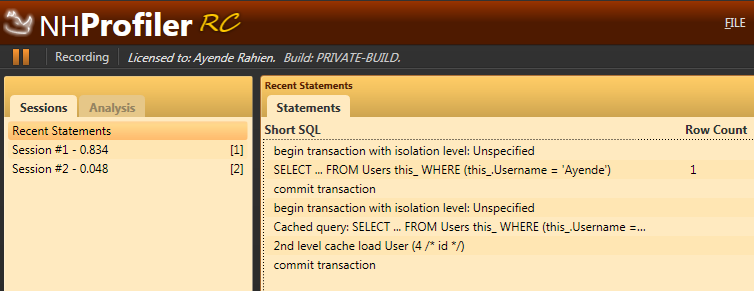
I recently got a question, asking why someone should pay for NH Prof if SQL profiler is available for (effectively) free?

The answer is actually very easy to answer. I run the following scenario through both NH Prof and SQL Profiler:

using (var s = sf.OpenSession())
using (var tx = s.BeginTransaction())
{
	s.CreateCriteria<User>()
		.Add(Restrictions.NaturalId()
			.Set("Username", "Ayende"))
		.SetCacheable(true)
		.UniqueResult();

	tx.Commit();
}

using (var s = sf.OpenSession())
using (var tx = s.BeginTransaction())
{
	s.CreateCriteria<User>()
		.Add(Restrictions.NaturalId()
			.Set("Username", "Ayende"))
		.SetCacheable(true)
		.UniqueResult();

	tx.Commit();
}

Here is what NH Prof gave me:

image

And here is what I got from SQL Profiler:

image

I think that I have rested my case, pretty conclusively.

time to read 2 min | 379 words

I am pretty fond of the way NH Prof is architected.  At a very high level, it looks like this:

image

The first part isn’t really that interesting, the main challenge is to get the data from your application to the profiler in as speedy and performant way as possible. We are using a binary protocol based on Protocol Buffers with TCP Sockets as the communication mechanism.

Next we have the listener and the message processors. That is where a lot of the magic actually happens, we do first level analysis on the incoming log messages and transform them into higher level concepts. At this point, we are only dealing with a single message, we have no overall picture, but a lot of work is actually happening at this layer.

It is there that I normalize the differences between all the NHibernate versions that I support and make sure that the other layers work on a common object model.

The next stage is the model building, where I am actually taking all the information and start putting it together, it is there where concepts such as sessions, and statements in session start making sense, it is there that I actually apply analytics to provide you with the alerts. It is a pretty complex piece of code, taken together, but each individual part is pretty simple.

Next, we have the view model, which is another representation of the model in a format that is applicable for showing to the user, I have spoke before about moving from a push to a pull model, in order to allow the UI to remain performant. That has been one of the major challenges in that area. Well, that and making sure that we have good UX.

The interesting part about this architecture is that a new feature is usually something that happen either in the listeners and the model building (when it match the current model that we have) or a vertical slice across the entire layer, when we need to express some new concept.

FUTURE POSTS

No future posts left, oh my!

RECENT SERIES

  1. API Design (10):
    29 Jan 2026 - Don't try to guess
  2. Recording (20):
    05 Dec 2025 - Build AI that understands your business
  3. Webinar (8):
    16 Sep 2025 - Building AI Agents in RavenDB
  4. RavenDB 7.1 (7):
    11 Jul 2025 - The Gen AI release
  5. Production postmorterm (2):
    11 Jun 2025 - The rookie server's untimely promotion
View all series

Syndication

Main feed ... ...
Comments feed   ... ...

