Setting up MonoRail Windsor Integration with Binsor
I think I'll let it stand on its own:
facility Castle.MonoRail.WindsorExtension.MonoRailFacility for type in AllTypesBased of Controller("HibernatingRhinos"): component type.Name, type
Done.
I didn't believe it, to be fair.
Async Actions in Monorail
One of the ways to significantly increase the scalability of our applications is to start performing more and more things in an asynchronous manner. This is important because most actions that we perform in a typical application are not CPU bound, they are I/O bound.
Here is a simple example:
public class HomeController : SmartDispatcherController { IUserRepository userRepository; public void Index() { PropertyBag["userInfo"] = userRepository.GetUserInformation(CurrentUser); } }
GetUserInformation() is a web service call, and it can take a long time to run. Now, if we have the code as above, while the web service call is being processed, we can't use this thread for any other request. This has a significant implications on our scalability.
ASP.Net has support for just those scenarios, using async requests. You can read more about it here, including a better explanation of the
I recently added support for this to MonoRail (it is currently on a branch, and will be moved to the trunk shortly).
Let us say that you have found that the HomeController.Index() method is a problem from scalability perspective. You can now rewrite it like this:
public class HomeController : SmartDispatcherController { IUserRepository userRepository; public IAsyncResult BeginIndex() { return userRepository.BeginGetUserInformation(CurrentUser, ControllerContext.Async.Callback, ControllerContext.Async.State); } public void EndIndex() { PropertyBag["userInfo"] = userRepository.EndGetUserInformation(ControllerContext.Async.Result); } }
That is all the change that you need to do to turn an action async. We are using the standard .NET async semantics, and MonoRail will infer them automatically and use the underlying ASP.Net async request infrastructure.
"BeginIndex/EndIndex" are the method pairs that compose the async method index. Note that the only thing that needs to be change is turning a synchronous action to an asynchronous action is splitting the action method into an IAsyncResult Begin[ActionName]() and void End[ActionName](). Everything else is exactly the same.
This is a major improvement for scaling an application. The more I learn about async programming, the more it makes sense to me, and I think that I am moving more and more to this paradigm.
Convention based security: A MonoRail Sample
I was asked how I would got about building a real world security with the concept of securing operations instead of data.
This is a quick & dirty implementation of the concept by marrying Rhino Security to MonoRail. This is so quick and dirty that I haven't even run it, so take this as a concept, not the real implementation, please.
The idea is that we can map each request to an operation, and use the convention of "id" as a special meaning to perform operation security that pertain to specific data.
Here is the code:
public class RhinoSecurityFilter : IFilter { private readonly IAuthorizationService authorizationService; public RhinoSecurityFilter(IAuthorizationService authorizationService) { this.authorizationService = authorizationService; } public bool Perform(ExecuteWhen exec, IEngineContext context, IController controller, IControllerContext controllerContext) { string operation = "/" + controllerContext.Name + "/" + controllerContext.Action; string id = context.Request["id"]; object entity = null; if (string.IsNullOrEmpty(id) == false) { Type entityType = GetEntityType(controller); entity = TryGetEntity(entityType, id); } if(entity==null) { if (authorizationService.IsAllowed(context.CurrentUser, operation) == false) { DenyAccessToAction(); } } else { if (authorizationService.IsAllowed(context.CurrentUser, entity, operation) == false) { DenyAccessToAction(); } } return true; } }
It just perform a security check using the /Controller/Action names, and it tries to get the entity from the "id" parameter if it can.
Then, we can write our base controller:
[Filter(ExecuteWhen.BeforeAction,typeof(RhinoSecurityFilter))] public class AbstractController : SmartDispatcherController { }
Now you are left with configuring the security, but you already have a cross cutting security implementation.
As an example, hitting this url: /orders/list.castle?id=15
Will perform a security check that you have permission to list customer's 15 orders.
This is pretty extensive, probably overly so, however. A better alternative would be to define an attribute with the ability to override the default operation name, so you can group several action into the same operation.
You would still need a way to bypass that, however, since there are some thing where you would have to allow access and perform custom permissions, no matter how flexible Rhino Security is, or you may be required to do multiply checks to verify that, and this system doesn't allow for it.
Anyway, this is the overall idea, thoughts?
Cross Site Scripting and letting the framework deal with it
Rob Conery asks how the MS MVC platform should handle XSS attacks. In general, I feel that frameworks should do their best to ensure that to be secure by default. This means that I feel that by default, you should encode everything that comes from the user to the app. People seems to think that encoding inbound data will litter your DB with encoded text that isn’t searchable and consumable by other applications.
That may be the case, but consider, what exactly is getting encoded? Assuming that this is not a field that require rich text editing, what are we likely to have there?
Text, normal text, text that can roundtrip through HTML encoding without modifications.
HTML style text in most of those form fields are actually rare. And if you need to have some form of control over it, you can always handle the decoding yourself. Safe by default is a good approach. In fact, I have a project that uses just this approach, and it is working wonderfully well.
Another approach for that would be to make outputting HTML encoded strings very easy. In fact, it should be so easy that it would be the default approach for output strings.
Here, the <%= %> syntax fails. It translate directly to Response.Write(), which means that you have to take an extra step to get secured output. I would suggest changing, for MS MVC, the output of <%= %> to output HTML encoded strings, and provide a secondary way to output raw text to the user.
In MonoRail, Damien Guard has been responsible for pushing us in this direction. He had pointed out several places where MonoRail was not secure by default. As a direct result of Damien's suggestions, Brail has gotten the !{post.Author} syntax, which does HTML encoding. This is now considered the best practice for output data, as well as my own default approach.
Due to backward comparability reasons, I kept the following syntax valid: ${post.Author}, mainly because it is useful for doing things like output HTML directly, such as in: ${Form.HiddenField("user.id")}. For the same reason, we cannot automatically encode everything by default, which is controversial, but very useful.
Regardless, having a very easy way ( !{post.Author} ) to do things in a secure fashion is a plus. I would strongly suggest that the MS MVC team would do the same. Not a "best practice", not "suggested usage", simply force it by default (and allow easy way out when needed).
You leave a team alone for one week...
And they go ahead and write Outlook Web Access behind your back...
I am going over the code, and I am simply amazed. JavaScript & HTML component, using DomainJSon Generation and some additional smarts around that idea.
MonoRail & App_GlobalResources
One on the nicer semantics of App_GlobalResources is that it is updated on the fly. I wanted to use it with MonoRail, but I wasn't quite sure how. A minute's search turned out that this syntax works:
[Resource("msgs", "Resources.Messages",
AssemblyName = "App_GlobalResources")]
[Resource("err", "Resources.Errors",
AssemblyName = "App_GlobalResources")]
public abstract class BaseController : SmartDispatcherController
{
}
Indistiguisable
Nikhil has a post about using MS Ajax with MS MVC*.
What was particulary interesting to me was that it reminded me very strongly of posts that I wrote, exploring Ajax in MonoRail. The method used was the same, the only changes were exteremely minute details, such as different method names with the same intention, etc.
* Can we please get better names for those?
Model View Action
Adam has an interesting discussion here about handling common actions in MonoRail. This has sparked some discussion in the MonoRail mailing list. I wanted to take the chance to discuss the idea in more detail here.
Basically, he is talking about doing this:
public class IndexAction : SmartDispatcherAction { private ISearchableRepository repos; private string indexView; public IndexAction( ISearchableRepository repos, string indexView) { this.repos = repos; this.indexView = indexView; } public void Execute(string name) { ISearchable item = repos.FindByName(name); if(item == null) { PropertyBag["UnknownSearchTerm"] = name; RenderView("common/unknown_quick_search"); } PropertyBag["Item"] = item; RenderView(indexView); } }
And then registering it with the routing engine like this:
new Route("/products/<name>", new IndexAction(new ProductRepository(), "display_product")); new Route("/categories/<name>", new IndexAction(new CategoryRepository(), "display_category"));
Now, accessing "/categories/cars" will give you all the items in the cars category.
On the face of it, it seems like a degenerated controller, no? Why do we need it? We can certainly map more than a single URL to a controller, so can't we solve that problem that way?
Let us stop for a moment and think about the MVC model. Where did it come from? From Smalltalk, when GUI was something brand new & sparkling. It is a design pattern for a connected system. In that case, the concept of a controller made a lot of sense.
But when we are talking about the web? The web is a disconnected world. What is the sense in having a controller there? An Action, or a Command, pattern seems much more logical here, no?
But then we have things that just doesn't fit this model. Consider the example of CRUD on orders. We can have a controller, which will handle all of the logic for this use case in a single location, or we can have four separate classes, each taking care of a single aspect of the use case.
Personally, I would rather have the controller to do the work in this scenario, because this way I have all the information in a single place, and I don't need to hunt multiply classes in order to find it.
But, there are a lot of cases where we do want to have just this single action to happen, or maybe we want to add some common operations to the controller, without having to get in to crazy inheritance schemes.
For this, MonoRail supports the idea of Dynamic Actions, which supports seamless attachment of actions to a controller.
Hammett describe them best:
DynamicActions offers a way to have an action that is not a method in the controller. This way you can “reuse an action” in several controllers, even among projects, without the need to create a complex controller class hierarchy.
The really interesting part in this is that we have both IDynamicAction and IDynamicActionProvider. This means that we get mixin-like capabilities.
Dynamic Actions didn't get all the love they probably deserve, we don't have the SmartDispatcherAction (yet), so if we want to use them, we will need to handle with the raw request data, rather than with the usual niceties that MonoRail provides.
Nevertheless, on a solid base it is easy enough to add.
Now all we need to solve is the ability to route the requests to the correct action, right? This is notepad code, so it is ugly and not something that I would really use, but it does the job:
public class ActionRoutingController : Controller { public delegate IDynamicAction CreateDynamicAction(); public static IDictionary<string, CreateDynamicAction> Routing = new Dictionary<string, CreateDynamicAction>(); protected override void InternalSend(string action, IDictionary actionArgs) { if(Routing.ContainsKey(action) == ) throw new NoActionFoundException(action); Routing[action]().Execute(this); } }
What this means is that you can now do this:
public void AddRoutedActions() { AddRoutedAction("categories", "/categories/<name:string>", delegate { return new IndexAction(new CategoryRepository(), "display_category"); }); AddRoutedAction("products", "/products/<name:string>", delegate { return new IndexAction(new ProductRepository(), "display_product"); }); } public void AddRoutedAction(string action, string url, CreateDynamicAction actionFactory) { RoutingModuleEx.Engine.Add( PatternRule.Build(action, url, typeof(ActionRoutingController), action)); ActionRoutingController.Routing.Add(action, actionFactory); }
And get basically the same result.
Again, all of this is notepad code, just doodling away, but it is nice to see that all the building blocks are there.

Template Controllers
Sharing common functionality across controllers is something that I have run into several times in the past. It is basically needing to offer the same functionality across different elements in the application.
Let us take for a moment a search page. In my current application, a search page has to offer rich search functionality for the user, the ability to do pattern matching, so given a certain entity, match all the relevant related entities that can fit this entity. Match all openings for a candidate. Match all candidates for an opening.
That is unique, mostly, but then we have a lot of boiler plate functionality, which moves from printing, paging, security, saving the query and saving the results, changing the results, exporting to XML, loading saved queries and saved results, etc, etc etc. Those requirements are shared among several
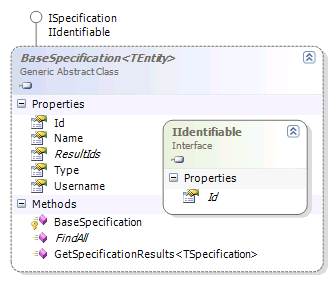
On the right you can see one solution for this problem, the Template Controller pattern. Basically, we concentrated all the common functionality into the Base Specification Controller.
What you can't see is that the declaration of the controller also have the following generic constraints:
public class BaseSpecificationController<TSpecification, TEntity> : BaseController where TSpecification : BaseSpecification<TEntity>, new() where TEntity : IIdentifable
This means that the base controller can perform most of its actions on the base classes, without needing to specialize just because of the different types.
Yes, dynamic language would makes things much easier, I know.
Note that while I am talking about sharing the controller logic here, between several controllers, we can also do the same for the views using shared views. Or not. That is useful if we want to use different UI for the search.
In fact, given that we need to show a search screen, it is not surprising that we would need a different UI, and some different behavior for each search controller, to get the data required to specify a search.
Now that we have the background all set up, let us see what we can do with the concrete search controllers, shall we.
You can see the structure of them on the right. The search candidates is doing much more than the search orders, but a lot of the functionality between the two is shared. And more importantly, easily shared.
Well, if you define the generics syntax above as easy, at least.
The main advantage of this approach is that I can literally develop a feature on the candidates controller, and then generalize it to support all the other searches in the application.
In this scenario, we started with searching for candidates, and after getting the basic structure done, I moved to start working on the search orders.
At the same time, another guy was implementing all the extra functionality (excel export, sending SMS and emails, etc).
After we I finished the search order page, we merged and refactored up most of the functionality that we needed in both places.
This is a good approach if you can utilize inheritance in your favor. But there is a kink, if you want to aggregate functionality from several sources, then you are going to go back to delegation or duplication.
Adam has interesting discussion about this issue, and an interesting proposition. But that will be another post.
Commercial support for Castle Windsor, Castle MonoRail, NHibernate, etc
This post by Ben Scheirman is interesting. He points out that the MS.MVC stuff is targeted toward a different crowd than the one who is using MonoRail, it is targeted toward the corporate developers and the All-Microsoft Shops.
The question of support has been raised again, and it prompted this post. It seems that there isn't a lot of awareness that there are commercial support options for those tools.
- Castle Stronghold is the obvious place for commercial support for Castle.
- JBoss / RedHat are offering commercial support for NHibernate. JBoss no longer support NHibernate.
- We!* (Hebrew site) is offering commercial support for NHibernate and Castle.
- Mindscape is offering commercial support for Castle.
I am actually not very interested in getting support for those, so it is entirely possible (and likely) that I missed some. Most of the active members of the community are members of consultancies that are capable offering support, but those are the one that I am aware of.
* Full disclosure: I work there.
Multiple parents in Cascading Drop Downs in MonoRail
Apparently I am suffering from the Bug Duplication Syndrom. Shortly after posting about cascading drop downs in MonoRail, I realized that I have actually duplicated a bug that I have run into while using the cascading drop down extender in the ASP.Net Ajax toolkit. That is not a fixable bug, btw, and has to do with what happens when you have more than a single parent. You can see my post about this scenario here, but be aware that the solution in that post is vulnerable to race conditions, and I have finally declared that unpracticle to use.
At any rate, I have duplicate the inability to have multiply parents in my previous solution using MonoRail. And I decided that instead of fixing it in place, I'll show the steps neccesary to fix the problem. Basically, we want to update both the secondaries select and the tertiaries select, which means that our GetSecondaryProfressionsByPrimary.brailjs will now contains:
page.Replace( 'secondaries',
Form.Select('secondaries',SecondaryProfessions,
{@value: @Id, @text: @Name, @firstoption: res.Select})
)
page.Replace( 'tertiaries',
Form.Select('tertiaries',TertiaryProfessions,
{@value: @Id, @text: @Name, @firstoption: res.Select})
)
page.Call( @hookSecondariesChangeEvent );
And that the GetSecondaryProfressionsByPrimary action is now:
public void GetSecondaryProfressionsByPrimary(Guid id) { PropertyBag["SecondaryProfessions"] = professionRepository.FindSecondariesByPrimaryIdOrAll(id); PropertyBag["TertiaryProfessions"] = professionRepository.FindTertiariesByPrimaryIdOrAll(id); }
Oh, and that was it.
Cascading Drop Downs in MonoRail
I just had this need, and I decided to explore what I could do without referring to what other people has already done. There are probably better ways, but this one has tickled my fancy.
Anyway, the idea here is to display three levels of hierarchy in a profression. Here is the HTML:
<table> <tr> <td> ${res.PrimaryProfession} </td> <td> ${Form.Select("primaries",PrimaryProfessions,
{@value: @Id, @text: @Name, @firstoption: res.Select}) } </td> <td> ${res.SecondaryProfession} </td> <td> ${Form.Select("secondaries",SecondaryProfessions,
{@value: @Id, @text: @Name, @firstoption: res.Select}) } </td> <td> ${res.TertiaryProfession} </td> <td> ${Form.Select("tertiaries",TertiaryProfessions,
{@value: @Id, @text: @Name, @firstoption: res.Select}) } </td> </tr> </table>
This is not very fancy, and the CSS guys would be all over me for using a table, but let us leave that aside. Basically, we render three select elements. Now, let us see the server side, shall we?
public void Index() { PropertyBag["PrimaryProfessions"] = professionRepository.FindAllPrimaries(); PropertyBag["SecondaryProfessions"] = professionRepository.FindAllSecondaries(); PropertyBag["TertiaryProfessions"] = professionRepository.FindAllTertiaries(); }
The ProfressionRepository uses Repository<T> internally, I want to avoid using Repository<T> directly in my controllers. Now, we need to actually respond to change events on the client side:
$j(document).ready(function() { $j('#primaries').change(function() { $j.ajax({ url:'GetSecondaryProfressionsByPrimary.ashx', data: { id: $j('#primaries').val() }, dataType: 'script' }); }); hookSecondariesChangeEvent(); }); function hookSecondariesChangeEvent() { $j('#secondaries').change(function() { $j.ajax({ url:'GetTertiaryProfressionsBySecondary.ashx', data: { id: $j('#secondaries').val() }, dataType: 'script' }); }); }
This is done using jQuery, to hook the events and issue Ajax requests to the server when they are done. Note that I am registering the seconderies change event in a separate function, it will be soon clear why.
Now, how does the server handles this?
public void GetSecondaryProfressionsByPrimary(Guid id) { PropertyBag["SecondaryProfessions"] = professionRepository.FindSecondariesByPrimaryIdOrAll(id); } public void GetTertiaryProfressionsBySecondary(Guid id) { PropertyBag["TertiaryProfessions"] = professionRepository.FindTertiariesBySecondaryIdOrAll(id); }
So we just pass the parameters to the repository, which does all the work for us, in this case, getting the children if the id is valid, or all if it isn't. Now let us move to the relevant views, shall we? We are using BrailJS here, so here is GetSecondaryProfressionsByPrimary.brailjs:
page.Replace( 'secondaries',
Form.Select('secondaries',SecondaryProfessions,
{@value: @Id, @text: @Name, @firstoption: res.Select})
)
page.Call( @hookSecondariesChangeEvent );
As you can see, I ask the page to replace the element secondaries with the newly rendered select element. I then acll the hookSecondariesChangeEvent function, since I actually replace the entire element, and not just its content. I am doing this because I don't feel like extracting the part that renders just the options from the Form.Select() method, but I will probably will the next time I need it.
The GetTertiaryProfressionsBySecondary.brailjs is actually simpler:
page.Replace( 'tertiaries',
Form.Select('tertiaries',TertiaryProfessions,
{@value: @Id, @text: @Name, @firstoption: res.Select})
)
Again, there are probably betters way, but this is the one I just came up with.
Handling javascript localization in Mono Rail
I run into the issue of having to alert the user of some error, and it brought home the fact that English & Hebrew are not easy to mix. In fact, code such as this is consider a very bad sign, usually code that you don't really want to touch, see or believe in:
So, we need some sort of a way to externalize those strings, even if the only language that this application is going to use is Hebrew, simply because of the pain of mixing the two together.
After thinking about it for a while, I decided to create this view (JavascriptResources/index.brail):
<% for de in controller.Resources: resourceName = de.Key %> var ${resourceName} = { <% for item in GetParameter(resourceName): %> ${item.Key}: '${item.Value.Replace("'","\\'") }', <% end %> Empty: '' }; <% end %>
And here is the definition of the controller:
[Resource("Processes", "MyApp.Resources.Javascript.Processes")]
[Resource("Errors", "MyApp.Resources.Javascript.Errors")]
[Resource("Messages", "MyApp.Resources.Javascript.Messages")]
public class JavascriptResourcesController : Controller
{
public void Index()
{
}
}
But what the hell does this do, anyway? Not much, actually, but it will iterate over all the registered resources for the controller, and output something that looks like this for each of those resources:
var Processes = {
EmploymentType: 'Employment Type',
Details: 'Details',
Dates: 'The dates',
Empty: ''
};
The nice thing is that I can now write: alert(Errors.RecursiveError);*. As a side affect (as I said, the application is just in Hebrew so I don't care about that much), I also get the usual benefits of localization.
* You have to read Hebrew to get the joke, I am afraid.
Active Record & MonoRail web casts
Here are the rehearsal sessions for Hammett & me at JAOO. Hammett has just published them. Not anything really new, frankly, and the quality is all over the spectrum. I was having a nasty case of the flu, especially on the MR screen cast, and that one was recorded close to midnight.
You can see me recording the screen cast, that is a weird movie, I tend to move a lot when I talk, but I don't think Hammett's laptop was very impressed. Ten points if you can find the part when I kicked it.
Random Impressions from JAOO: Web Forms on the Enterprise
When Hamilton and me gave the MonoRail talk to the Enterprise Application track, we asked how many people were .NET vs JAVA vs Ruby. The results where roughly 43%, 43% and 4%, respectively.
The interesting part was when I asked how many of the .NET guys used Web Forms, almost all of them said that they do. Then I asked how many enjoyed using Web Forms.
No one raised their hands.
MonoRail.HotSwap in Action
Colin Ramsay has a short screen cast showing the advantages of using MonoRail HotSwap. I should mention that the startup times that you see in the screen cast are for empty projects, for real world projects they are much longer.
And yes, that is how I say Ayende. :-)
Refactoring MonoRail Views
As I mentioned, I build a very quick & dirty solution to display a collection of scheduled task descriptions. The end result looked like this:
![]()
This works, and it should start producing value as of next week, but I didn't really like the way I built it.
Here is the original view code:
<table cellspacing="0" cellpadding="0"> <thead> <tr> <th> Name:</th> <th> Occurances</th> <th> </th> </tr> </thead> <tbody> <% for task in tasks: %> <tr> <td> ${Text.PascalCaseToWord(task.Name)} </td> <td> Every ${task.OccuranceEvery} </td> <td> ${Html.LinkTo("Execute", "ScheduledTasks", "Execute", task.FullName)} </td> </tr> <% end %> </tbody> </table>
This work, it is simple and easy to understand, but it still bothered me. So I replaced it with this:
<% component SmartGrid, {@source: tasks} %>
Well, that was much shorter, but the result was this...
I am cropping things, because it is a fairly long picture, but it should be clear that this is not a really nice UI to use.
This was my second attempt;
<% component SmartGrid, {@source: tasks, @columns: [@Name, @OccuranceEvery] } %>
And it produced this:
Better, but not really that much, let us try to have nicer names there, shall we?
<% component SmartGrid, {@source: tasks, @columns: [@Name, @OccuranceEvery] }: section Name: %> <td>${Text.PascalCaseToWord(value)}</td> <% end end %>
And this produced:
That is much better on the name side, but we still have the "Occurance Every" column to fix...
<% component SmartGrid, {@source: tasks, @columns: [@Name, @OccuranceEvery] }: section OccuranceEveryHeader: %> <th>Occurances</th> <% end section Name: %> <td>${Text.PascalCaseToWord(value)}</td> <% end section OccuranceEvery: %> <td>Every ${value}</td> <% end end %>
With the result being:
One last thing that we have left is the additional column at the end, we can manage it like this:
<% component SmartGrid, {@source: tasks, @columns: [@Name, @OccuranceEvery] }: section OccuranceEveryHeader: %> <th>Occurances</th> <% end section MoreHeader: %> <th></th> <% end section Name: %> <td>${Text.PascalCaseToWord(value)}</td> <% end section OccuranceEvery: %> <td>Every ${value}</td> <% end section More: %> <td>${Html.LinkTo("Execute", "ScheduledTasks", "Execute", item.FullName)}</td> <% end end %>
So here is the final result:
Now that I did that, I am looking at both pieces of code and wondering:
- What is the fuss about, anyway?
- Which of those versions is more readable?
Granted, this is a fairly specialized case, but in terms of LoC, the second approach is actually longer, and the "major" benefit here is that I get less HTML in the view, but that is not a really major consideration.
The SmartGrid would produce a pager if needed, but that about it with regards to the differences in their abilities.
Convention over configuration: Structured approach
Hammett has a post that made me think. He is talking about configuring Spring for Java and has this to comment:
I can’t understand this uncontrolled passion that java programmers carry for xml.
I can certainly agree with him about that, but I got to the same point a long time ago with Windsor. I had an application which was rife with components. I am talking about many dozens of generic (as in MyComponent<T>) components, all of which required registration in the config file, which got to be fairly annoying very fast.
I solved that by creating Binsor, a Boo DSL for configuring an IoC container. Initially, it was very similar to the Batch Registration Facility, but I pushed it much further, until today I do all my Windsor configuration using Windsor.boo, and its existence is a core part of my application architecture. Why? Because I can do things like this:
controllersAssemblies = (Assembly.Load("MyApp.Web"), Assembly.Load("Castle.MonoRail.ViewComponents") )
for asm in controllersAssemblies:
for type in asm.GetTypes():
continue if type.Name == "ScheduledTasksController"
if typeof(Controller).IsAssignableFrom(type):
IoC.Container.AddComponent(type.FullName, type)
if not typeof(ViewComponent).IsAssignableFrom(type):
IoC.Container.AddComponent(type.Name, type)
The immediate result of this type of behavior is that I don't have any weight of the IoC, I just develop as I would normally would, and it catches up with everything that it needs to handle.
I recently had the chance to maintain a MonoRail application that used XML for configuring Windsor, and by the third time that I added a controller, I was pretty annoyed. Each and every time, I had an additional step to perform before I could run the code. Compared to the approach that I was using, it was hardly zero friction.
Of course, my approach is not flawless in any mean, there is a bug in the configuration above, can you spot it?
The point of this post, which I have been trying to get to for a while, while random electrical pulses moved my fingers in interesting ways, is that I have began not only to use this to a great extent (all projects in the last year or so are based on this idea), but I have started to actually design with this in mind.
The end result right now is that I am relying a lot more on commands patterns and attributes for selections. This means that I often do things like:
[SelectionCriteria(Selection.FirstOption, Selection.SecondOption)] public void SomeSpecficCommand : Command<ObjectActingUpon> { public override void Execute() { } }
You can see a more real world sample here, but the idea is to declaratively express the intent, have the configuration figure out what I want, and make it happen. The nice thing, most of the time, It Just Works. And the nice thing about utilizing Binsor is that I can adapt the convention very easily. So I can have many nice conventions, each for a particular situation.
Scheduled Tasks in MonoRail: The Quick & Dirty solution
I need to develop a set of tasks that would run in internals. Now, we need to do several dozens of those, and at that point, it is not important how we actually schedule them, we can defer that decision. But we really need to be able to start develop them soon.
So, I came up with this idea. The basic structure is this:
[OccuresEvery(Occurances.Day)] public class SendBirthdayEmails : ScheduledTask { public override void Execute() { foreach(Employee emp in Repository<Employee>.FindAll(Where.Employee.Birthday == DateTime.Today) { Email .From(Settings.Default.HumanResourcesEmail) .To(emp.Email) .Template(Templates.Email) .Parameter("employee", emp) .Send(); } } }
This is not really interesting, but the rest is. Remember that I don't want to deal with deciding how to actually schedule them, but we need to be able to run them right now for test / debug / demo purposes.
In my windsor.boo:
//Controllers controllersAssembly = Assembly.Load("MyApp.Web") for type in controllersAssembly.GetTypes(): continue if type.Name == "ScheduledTasksController" continue if not typeof(Controller).IsAssignableFrom(type) IoC.Container.AddComponent(type.FullName, type) //register scheduled tasks scheduledTasksAssembly = Assembly.Load("MyApp.ScheduledTasks") scheduledTasks = [] for type in scheduledTasksAssembly.GetTypes(): continue if not typeof(ScheduledTask).IsAssignableFrom(type) IoC.Container.AddComponent(type.FullName, type) scheduledTasks.Add(type)//register scheduled tasks controller independently, since it requires special configuration Component("ScheduledTasksController", ScheduledTasksController, scheduledTasks: scheduledTasks.ToArray(Type) )
So it will automatically scan the scheduled tasks assembly, and the only thing that I have left is to write the ScheduledTasksController. This is a very simple one:
It has just two methods, one to list all the tasks, and the second to execute them. This is strictly a dev only part of the application, so I took most of the available shortcuts that I could. So the UI looks like this:
And the view code is:
<% for task in tasks: %> <tr> <td> ${Text.PascalCaseToWord(task.Name)} </td> <td> Every ${task.OccuranceEvery} </td> <td> ${Html.LinkTo("Execute", "ScheduledTasks", "Execute", task.FullName)} </td> </tr> <% end %>
I really like the PascalCaseToWord helper, really nice.
On the controller's side of things, I have this:
public ScheduledTasksController(Type[] scheduledTasks) { scheduledTaskDescriptions = new ScheduledTaskDescription[scheduledTasks.Length]; for (int i = 0; i < scheduledTasks.Length; i++) { scheduledTaskDescriptions[i] = new ScheduledTaskDescription(scheduledTasks[i]); } } public void Index() { PropertyBag["tasks"] = scheduledTaskDescriptions; }
Not a best practice code, but I did knock the whole thing very quickly. ScheduledTaskDescription just takes a type and unpack it in terms of attributes, name, etc.
The end result is that the other developers on my team can add a new scheduled task by simply adding a class that inherits from ScheduledTask, go to the browser, hit F5 and start executing it.
Now that is RAD.
In Defense of WebForms: Well, maybe not...
Mats Helander is in love with WebForms, and he explains why. I think that I have already explained why I don't agree with that, but allow me to go over his points. One important thing to notice is that Mats ignore the problem of "WebForms tries to be WinForms", because, as he says, that is usually an issue raised to explain the root cause WebForms problems.
I think that this is a mistake, because the rest of the problems in WebForms are non as critical as the issue of trying to be WinForms. And the main problem there is state. The web is stateless, windows is stateful. Once you break that basic concept, you already in a world of hurt.
I am much more in love with the WebForms model, which in my opinion is beautiful, efficient, powerful, flexible, scalable, portable, un-obtrusive, perfect for spitting out html, has a really well designed page lifecycle and it jives very nicely with MVC thank-you-very-much
I was going to try to formulate an answer to that myself, but I think that I will let Mats' own word handle that:
The WebForms page lifecycle model is too complex to wrap your head around
Well, ok, it is.
But it is also really, really good. I freely admit that whenever I need to do something more complex than implement Page_Load and the event handlers of controls, I get totally lost. But when I eventually get it to work – by luck, swearing and occult sacrifice – I must admit I am impressed with the results.
And after saying that, you still think that you can call it good?! That is my definition of Hell. Building software should be predictable, maintainable and obvious. I don't have an issue with learning complex stuff, but needing occult sacrifice (which I have felt the need as well) to get it to work is out of the question. To quote Paul Graham:
It's pretty easy to say what kinds of problems are not interesting: those where instead of solving a few big, clear, problems, you have to solve a lot of nasty little ones. One of the worst kinds of projects is writing an interface to a piece of software that's full of bugs. Another is when you have to customize something for an individual client's complex and ill-defined needs. To hackers these kinds of projects are the death of a thousand cuts.
Sorry, just that is enough to keep me away from WebForms.
Mats then talks about using the DOM that WebForms provides:
Say that you were asked to implement the following method:
public string SerializeToXml(Employee employee);
There are two obvious ways to do this:
StringBuilder
Using a StringBuilder object (or a plain string) you simply build up the xml as a string, doing things like stringBuilder.Append(“[name]” + employee.Name + “[/name]”);
XmlDocument
Using an XmlDocument object you build up your xml as a Document Object Model (DOM), doing things like xmlNodeEmployee.ChildNodes.Append(xmlNodeName);
When asked to implement the following method, you have the same basic choice:
public string SerializeToHtml(Employee employee);
You can either use a StringBuilder and just build up the html as a string, or you can build up a DOM representation of your html.
Mu! I can also do the smart thing and use a templating language. Using XmlDocument to generate XML is tedious in the extreme, because the DOM is built to the document model, not to ease the way we build XML. There is a reason why Orcas has a whole new set of ways to work with XML, because going the DOM approach is just too awkward.
As anyone who has ever worked with AST / DOM can tell you, just because it is the way the computer thinks that way, it does not means that this is the best way to generate it. If I wanted to generate XML, I would much prefer to use something like BooML than XmlDocument. Take a look at the differences:
[XmlLiteral()] def GetBooksXml(books): books: for book as Book in books: book: @id = book.Id title book.Title author book.Author
The same goes for generating HTML. The DOM is a very awkward way to handle it.
Mats then raise several cases where having a DOM is useful. Multiply outputs and wanting to delete an existing node after the fact are two of the issues he raises, he then says:
The problem, in my view, with going with a platform that doesn’t offer the flexibility of a DOM is that you don’t have the option the day it would become useful.
I would say YAGNI to that, while adding that if you want it, it is already there. In MonoRail it is DSL Support for Brail, in Ruby on Rails it is Haml. Here is how it looks like:
<?brail
dsl Html:
body:
component SmartGridComponent, {"source" : names}
end
end
?>
Right now it does direct calls to HTML, but it is trivially possible to add HtmlDOM implementation, and handle that.
Mats has this to say on the page lifecycle complexity issue:
So my response to this accusation is to say that the complexity is usually hidden from the application developer.
Really? Take a repeater and put a button in the ItemTemplate, with an OnClick handler to a method. Now DataBind it, send it to the client, and press on one of those buttons. A postback occurs, but the event is not raised. Why?
This is just one of several hundreds of examples that I have where, as an application developer, I need to intimately understand the page lifecycle model and how it affects me. I don't really think that you can say that that an app dev is free from having to always deal with that on all but the simplest page.
Here is another telling statement:
Since it is too complex for me to understand, I really couldn’t make a judgment
Mats wrote an OR/M implementation, which is one complex piece of software. I have a lot of personal respect for that, since I know what is involved in making such an effort. If he can't grasp the page lifecycle, what is the chance that most developers would be able to?
WebForms and MVC
I have talked about the issues that WebForms MVC has extensively here, but I can surmise it simply as: There is no way for the controller to know that a user has pressed a button without the view being involved, or to build a Controller that doesn't need to be modified to fit the page lifecycle.
You can see how I think about the flow of a request using an MVC platform in the image. Notice that the view is the last thing that is involved, since it is not an important player until the very very end.
One thing that come up as a result of that is that a lot of the DOM manipulation games that Mats talks so much about are simply not necessary when you are using an MVC architecture, it is not needed because you know, in advance of building the view, exactly what you need to do.
I have done extensive work in this area, and my conclusion is that it is simply not possible to get separation from the view layer in WebForms, it is built into the platform, and cannot be changed.
Conclusion, while Mats may have intended to support the WebForm model, but I think that he had managed to bring up the points where using WebForms hurts.
And, as the joke says, stop doing that.
Testing Presentation Logic
I wanted to comment to this post from Scott McMaster, where he responds to my SoC post. What caught my eye was this:
Below the surface, a lot of the linked-in discussion seems to hinge on whether the banding logic qualifies as "business logic" or "presentation logic". For the purpose here today, I don't much care what kind of "logic" it is, but it IS sufficiently non-trivial to require unit testing. And if you bury it inside the page markup, you will have an extremely difficult time doing that.
I don't agree, it is extremely easy to test a view in MonoRail. In this case, I would do it with something like this:
[Test] public void ShowOrdersView_WithMoreThanTenRows_WillShowRunningTotal() { List<Order> orders = new List<Order>(); for(int i=0;i<15;i++) { orders.Add( TestGenerator.CreateOrderWithCost(500) ); } XmlDocument viewDOM = EvaluateViewAndReturnDOM( "ShowOrdersView", new Parameters("orders", orders)); int index = 1; int totalSoFar = 0; foreach(XmlNode tr in viewDOM.SelectSingleNode("//table[@id='orderSummary']/tr")) { if(index%10 != 0) { Assert.IsNotNull(tr.SelectSingleNode("td/value()=='500'")); totalSoFar += 500; } else { Assert.Contains(td.Children[0].InnerText, "Running Total"); Assert.Contains(td.Children[1].InnerText, totalSoFar.ToString()); } index+=1; } Assert.AreEqual(15, index, "Not enough rows were found"); }
As you probably have figured out, this is an semi-integration test, and it tests the output of the view without involving anything else. The EvaluateViewAndReturnDOM will evaluate the view and will use SgmlReader to return an XmlDocument that can be easily checked.
The Forum Sample Application
So, it looks like the vote goes decidefully for MonoRail, so that is what I am going to build it with. I have setup a project here:
https://rhino-tools.svn.sourceforge.net/svnroot/rhino-tools/trunk/SampleApplications/Hibernating.Forums
I have decided to take advantage of this series and show some other cool stuff that I have used, from the Repository<T> & NHQG to Binsor and MonoRail Windsor Integration.
The application is basically just UI and configuration right now. I did some very rough strcuturing of the UI in a way that should help me work on it.
The most interesting part is probably the windsor configuration:
import System.Reflection
import Castle.MonoRail.Framework
import Castle.MonoRail.WindsorExtension
Facility( "rails", RailsFacility )
webAsm = Assembly.Load("HibernatingForums.Web")
activeRecordAssemblies = ( Assembly.Load("HibernatingForums.Model"), )
for type in webAsm.GetTypes():
if typeof(Controller).IsAssignableFrom(type):
Component(type.Name, type)
elif typeof(ViewComponent).IsAssignableFrom(type):
Component(type.Name, type)
Component("active_record_repository", IRepository, ARRepository)
Component("active_record_unit_of_work",
IUnitOfWorkFactory,
ActiveRecordUnitOfWorkFactory,
assemblies: activeRecordAssemblies )
I will probably start recording tomorrow (unlikely) or on Friday.
Castle.MonoRail.ViewComponents
So I finally found the time to build the project and put it on castle contrib. The main idea is that this is the place where community contributed view components can be aggregated, including documentation and sample code.
You can get the initial stub here, it includes the Grid Component and Smart Grid Component, as well as (hopefully) thorough documentation about their usage.
StoryVerse (and very cool search technique)
StoryVerse is an agile management web application, based on MonoRail & Active Record. The UI is very googlish in nature, and I really like it. Still very early in the project, but showing a lot of promise.
The way that the guys from LunaVerse are using the criteria objects had me scratching my head for a while, until I saw how it is used on the controller, then I had a "Wow! That is cool!" momemt.
Here is a sample:
{
PropertyBag["projects"] = Project.FindAll( projectSearchCriteria.ToDetachedCriteria() );
}
You really need to check out the code in order to appriciate it. It is like placing a lot of domino pieces and watching them all fall into places, no extra work required. Here is one technique that I am so going to take advantage of next time I am going to write a search screen.
MonoRail and Update Panel
It seems like a MonoRail implementation of the UpdatePanel is fairly high for people coming to MonoRail from the WebForms world. I am doing a project that uses Update Panel fairly extensively, and I can see why, it is really nice way to add Ajax capabilities to your web form. I started to look into what it would take to implement it with MonoRail, and I came to two conclusions:
- The technical challanges on the server side are minor, on the client side it is more of an issue, but not hugely so.
- The default architecture for UI in MonoRail basically makes it a non applicable.
I guess that I should explain.
The Web Form architecture is constraining the page to mostly interact with the page using post backs. There is a whole mechanism at both client and server side that is used to make this happen, which is what the Update Panel plugs into. This means that programming concepts such as AutoPostBack=true are very common on the WebForms world, and a great deal of work is done on the same page.
MonoRail, on the other hand, doesn't place such constraints, and the default architecture for the UI is radically different. Instead of interacting mostly with the same page, mostly using postbacks, you tend to have a more relaxed model, where you usually talk to the controller, and that chooses one of several views to send your way.
When I say "talking to the controller", I mean issuing requests to the application, most often, Ajax seems to be the choice for that, but moving between actions and views using POST/GET is fairly common as well. While you could build the views to work in the same manner as Web Forms, I have hard time thinkning about good reasons why you would want to do that.
So, I hope we can agree that the default architecture between the two is hugely different. Now, let us go back to the update panel request. While the mechanics may not be the same, it is fairly common to want to replace part of your page. And it wouldn't be nice if MonoRail made it hard. Well, as it turn out, it doesn't.
In my MonoRail web cast, I have shown how it can be done, you have a piece of the UI that you want to replace using Ajax. Let us take Fowler's refactoring approach:
- You decide that you want to update a part of the UI dynamically.
- You extract that part into a separate view (mostly involving Cut&Paste)
- You call the new view from the old view
- You create a new method on the controller that would rendner the new view and return it.*
- On the UI, you create an Ajax.Updater element that would call the new method on the server (and automatically replace the part of the page with the returned result).
* There are several ways to do it, a new method is one, specifying different view for the same method is another, which I sometimes like more.