
Oren Eini

CEO of RavenDB

a NoSQL Open Source Document Database

Get in touch with me:

oren@ravendb.net +972 52-548-6969

Posts: 7,655
|
Comments: 51,282
Privacy Policy · Terms
filter by tags archive
time to read 7 min | 1305 words

Every now and then, you run into the sort of bugs that are flat-out impossible to figure out. Recently one of our RavenDB servers started to throw impossible errors. Now, I know what you are going to say, you’ve all seen “impossible” bugs that were very clear in retrospect.

In this case, this is a piece of code that worked tirelessly for over a decade, so it has both tenure and length of service to show that there is no obvious bad stuff there. The relevant failure was in writing RavenDB’s journal files, to give you some context.

That is the sort of thing that has gone through the wringer. That is something that we went over, tested, verified, etc. And suddenly, within the span of a few weeks, we had several separate incidents where journal writing & recovery failed.

We investigated, because that is a Bad Thing. The Emergency Council for Horrible Bugs was convened. The council has over 50 years of cumulative experience in RavenDB. It issued a ruling: that Was Not Supposed To Happen.

Behind the scenes, there were three guys scratching their heads about this. Because it really shouldn’t be possible. The only lead we had was that the errors all happened on the same instance, and that was an ARM machine. RavenDB has been running on ARM for a long time, that isn’t something new.

We scanned the code, we consulted the auguries (Claude), but nothing made sense. Then we tried to reduce the problem to its essential components. Here is what we came up with. A short Python script that can reproduce the problem:


import ctypes, mmap, os, signal


MB = 1024 * 1024


def region(i):
    fd = os.memfd_create(f"region{i}")
    os.ftruncate(fd, 4 * MB)
    m = mmap.mmap(fd, 4 * MB)  # MAP_SHARED
    # 2 MB aligned
    off = -ctypes.addressof(ctypes.c_char.from_buffer(m)) % (2*MB) 
    return fd, m, off


for _ in range(os.cpu_count() - 1):  # fork process per core
    if os.fork() == 0:
        break


regions = [region(i) for i in range(16)]
it = 0
while True:
    it += 1
    for i, (fd, m, off) in enumerate(regions):
        m[off:off + 16] = b"%2d %13d" % (i, it)  # write via mmap
    for i, (fd, m, off) in enumerate(regions):
        found = os.pread(fd, 16, off)  # read via file I/O
        if found != b"%2d %13d" % (i, it):
            print(
    f"pid {os.getpid()}: "
    f"wrote {b'%2d %13d' % (i, it)}, "
    f"but the file holds {found}",
    flush=True,
            )


            os.killpg(0, signal.SIGTERM)  # stop all


    for fd, m, off in regions: # done with the buffer, release the memory
        m.madvise(mmap.MADV_DONTNEED, off, 2*MB)

If you run this code on a 2-core ARM instance, such as AWS’ c7g.large, you’ll eventually hit a failure.

The code here isn’t complex. We spawn a (separate) process per core, and in each one we create 16 (separate) files and write to them using mmap and then read them via file I/O. Linux explicitly ensures that this is valid, and that both the file I/O and mmap writes will use the same physical memory in the page cache.

Note that after each loop, we discard the memory to free the buffers. Linux doesn’t guarantee what we’ll see after we call this method, but since we read only our own writes, that is fine.

There is no concurrent access to the same data here. We use multiple processes, but they all run on their own data, there are no threads, etc.

You can look at the code above for as long as you like. There is nothing there to see. The problem lies a lot lower than this, in the kernel.

Our original problem, with messed-up journal writes, started when the ARM instance we were running was upgraded to kernel version 7.0.0-1014-aws. That version is affected by CVE-2026-74674, which we encountered on our ARM instance.

The underlying issue is that the kernel messes up page mapping, leading you to write to someone else’s memory. Yes, that includes some other random process, in this case. That is why this is a CVE, and not “just” a bug.

In our case, we can close the chapter on this impossible issue with a pat on the back. Yes, that was Not Our Fault. We’ll reconvene tomorrow for the next bug (which will probably be our fault).

I do want to point out something really interesting here. It took us a very short amount of time to figure out what the problem was when we started to actually look at this. That is solely because of the use of AI. We have experience with handling similar bugs in the past, and the typical time to resolve them was in the order of many weeks. This one was solved within a much shorter time frame, and most of the time was just figuring out where the problem was, so we could look into it.
time to read 3 min | 486 words

The term Shadow IT used to refer to software infrastructure that a company relies on, without the explicit knowledge of the company’s IT department. It can be a massive Excel spreadsheet, it can be some VB script or a SaaS subscription that no one is aware of.

Shadow IT is, by definition, unmanaged. That means that you can move forward a lot more quickly, because you aren’t constrained by the slow company processes. The problem with that is that those processes include things like security, compliance, etc.

A typical example is needing to do a survey. Google Forms does that, no? Let’s just use that rather than try to figure out what the actual survey tool in the company is. I’m sure that you can recall at least a few such stories, where all the replies were available to anyone with a browser.

With AI, it is getting more interesting. Instead of having to wait for IT, non-technical users can build complex systems that bring real value to the company. They are also completely horrendous in terms of meeting the requirements of most organizations.

I just watched a non-techie present an amazing report, showing detailed analysis and visualization that allowed us to really understand what is going on. The “report” is an interactive web application running at localhost on port 3000. That is a Node.js app that Claude built. It pulls data from four different sources, aggregates it all, slices & dices the data and presumably kicks the CISO’s puppy along the way.

Amazing results, but it can only run on their laptop. And looking at the report from last week requires that we find the relevant screen shot, etc…

The problem is that this is useful, and the kind of result that would take a team of two devs three months to deliver. It isn’t worth 6 man-months of development effort, but if it takes a few hours, then it brings a lot of real value.

Now the problem is that this is actually useful, but as it currently stands, it isn’t something that can be taken off that laptop. Making that into a real app still takes multiple man-months to do it properly, securely, and maintainably.

That is going to be a serious concern going forward, I think. Shadow IT and those sorts of one-off apps are going to be much more common. The problem is how they fit into the overall organizational structure.

It is easy to be frustrated by the onerous requirements that most organizations have for building software, especially when you realize how easy it is to just ask the model to generate that for you. The problem is that they are not the same. Just considering a single aspect like backups, for example (and the associated compliance for it), can take more time than it took for the model to generate the entire application.

I don’t have a good answer for this problem, but I can see that it would be a major problem going forward.

time to read 5 min | 955 words

In general, I don’t like the notion of “I’m an XYZ developer”. I write code in C#, Python, TypeScript, C, Zig, Rust, and anything else that I feel like. Most of the production code I write is in C#, but I don’t like the tag of “I’m a C# dev”. It is… a very limiting term.

Having said that, I started writing C# code over 25 years ago. I got started during the .NET alpha days, around 2001, I think. Given that, I have a lot of experience with C# & .NET, all the way to contributing code to .NET.

I want to talk a bit about the meaning of having that kind of knowledge in a particular platform, especially when we have expert models. After all, we can assume that the AI knows the platform, so you just need to tell it what to build, no?

Let’s talk a bit about performance and the depth of knowledge you need to get great results with it.

I have an event loop where I’m processing events. I care about processing them as fast as possible. I do that by grabbing a batch of items from a queue, processing them, then notifying the callers about it. The code looks roughly like this:


var batch = new List<Event>(100);
while (true) 
{
    while (batch.Count < 100 && queue.TryDequeue(out var evt)) 
batch.Add(evt);
    if (batch.Count == 0) 
    { 
newEvents.Wait();
newEvents.Reset();
       continue; 
    }
    ProcessBatch(batch); // do the work...
    foreach (var evt in batch) 
evt.CompletionSource.TrySetResult();
    batch.Clear();
}

Note the call to evt.CompletionSource.TrySetResult()? It turns out that this is responsible for more than 25% of the cost of the loop.

How do you fix that? Well, you can do this…


Task.Factory.StartNew(() => 
{
    foreach (var evt in batch) 
evt.CompletionSource.TrySetResult();
});

In other words, you move the notification for the clients to the thread pool, freeing the event loop to process more messages.

The problem here is that the clients are what is actually generating the work for the event loop. So the loop now moves from spending time notifying the clients to spending time waiting for the new events.

The problem is that calling TrySetResult() will try to execute the continuation for this code inline. That means that there is a single thread notifying all the clients. This is because the .NET thread pool will default to registering work to the local thread, and will spread the work to the rest of the cores using work stealing.

There is a good way to handle that: we can set those task completion sources with the RunContinuationsAsynchronously flag. We can go back to calling TrySetResult() inline in the event loop, and the RunContinuationsAsynchronously flag will ensure that this is very fast.

The problem is that the event loop is not a thread pool thread. So this will force the continuations for those tasks to be registered in the global thread pool. Then we pay additional costs with work stealing to actually get these continuations executed (basically, we contend on each and every one of them).

Instead, we can write this nonsensical code (without the RunContinuationsAsynchronously flag) and execute it inline in the event loop code:


const int BatchSize = 16;


for (var i = 0; i < workers.Length; i += BatchSize)
{
    int count = Math.Min(BatchSize, workers.Length - i);
    var segment = new ArraySegment<Worker>(workers, i, count);


    ThreadPool.UnsafeQueueUserWorkItem(static seg =>
    {
        for (int j = 0; j < seg.Count; j++)
        {
            seg[j].CompletionSource.TrySetResult();
        }
    }, segment, preferLocal: false);
}

This will register batches of 16 notifications on the global thread pool. So instead of contending on every single notification, we’ll have far less contention.

Overall, this sped up the scenario we tested by a lot. And the only thing that we had to do was actually understand, at a pretty deep level, exactly the impact that this code has and how it interacts with its environment.

That is the sort of thing that you gain only from actually experiencing a platform, not merely writing code for it.

time to read 7 min | 1249 words

In my last post on the topic, I talked about ImmutableDictionary and why it was too costly for us to use. At the same time, it is basically the data structure that we need for the task at hand. That task is keeping track of the current set of modified pages, with multiple concurrent versions running at the same time.

ImmutableDictionary is perfect for the task, because it gives us the right immutable behavior, but its performance makes it unacceptable. So the solution is to design a data structure that would fit our needs and requirements.

The people who wrote ImmutableDictionary are not stupid. They didn’t set out to make something that would be slow. The issue is that they set out to solve a generic problem. We can benefit from specializing the data structure for our needs (removing a lot of complexity along the way).

Concretely, we need something that:

  • Provides O(1) lookup.
  • Plays nicely with the GC and allocates rarely.
  • Has a simple structure for the GC to work with (not a lot of interior pointers).
  • Still supports the snapshot model that made the immutable dictionary so attractive: the ability to discard values while old snapshots remain valid and consistent.

The problem is combining all of those together. It is much easier if we can drop any of those requirements.

I started the design by dropping the very notion that this is a generic data structure. It isn’t an ImmutableDictionary<TKey, TValue>; instead, we have the ScratchPagesTable data structure.

Conceptually, this is similar to a Dictionary<long, ScratchEntry> in terms of how we’ll use it. ScratchPagesTable is essentially an open-addressing hash table, using linear probing and Fibonacci hashing. That is pretty basic, to be honest. That isn’t what makes it interesting.

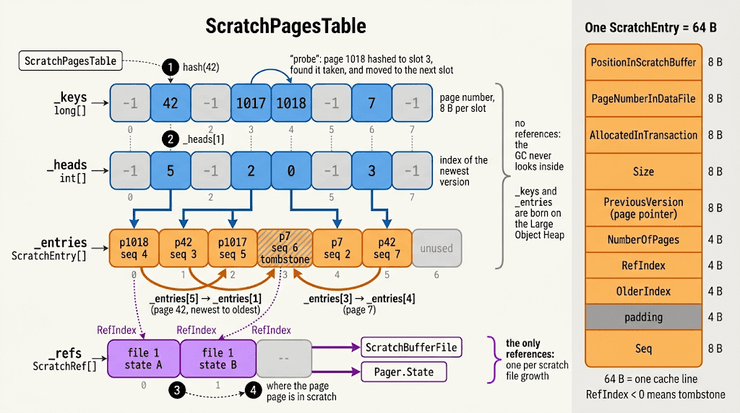
Here is the actual layout of the data structure:

The entire design for this table is meant to make it easier for the GC to work. Note that the first three arrays here are plain objects. The _keys and _heads are parallel arrays, which we use to find the actual entry in the _entries array.

The _entries array contains the ScratchEntry structs, which you can see on the right side. Each struct contains all the details about the current entry. Note that the entry also does not use any pointers.

The only pointers in the entire ScratchPagesTable are in the _refs array. Each ScratchEntry in the table points to a location in a particular file. Instead of carrying a pointer in each of the (many) entries in the table, we put them all in the _refs array and refer to them by index from the entries.

We may have tens to hundreds of thousands of entries in the table, but we’ll usually have a much smaller number of files (almost always under ten). By centralizing the references in a single small array, we made the job of the GC so much simpler.

When it needs to scan the ScratchPagesTable to see what is used, it can mark each of the top three arrays immediately and not walk their contents (because they have no pointers). And the _refs array is very small, so that isn’t meaningful.

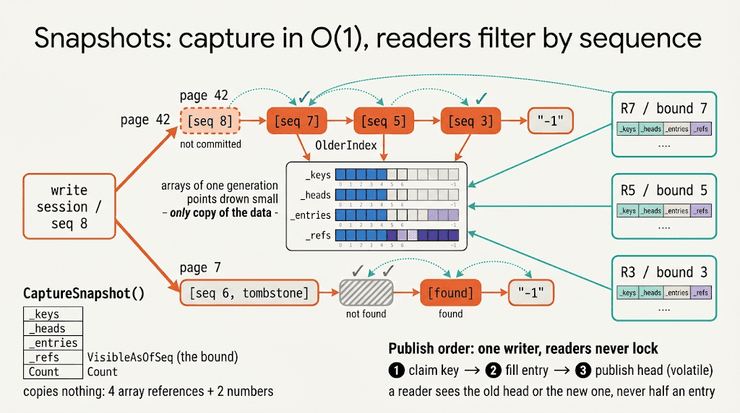
Let’s talk about the concurrency aspect here. We have the ability to take cheap snapshots from this data structure, which gives us a stable view of the data.

We take advantage of the fact that we have a single writer, so there is just a single thread that mutates the table. Then that same thread is the one that is publishing the new snapshots to other threads.

Here is what this looks like:

A snapshot simply captures references to all four arrays, the total count of items in the table, and, most importantly, the sequence number that was stamped on the snapshot when it was created.

If you look at the ScratchEntry layout, you’ll note that we have the OlderIndex field and the Seq field. Together, those represent a linked list that we can scan to find the first entry (value or tombstone) whose sequence number is less than or equal to the current sequence number that we are using.

A reader using a snapshot holds a mutable array, but the use of the sequence number ensures that it can never actually observe changes that happened after the snapshot was taken.

We don’t need to worry about concurrent mutation, since this is meant to be used with a single publisher (already guaranteed by the way RavenDB works).

Of course, if we just keep on using the table in this manner, we’ll have to deal with garbage. How do we get rid of old entries that no snapshot looks at? Don’t we have to replace the GC ourselves?

Let’s go back to the concept of the sequence. RavenDB keeps track of all the active transactions, and each of those holds a snapshot. That means that we have a cheap way of getting the oldest snapshot and its sequence.

Whenever we create a new write transaction, we check what the oldest sequence number is. That means that when we update the scratch table, we can prune the chains when we find entries that no one is able to look at any longer.

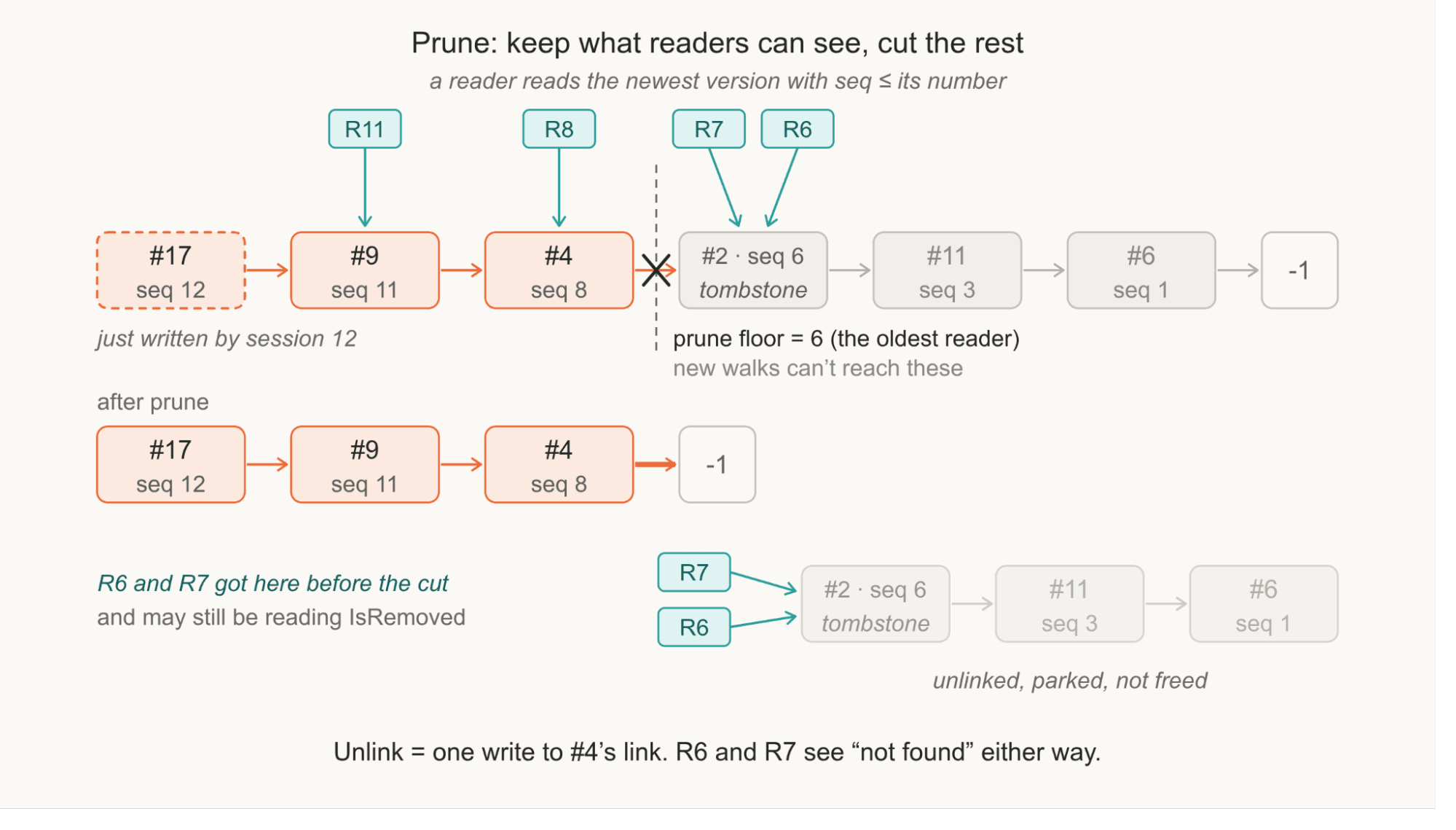
Pruning the chain in this manner doesn’t mean that we can immediately use the entries we unlinked. The issue is that a reader may want to read them. Let’s assume we have a deletion, like in the diagram above. When we prune, we cannot just immediately reuse the entries, because the readers may have already started looking at them.

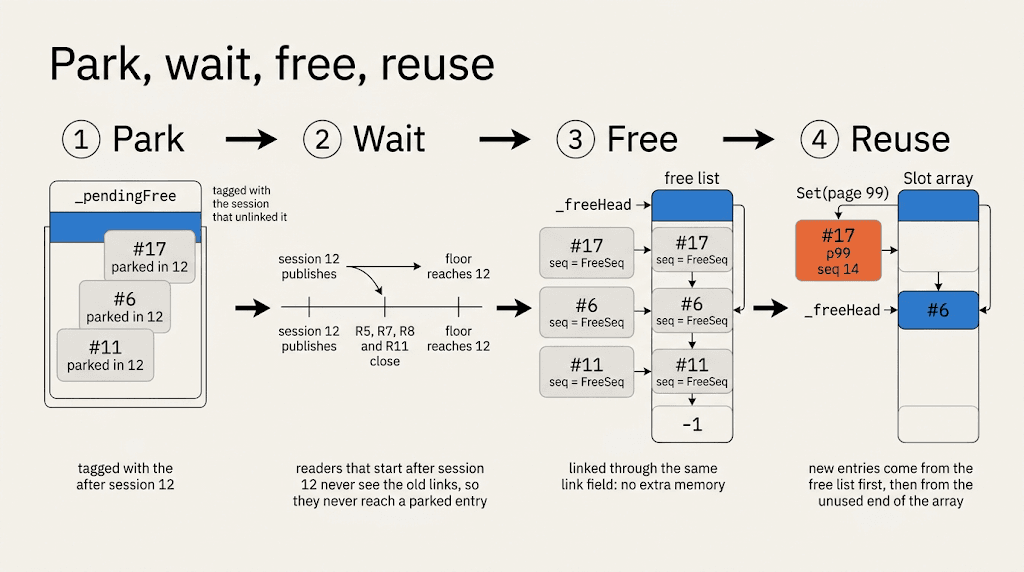
What we do instead is park them, as you can see in the following diagram:

Once we have progressed through enough transactions and all currently opened transactions started after the entries were parked, we can reuse those entries. Of course, if we have enough entries, we may need to allocate brand new arrays (re-hashing). That is safe to do because all the old snapshots contain the old references; we just discard them.

This model of pruning the old versions from the end is great for most scenarios. However, there is a particularly nasty use case where it utterly breaks down. What happens when we have a long-running transaction? We have to keep all the versions alive until the oldest read transaction is done with them.

As it turns out, there is a very common scenario where this can happen. If we run a backup, we may hold a read transaction for a long time. Write transactions while the backup is running will cause the chain to become longer and longer. The design of the scratch table means that we keep things fast for the current transactions and recent ones.

The old transaction has to traverse the entire chain each time, becoming slower the more time goes by. The slower it becomes, the more time it takes, the more write transactions can happen, the slower it becomes… That isn’t a fun scenario.

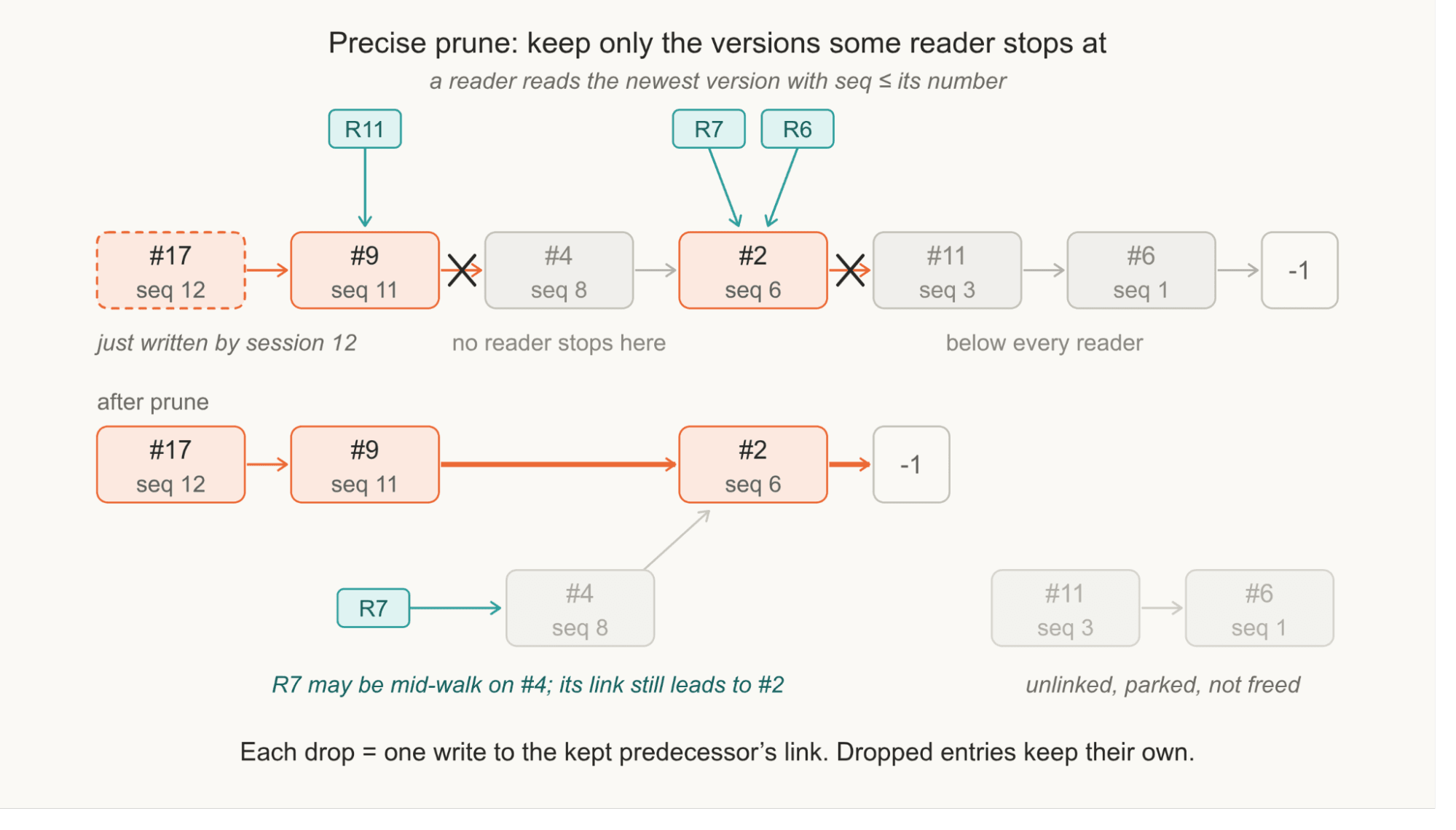
RavenDB handles this scenario explicitly. When we detect that the chain is too deep, we start pruning the chain. We discard all the intermediate transactional versions that exist between the current committed version and the oldest read transaction.

You can see what this looks like in the following diagram:

Using this mechanism, we can keep the amount of work that old transactions need to do under control.

The end result of all of this work is a high-performance concurrent data structure that takes into account both how it is actually being used and the internal intricacies of the .NET garbage collection. It isn’t your run-of-the-mill data structure, nothing that would be relevant off the shelf.

It is also directly responsible for an improvement of over 20% in the performance of RavenDB when we compare the two versions side by side.

time to read 4 min | 761 words

Over a quarter of a century ago, Joel Spolsky wrote about Netscape’s decision to rewrite its browser from scratch, which later led to Firefox. He called it Things You Should Never Do, Part I.

I remember reading that article at the time and fully agreeing with him. As a side note, it is well worth the time to go through the archive of his posts. Even today, a lot of them hold up very well.

Reading it back again, I found the following quote, which is really appropriate today:

Before Borland’s new spreadsheet for Windows shipped, Philippe Kahn, the colorful founder of Borland, was quoted a lot in the press bragging about how Quattro Pro would be much better than Microsoft Excel, because it was written from scratch. All new source code! As if source code rusted.

To be clear, he was writing in (April 2000) about something that happened in 1992, so 34 years ago. That statement is still very much in force today. Another quote from this article that still lives in my head is:

Back to that two page function. Yes, I know, it’s just a simple function to display a window, but it has grown little hairs and stuff on it and nobody knows why. Well, I’ll tell you why: those are bug fixes. One of them fixes that bug that Nancy had when she tried to install the thing on a computer that didn’t have Internet Explorer. Another one fixes that bug that occurs in low memory conditions. Another one fixes that bug that occurred when the file is on a floppy disk and the user yanks out the disk in the middle. That LoadLibrary call is ugly but it makes the code work on old versions of Windows 95.

There is an interesting question here. Do we have the same problem with AI? After all, AI can write a lot of code. Does it matter?

This post was started when I was working on optimizing RavenDB. That is something that I do as a habit, in an ongoing process. Right now I’m looking into optimizing the scenario of how RavenDB starts up after a cold boot, when running on an I/O-constrained system.

The scenario is a 100GB database running on an AWS gp3 disk with 125MB/sec and 3K IOPS. In most cases, you size up your machines so the working set will fit comfortably in memory. But what about when you start up after a cold boot (memory is empty)?

In that case, the access pattern you have for the data is really important. That is also not something that you’ll typically see in “I used AI to generate a storage engine”. That is the sort of “detail work” that is not interesting to teach (no fancy coding here); it isn’t “my benchmark got 15% faster” (it is very specific to a single scenario).

In long-lived software, however, you accumulate such features. Over time, those end up being a very significant advantage.

Another gem from Spolsky is this blog post, where he talks about software bloat, which is the other side. Then he points out that the review for a new word processor pointed out that the software is very fast, but it lacked (for a journalist) an essential word count feature.

Can you get AI to write all those features and behaviors? Of course, but in order to actually run into them (so you know what to do), you need actual in-field experience.

To really hammer that home, you need that support call when they are looking at the downtime clock while the disk is reading in small increments and their business is down. It’s the same as the old story about the chalk mark.

Going back to the original scenario of optimizing RavenDB for I/O-constrained environments, you need to understand how disks work. In general, for a gp3 disk, the cost of reading 8 KB is the same as reading 128 KB. If you are working from a cold boot and try to read an 8 KB page from the disk, it actually makes sense to read more to try to get things into memory faster.

That is where things get interesting, because the previous statement is true only about IOPS; you also have to balance bandwidth limits, as well as what happens when your memory is full and you’ll need to evict data from the cache.

RavenDB is using prefetching; it will analyze patterns in how you access the data and proactively try to read more when it can. That can dramatically improve cold boot performance.  

FUTURE POSTS

No future posts left, oh my!

RECENT SERIES

  1. API Design (10):
    29 Jan 2026 - Don't try to guess
  2. Recording (20):
    05 Dec 2025 - Build AI that understands your business
  3. Webinar (8):
    16 Sep 2025 - Building AI Agents in RavenDB
  4. Production postmorterm (2):
    11 Jun 2025 - The rookie server's untimely promotion
  5. RavenDB News (2):
    02 May 2025 - May 2025
View all series

Syndication

Main feed ... ...
Comments feed   ... ...