Ayende @ Rahien

Unnatural acts on source code

WPF, Default Buttons and input

I got the following bug report about NH Prof:

When renaming a session, the "enter" key seems to invoke the "Cancel" rather than the "Rename Session" button - this is slightly annoying (and unexpected) behavior.

image 

But that is impossible, here is the XAML for this:

image

And as it turned out, the code is correct, and the explanation for the error is wrong, but the behavior exists.

The actual problem turned out to be that if you hit enter while the focus is on the text box, the RenameSession method will be called, but the bound value will not be modified, since the default binding mode for text boxes is on focus lost. We can fix this using:

image 

Although this is logical, considering how WPF works, I still find it surprising, I would expect this to be a common scenario that would be handled OOTB.

Tags:

Published at

Originally posted at

Comments (9)

Effectus: Isolated features

Continuing in my exploration of the Effectus code base, which originated from my Building a Desktop To-Do Application with NHibernate article on MSDN Magazine, I wanted to talk today about separating features into individual pieces in the application.

Each feature in the Effectus application is built as an isolated unit, that has little to do with any other features. This is very clear when you look at how they are organized:

image 

Sidenote: In each feature, the component parts are named the same (Presenter, View, Model). This is intentional, since it make it that much harder to mix stuff from other features.

Every feature has a pretty rigid structure, defined by the application, and trying to reuse stuff between features is frowned upon and avoided, even if doing so can reduce duplication. As a good example, the Model for both CreateNew and Edit features are identical, but they are two different classes with no attempt to merge it up.

The reason for this is quite simple, treating each feature as an isolated unit bring us great benefits, we can have different developers working on different features without the chance of stepping on each other toes, it is very hard for one feature to break another, deploying new features is easier to handle, etc. Trying to apply DRY and consolidate common pieces of code would introduce dependencies between features, and that is a bad idea.

But what about communication between features? What about when one feature needs to call another?

As it turned out, it is quite easy to turn a lot of the inter feature communication into an indirect calls, using pub/sub. We gain the independence from dependencies using pub/sub, while maintaining the feel of a well integrated product for the user. For the rare cases of one feature calling another, I create a simple Call(“FeatureName”) mechanism (in the code, this is Presenters.Show(name) method) that all us to just explicitly invoke another feature, maybe with some initial arguments. A more complete implementation will handle even that using pub/sub, probably with an integrator class that would dispatch the appropriate event to start and invoke the feature(s) that want to handle it.

You can read more about the architecture principles behind this system in: Application structure: Concepts & Features

Effectus: Fatten your infrastructure

Continuing in my exploration of the Effectus code base, which originated from my Building a Desktop To-Do Application with NHibernate article on MSDN Magazine, I wanted to talk today about how to build an application infrastructure.

First, to be clear, I am not talking about infrastructure pieces such as caching, data access, etc. Those are generic concerns and you should be able to just get them from an off the shelve library. When I am talking about an application infrastructure, I am talking about the infrastructure code that you are going to need to write for a particular application. You are always going to have to do that, even if it is something as simple as just wiring the container together, or registering session handling, etc.

From my point of view, the point of the application infrastructure is to make writing the actual application features as simple as possible. Ideally, you want to make the infrastructure pieces handle everything that isn’t purely related to the feature you are implementing. The reason that an application infrastructure can do this while a generic infrastructure cannot is that an application infrastructure can make a lot of assumptions about the way the application is built.

Let us take the Main screen feature in Effectus, shall we, it will let us look at how this is implemented:

public Observable<int> CurrentPage { get; set; }


public
Fact CanMovePrev { get { return new Fact(CurrentPage, () => CurrentPage > 0); } } public Fact CanMoveNext { get { return new Fact(CurrentPage, () => CurrentPage + 1 < NumberOfPages); } } public void OnCreateNew() { Presenters.Show("CreateNew"); } public void OnActionsChoosen(ToDoAction action) { Presenters.Show("Edit", action.Id); } public void OnLoaded() { LoadPage(0); } public void OnMoveNext() { LoadPage(CurrentPage + 1); } public void OnMovePrev() { LoadPage(CurrentPage - 1); }

Looking the code, we can see that there are actually a lot of infrastructure playing a part here.

  • Automatic binding of On[Button Name]() methods to the button command.
    • Within this, enabling / disabling automatically using Can[Button Name] properties
  • Automatic binding of On[List name]Choosen(Item) to the selected item changed behavior on the list.
  • Automatic updates of property states using Fact.
  • Automatic updates of property values, using Observable.

There isn’t much to say about the automatic binding between UI actions and presenter methods, except that I think it is clear how this behavior reduce the level of infrastructure level code that you would have to write, test and maintain. But both Fact and Observable deserve a bit more explanation.

In the LoadPage() method, not shown here, we are updating the CurrentPage property, this will trigger invalidation of the all the facts bound to the value (CanMoveNext, CanMovePrev), which will force their re-evaluation. Since the infrastructure knows how to wire this up to the appropriate commands on the UI, this means that this will enable/disable the given controls automatically. What is more, look at the code. It is clear, concise and pretty easy to reason about and use.

I’ll leave the actual exploration of the implementation to you, it is fairly simple, but the idea is important. The Effectus application actually have more infrastructure code than it have code to implement its features. But that is a very small application. Just to give you an idea, the # of lines of code devoted to infrastructure in Effectus is about 600 LOC! In most applications, you probably wouldn’t even notice the amount of code that the infrastructure takes, but the effects are quite clear.


Effectus: Building UI based on conventions

I waited for a while after my article was posted, to see if anyone caught on to some of the things that I did in the sample code that weren’t related to NHibernate usage. It seems that no one caught on to that, so I’ll try pointing them out explicitly.

The basic format of a feature in Effectus is this:

image

Each feature have a Presenter (business logic for the feature), a View Model, which is directly bound to the View and is the main way that Presenter has to communicate with the View. The main responsibility of the Model is to be bound to the UI, and allow the presenter to update it, but it is not quite enough.

The UI also need to raise events and handle user input. A common example is handling button clicks. You can’t really map them into Model behavior, at least not easily and in a way that make sense to the developers. Instead, I defined a set of conventions. As you can see in the picture, based on the name of the element, we match is with the appropriate execute method and the way to decide if the command can execute. Under the cover, we generate the appropriate ICommand instance, bound to the Presenter behavior.

image

If you look at the code, you can see that the conventions extend even to handling the selected item changed in a list box, including passing the newly selected instance back to the presenter. Those conventions are project specific, based on what the project need, and they result in a code base that is very easy to read and follow. Moreover, they result in a codebase that is relatively free from infrastructure concerns.

I am going to have a few more posts about Effectus, can you figure out what else I put in that code base?

Reproducing a WPF memory leak

I have run into WPF memory leaks before, and I thought that I fixed them all, but I started getting more reports from people experiencing large memory usage from NH Prof. That lead me to try to track it down again.

Short story, you can get the reproduction here: http://github.com/ayende/wpf-mem-leak

I left an NH Prof instance running overnight, and was able to confirm that there is a memory leak in there, just by seeing how much more memory it had in task manager. One of the nicest things in Windows 7 is the ability to generate a dump directly from task manager.

I loaded that dump into windbg, loaded sos and mscrowks and set out to figure out what was taking so much memory. The most common way to start a memory leak issue is to start figuring out what is taking all this memory.  For that, the !dumpheap –stat command is great, since it give you memory usage by type and size. Here is what I found:

000007fee95b8a88   364674     11669568 MS.Utility.SingleItemList`1[[System.WeakReference, mscorlib]]
000007feeffe4748    51074     13161552 System.Object[]
000007fee77417a8   728189     17476536 MS.Internal.Data.ValueChangedEventArgs
000007fee95aafe8   364133     17478384 MS.Utility.ThreeItemList`1[[System.WeakReference, mscorlib]]
000007fee95b88c0   728814     17491536 MS.Utility.FrugalObjectList`1[[System.WeakReference, mscorlib]]
000007fee95b8838   728814     23322048 System.Windows.WeakEventManager+ListenerList
0000000000496170    19063     28004120      Free
000007fee7741730   728189     40778584 MS.Internal.Data.ValueChangedEventManager+ValueChangedRecord
000007fef0036c90   736210     47117440 System.EventHandler
000007feeffe7a90  1837702     58806464 System.WeakReference

I literally groaned when I saw that, based on my previous experience, it means that the memory leak is generated from inside WPF code, and that I am not likely to fix it. Then I set out to figure out where it is at. My suspicion fell on the statistics feature, it is the only thing that really updates frequently, after all.

So I setup to build a reproduction. Sadly, it is trivially easy to reproduce the issue. Given this XAML:

<StackPanel>
<ItemsControl ItemsSource="{Binding Path=Statistics}">
<ItemsControl.ItemTemplate>
<DataTemplate>
<Border Padding="2 0 0 0">
<Grid>
<Grid.ColumnDefinitions>
<ColumnDefinition Width="160"/>
<ColumnDefinition Width="Auto" />
<ColumnDefinition Width="*" />
</Grid.ColumnDefinitions>
<TextBlock Text="{Binding Path=Key}"
ToolTip="{Binding Path=Key}"
TextTrimming="CharacterEllipsis" />
<GridSplitter Grid.Column="1"
Background="#3000"
Width="2"
Margin="2 0" />
<TextBlock Text="{Binding Path=Value}"
Grid.Column="2" />
</Grid>
</Border>
</DataTemplate>
</ItemsControl.ItemTemplate>
</ItemsControl>
</StackPanel>

The following code will generate a memory leak:

public partial class Window1 : Window
{
readonly DispatcherTimer timer = new DispatcherTimer(DispatcherPriority.Normal)
{
Interval = TimeSpan.FromMilliseconds(1)
};

private readonly MyModel context;

public Window1()
{
InitializeComponent();
context = new MyModel();
context.UpdateData();
timer.Tick += (sender, args) => context.UpdateData();
DataContext = context;
timer.Start();
}

public class MyModel
{
public ObservableCollection<DictionaryEntry> Statistics { get; set; }

public MyModel()
{
Statistics = new ObservableCollection<DictionaryEntry>();
}

public void UpdateData()
{
Statistics.Clear();
Statistics.Add(new DictionaryEntry("Time", DateTime.Now.ToString()));
Statistics.Add(new DictionaryEntry("Mem", GC.GetTotalMemory(true).ToString("#,#")));
}
}
}

When you run the code, you can see that memory usage is going up all the time. As far as I can tell, I am not doing anything that is wrong or even slightly strange here. You can get the reproduction here: http://github.com/ayende/wpf-mem-leak

I tried several workarounds so far, but I didn’t like any of them. Any ideas?

Sometimes it looks like select IS broken: A WPF memory leak

One of the most annoying bug reports that we got for NH Prof is that it crash with out of memory exception after long use. We did the usual checkups, and the reason for the memory leak was obvious, something kept a lot of objects internal to WPF in memory. In fact, here are the heavy hitters, as extracted from the dump:

Count Size (kliobytes) Type
5,844 3,337 System.Byte[]
69,346 5,474 System.String
49,400 37,198 System.Object[]
1,524,355 47,636 MS.Utility.SingleItemList`1[[System.WeakReference,mscorlib]]
3,047,755 71,432 MS.Internal.Data.ValueChangedEventArgs
1,523,918 71,434 MS.Utility.ThreeItemList`1[[System.WeakReference,mscorlib]]
3,048,292 71,444 MS.Utility.FrugalObjectList`1[[System.WeakReference,mscorlib]]
3,048,292 95,259 System.Windows.WeakEventManager+ListenerList
3,047,755 166,674 MS.Internal.Data.ValueChangedEventManager+ValueChangedRecord
3,056,462 191,029 System.EventHandler
7,644,217 238,882 System.WeakReference

As you can see, this just says that we are doing something that cause WPF to keep a lot of data in memory. In fact, this looks like a classic case of “memory leak” in .NET, where we aren’t releasing references to something. This usually happen with events, and it was the first thing that I checked.

It took a while, but I convinced myself that this wasn’t that. The next step was to try to figure out what is causing this. I’ll skip the sordid tale for now, I’ll queue it up for posting at a later date. What we ended up with is a single line of code that we could prove caused the issue. If we removed it, there was no leak, if it was there, the leak appeared.

That was the point where I threw up my hands and asked Christopher to look at this, I couldn’t think of something bad that we were doing wrong, but Christopher and Rob are the experts in all things WPF.

Christopher managed to reproduce this in an isolated fashion. here is how it goes:

public class TestModel : INotifyPropertyChanged
{
private readonly DispatcherTimer timer;
private int count;

public event PropertyChangedEventHandler PropertyChanged = delegate { };

public TestModel()
{
timer = new DispatcherTimer(DispatcherPriority.Normal)
{
Interval = TimeSpan.FromMilliseconds(50)
};
timer.Tick += Timer_Tick;
timer.Start();
}

public IEnumerable Data
{
get
{
return new[]
{
new {Name = "Ayende"},
};
}
}

private void Timer_Tick(object sender, EventArgs e)
{
if (count++ % 100 == 0)
{
GC.Collect(2, GCCollectionMode.Forced);
Console.WriteLine("{0:#,#}", Process.GetCurrentProcess().WorkingSet64);
}
PropertyChanged(this, new PropertyChangedEventArgs("Data"));
}
}

This is a pretty standard model, showing data that updates frequently. (The short time on the time is to show the problem in a short amount of time.) Note that we are being explicit about forcing a GC release here, to make sure it isn’t just waste memory that haven’t been reclaimed yet.

And the XAML:

<Grid>
<ItemsControl ItemsSource="{Binding Data}">
<ItemsControl.ItemTemplate>
<DataTemplate>
<StackPanel Orientation="Horizontal">
<TextBlock Text="{Binding Name}" />
</StackPanel>
</DataTemplate>
</ItemsControl.ItemTemplate>
</ItemsControl>
</Grid>

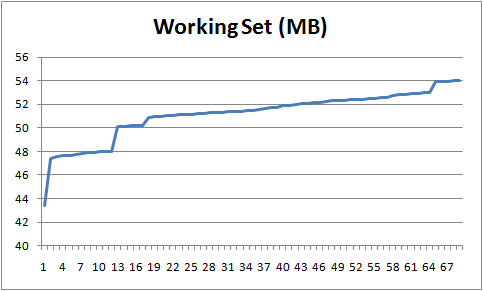
Executing this will result in the following memory pattern:

image

Looking at the code, I really don’t see anything that is done wrong there.

I uploaded a sample project that demonstrate the issue here.

Am I going crazy? Am I being stupid? Or is select really broken?

WPF tripwires, beware of uncommon culture infos

I got a few bug reports about NH Prof giving an error that looks somewhat like this one:

System.Windows.Markup.XamlParseException: Cannot convert string '0.5,1' in attribute 'EndPoint' to object of type 'System.Windows.Point'. Input string was not in a correct format. 

It took a while to figure out exactly what is going on, but I finally was able to track it down to this hotfix (note that this hotfix only take cares of list separator, while the problem exists for the decimal separator as well. Since I can’t really install the hotfix for all the users of NH Prof, I was left with having to work around that.

I whimpered a bit when I wrote this, but it works:

private static void EnsureThatTheCultureInfoIsValidForXamlParsing()
{
	var numberFormat = CultureInfo.CurrentCulture.NumberFormat;
	if (numberFormat.NumberDecimalSeparator == "." && 
		numberFormat.NumberGroupSeparator == ",") 
		return;
	Thread.CurrentThread.CurrentCulture = CultureInfo.GetCultureInfo("en-US");
	Thread.CurrentThread.CurrentUICulture = CultureInfo.GetCultureInfo("en-US");
}

I wonder when I’ll get the bug report about NH Prof not respecting the user’s UI culture…

WPF is magic

And I mean that in the kindest way possible. I am currently working with these wizards, and they (and the possibility WPF opens) keep surprising me.

I am well aware that this piece of code is par the course for WPF devs, but I have only dabbled in WPF, and seeing what it can do from visual perspective doesn't mean much until I have seen how clean the UI code looks like. I mean, just take a look at this:

image

All the information that I need to have about how to handle a piece of the UI is right there, and the infrastructure supports working in the way that I think is appropriate. The reason for this post is seeing how context menus works. I was extremely pleased to see how it all comes together in a single cohesive unit.

Looking for a WPF dev

I am currently working on an interesting application, basically, rule engine, data + DSL, and other fun stuff. Unfortunately, here is how the UI is right now:

image

Yes, the disclaimer is in the UI.

Therefor, I currently looking for a WPF dev / designer. I am currently in New York, but there is no location limitation.

If you are interested, please contact me.

WPF & Prism: Before & After

Glenn posted the before/after pictures of the Prism Reference Implementation application.

I was very impressed when I saw how they got from the traditional developer styled UI:

StockTrader_Before.png

To this UI:

StockTrader_After.png

Something else that Glenn said couldn't be stressed enough, this metamorphosis has happened in two weeks by a single developer.

I have worked on skinnable (win forms) applications, and that kind of thing just doesn't take just two man weeks, if it is possible at all.

Wow!

This make the WPF story much more compelling.

Yet another internal issue


I want to give a nice error message when windows integration is enabled. Now, WCF has this ability, and while it took me a while, I managed to track down the way they do it to this method:
HostedTransportConfigurationManager.MetabaseSettings.GetAuthenticationSchemes(base.HostedVirtualPath);
Which, of course, is internal.
Bad WCF, no cookie for you.
This is something really useful that I could make use of.
But, of course, Framework Design Guidelines says that you should make everything internal.
Argh!

The WPF mystery

Okay, here are a few weird things that I wish I didn't know about WPF.

  • It does some low level cheating all over the place, for fun & profit, put the following like in the main window ctor:
    	Debug.Assert(Application.Current.MainWindow != this); 
    Remember that on the CLR, you don't often see other objects referencing before you even started your constructor.
  • Then there is this fun puzzle, when I am registering to the Application.Startup event, I am getting inconsistent results with regards to Application.MainWindow being null or not. After a short investigation, I pinned the blame on the async initialization of the windows. But it was a major PITA, to say the least.
Tags:

Published at

WPF Adventures: Part IV

I have made some progress since my last post, I now have removed the TextBlock hacks and am using buttons with replaced UI. The even look nice. I can't figure out how to get accelerator keys to work, I am pretty sure that I am doing everything right, but it doesn't work.

The button:

<Button

      Name="Next"

      Grid.Column="2"

      Click="Next_Click" >

      _Next &gt;&gt;

</Button>

The style (sans some UI stuff to make it shorter):

<Style TargetType="{x:Type Button}" >

      <Setter Property="Cursor"

                  Value="Hand"/>

      <Setter Property="Template">

            <Setter.Value>

                  <ControlTemplate>

                        <Border

                              Background="{StaticResource NormalBrush}"

                              BorderBrush="{StaticResource NormalBorderBrush}">

                              <TextBlock Style="{StaticResource BigText}"

                                             Name="TextField"

                                             Text="{TemplateBinding Property=Button.Content}">

                                    <ContentPresenter RecognizesAccessKey="True"/>


                              </TextBlock>

                        </Border>

                        <ControlTemplate.Triggers>

                              <Trigger

                                    Property="Button.IsPressed"

                                    Value="True">

                                    <Setter TargetName="Border"

                                                Property="Background"

                                                Value="{StaticResource PressedBrush}" />

                              </Trigger>

                        </ControlTemplate.Triggers>

                  </ControlTemplate>

            </Setter.Value>

      </Setter>

</Style>

The way it looks:

(Image from clipboard).png

Another issue that I am not sure how to solve is putting more controls on the navigation bar of the application:

(Image from clipboard).png

I am pretty sure that this involves overriding the style for NavigationWindow and doing something there, but I haven't been able to figure it out yet. The new stuff is in the repository if you feel like looking at it, of course.

Tags:

Published at

XAML Interview Question

So here I am, only 3 days into WPF, and I have an interesting interview question. Given the following, what will be the title of the page? Why?

XAML:

<Page x:Class="Browser.BlogViewer"

    xmlns="http://schemas.microsoft.com/winfx/2006/xaml/presentation"

    xmlns:x="http://schemas.microsoft.com/winfx/2006/xaml"

    Title="Foo">

</Page>

Code:

public partial class BlogViewer : Page

{

      public BlogViewer()

      {

            Title = “Bar”;

      }

}


Tags:

Published at

WPF / Ayende Viewer: Part III

WPF / Ayende Viewer: Part III

The application is now composed of three screens, main one (choose categories):

(Image from clipboard).png

Select a post in a category:

(Image from clipboard).png

And view the posts in a category:

(Image from clipboard).png

Notice that you can page between the posts, this enables a very quick browsing experiance.

I commited the changes to the Rhino Tools repository (here), so you can see how I did it (not very complex). That data arrives from a sqlite database called ayende.blog using Active Record, of course.

Additional features that I want to add:

  • Add search capabilities, so I would be able to search the content / titles. Probably using SQLite full text searches. Allow to view the page results and to page through them.
  • Add tagging support, allow to browse the tags and page through tagged posts.

Not a lot of feature, eh?

Except that I have this list of things that I want to fix:

  • Give a uniform UI for the buttons in the first two screens, probaly on par with the prev/next links on the last screen.
  • Figure out control templates and replace the links on the last screen with a real control (right now it is a TextBlock with an event on MouseDown).
  • Figure out how to factor the common header into a seperate header control.
  • Add a column with the number of posts in each category.
  • Use WPF Commands instead of doing things in the events.
  • Figure out a better way to do paging than just moving between all those pages. There are advantages to this approach, so I think that I will keep them.
  • Put a meaningful title on the page, so the back button menu will look nice.
  • Put a Home button on the titlebar that will get you back to the main screen.
  • Figure out if an a really long chain of pages is a memory leak in the order that I should do something about. Yes, it is a memory leak, probably need to use KeepAlive=false, in which case the page will be discarded, and a new instance will be used when stepping back to it. As this is the default behavior, no need to do anything about it.
  • Figure out if triggers can replace the checks for next item, prev item. There isn't a way to do this properly, because there is an if pos+1 == count invovled.

WPF Question: Is this possible from mark up?

(Image from clipboard).png

"Categories:" is static text, the rest is generated via this code:

IAddChild c = Categories;//Categories is a Stack Panel with Horizontal Orientation

foreach (Category category in post.Categories)

{

      TextBlock block = new TextBlock();

      block.Text = category.Name;

      block.Style = (Style) FindResource("BigText");

      c.AddChild(block);

      TextBlock seperator = new TextBlock();

      seperator.Text = "//";

      seperator.Style = (Style)FindResource("BigText");

      seperator.Foreground = Brushes.Brown;

      c.AddChild(seperator);

}

Is there a way to do this via XAML and not from the code?

I would like to thank Tomas Restrepo for pointing me in the direct direction, this is indeed possible, like this:

<ItemsControl Name="Categories"

                    ItemsSource="{Binding}">

      <ItemsControl.ItemsPanel>

            <ItemsPanelTemplate>

                  <WrapPanel Orientation="Horizontal"/>

            </ItemsPanelTemplate>

      </ItemsControl.ItemsPanel>

      <ItemsControl.ItemTemplate>

            <DataTemplate>

                  <WrapPanel>

                        <TextBlock Text="{Binding Path=Name}" Tag="{Binding Path=CategoryId}"

                                       MouseDown="Category_Browse"

                                       Style="{StaticResource BigText}"/>

                        <TextBlock Text="//"

                                       Foreground="Brown"

                                       Style="{StaticResource BigText}"/>

                  </WrapPanel>

            </DataTemplate>

      </ItemsControl.ItemTemplate>

</ItemsControl>

Notice the ItemsSource="{Binding}", which tripped me at first. Also, note that I am binding the tag of the text blog to the ID of the category. I don't really like this, but I couldn't figure out how to bind to the current item itself.

Tags:

Published at