Oren Eini

CEO of RavenDB

a NoSQL Open Source Document Database

Get in touch with me:

oren@ravendb.net +972 52-548-6969

Posts: 7,640
|
Comments: 51,260
Privacy Policy · Terms
filter by tags archive
time to read 2 min | 289 words

I did this a year and a half ago, so it probably about time to do it again. I am using the same approach I outlined in this post.

  • Active since: April 2004 ( I am doing this for 4 years! Wow! )
  • Number of Posts: 3,437 (was 2196)
  • Number of Comments: 12,958 (was 3030)
  • Avg. Comments Per Post:  6 (was 3)
  • Avg. Posts per Month: 71 (was 60)
  • Avg. Posts per Month Last Year: 51 (was 82)
  • Avg. Posts per Week Last Year: 11 (was 19)
  • Avg. Comments per Month Last Year: 550 (was 108)

Posts to comments, over time. I actually got to the point where I can't fit everything in a single graph, so I split them by year. Note that the scale for each graph is different!

2004

image

2005

image

2006

image

2007

image

2008

image

It is especially interesting if you look at the amount of posts per month over the entire period:

image

And now compare this to the number of comments per month over the entire period:

image

I thought about putting the most popular posts here, like in last year, but I find the list depressing.

time to read 4 min | 665 words

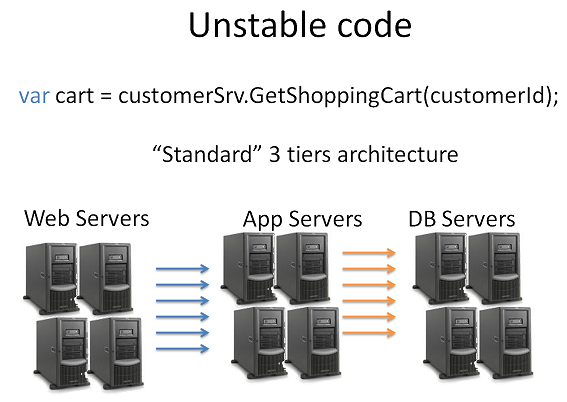
I mentioned that this line has the potential to destabilize an application, because it is a remote blocking call.

var cart = customerSrv.GetShoppingCart(customerId);

Neil Mosafi left the following comment:

I've never experienced other threads being blocked whilst making a sync service call.  Even an Async call is essentially a sync call but done in another thread or using an iocompletion port.  Or are you saying we should be making duplex service calls to avoid possible problems?

Let us start by saying that I am talking about pathological scenarios, nothing that you'll meet in everyday scenario. However, "once in a million is next Tuesday" in our business. I have seen applications behave... strangely on production.

Let us focus on the trivial issues first, shall we?

  • HTTP: Only 2 concurrent requests per host
    This is fairly well known, and there are ways around it, but it is neither trivial nor something you can ignore.
    Result: requests are serialized in the HTTP layer
  • HTTPS: All of HTTP limitations, plus ~4,000 request per IP (not host)  in any 2 minutes duration.
    This is not well known, and while there are ways around it, it is not something that most people think of until the application fail.
    Result: request is denied.

Those are the common ones, but with TCP based protocols, the server can hang the client in so many ways, it isn't even funny. TCP redirection loops, waiting on the listen queues, slow transfer rates, malformed TCP protocols and high packet loss are just the things that occur to me right now.

In general, we can divide the issues into fail fast and block. Fail fast are what we want, block is what we have to deal with.

Now, how can a blocking call take down an application? Starting with a convoy and ending with a chain reaction.

Let us say that we are making the blocking call above, and for some reason, it takes longer to process this than our SLA allows. In most scenarios, we would like to abort the current call and send an error downstream. What we don't want is to have a situation on our hands where we block. If we block, we hold a valuable thread that is doing nothing but wait.

In .NET, there are several types of threads that we utilize. Thread pool threads (ASP.Net, WCF, QueueWork, etc), main thread (in client applications), free threads (my own term, threads that were created by the application manually), IO threads (we mostly don't deal with them, they are an infrastructure concern) and private thread pools.

A thread is an expensive resource, so we tend to hang to it, rather than creating them all the time. In particular, for most servers, we have a finite amount of threads that are available for doing work.

Now, assume that some threads are blocked, or even just processing things more slowly. The concept of blocking remote calls means that we have now propagated this issue to all our clients, which will propagate them to their clients, etc.  In fact, a convoy (serialization of processing work in one place) can easily lead to a chain reaction which will lead to the entire application meltdown.

And that is the good part.

The bad part is if all you threads are blocked for some reason. (I had a case once where some idiot run a long query with serializable isolation on the log table. Guess what happened to the application in the meantime?) If all the threads are blocked, you can't do anything, you are dead in the waters.

I will talk about approaches to dealing with this in a future post.

time to read 4 min | 608 words

Because they aren't helpful for the pathological cases. Let us take this simple example:

[ServiceContract]
public interface IFoo
{
	[OperationContract]
	string GetMessage();
}

var stopwatch = Stopwatch.StartNew();
var channel = ChannelFactory<IFoo>.CreateChannel(
	new BasicHttpBinding
	{
		SendTimeout = TimeSpan.FromSeconds(1), 
		ReceiveTimeout = TimeSpan.FromSeconds(1),
		OpenTimeout = TimeSpan.FromSeconds(1),
                CloseTimeout = TimeSpan.FromSeconds(1)
	},
	new EndpointAddress("http://localhost:6547/bar"));

var message = channel.GetMessage();

stopwatch.Stop();
Console.WriteLine("Got message in {0}ms", stopwatch.ElapsedMilliseconds);

On the face of it, it looks like we are safe from the point of view of timeouts, right? We set all the timeout settings that are there. At most, we will spend a second waiting for the message, and get a time out exception if we fail there.

Here is a simple way to make this code hang for a minute (more after the code):

namespace ConsoleApplication1
{
	using System;
	using System.Linq;
	using System.Diagnostics;
	using System.IO;
	using System.Net;
	using System.ServiceModel;
	using System.Threading;

	class Program
	{
		static void Main(string[] args)
		{
			var host = new ServiceHost(typeof(FooImpl), 
				new Uri("http://localhost/foo"));
			host.AddServiceEndpoint(typeof(IFoo), 
				new BasicHttpBinding(), 
				new Uri("http://localhost/foo"));
			host.Open();

			new SlowFirewall();

			var stopwatch = Stopwatch.StartNew();
			var channel = ChannelFactory<IFoo>.CreateChannel(
				new BasicHttpBinding
				{
					SendTimeout = TimeSpan.FromSeconds(1), 
					ReceiveTimeout = TimeSpan.FromSeconds(1),
					OpenTimeout = TimeSpan.FromSeconds(1),
                 			CloseTimeout = TimeSpan.FromSeconds(1)
				},
				new EndpointAddress("http://localhost:6547/bar"));
			
			var message = channel.GetMessage();
			
			stopwatch.Stop();
			Console.WriteLine("Got message in {0}ms", stopwatch.ElapsedMilliseconds);


			host.Close();
		}
	}

	[ServiceContract]
	public interface IFoo
	{
		[OperationContract]
		string GetMessage();
	}

	public class FooImpl : IFoo
	{
		public string GetMessage()
		{
			return new string('*', 5000);
		}
	}

	public class SlowFirewall
	{
		private readonly HttpListener listener;

		public SlowFirewall()
		{
			listener = new HttpListener();
			listener.Prefixes.Add("http://localhost:6547/bar/");
			listener.Start();
			listener.BeginGetContext(OnGetContext, null);
		}

		private void OnGetContext(IAsyncResult ar)
		{
			var context = listener.EndGetContext(ar);
			var request = WebRequest.Create("http://localhost/foo");
			request.Method = context.Request.HttpMethod;
			request.ContentType = context.Request.ContentType;
			var specialHeaders = new[] { "Connection", "Content-Length", 
"Host", "Content-Type", "Expect" }; foreach (string header in context.Request.Headers) { if (specialHeaders.Contains(header)) continue; request.Headers[header] = context.Request.Headers[header]; } var buffer = new byte[context.Request.ContentLength64]; ReadAll(buffer, context.Request.InputStream); using (var stream = request.GetRequestStream()) { stream.Write(buffer, 0, buffer.Length); } using (var response = request.GetResponse()) using (var responseStream = response.GetResponseStream()) { buffer = new byte[response.ContentLength]; ReadAll(buffer, responseStream); foreach (string header in response.Headers) { if (specialHeaders.Contains(header)) continue; context.Response.Headers[header] = response.Headers[header]; } context.Response.ContentType = response.ContentType; int i = 0; foreach (var b in buffer) { context.Response.OutputStream.WriteByte(b); context.Response.OutputStream.Flush(); Thread.Sleep(10); Console.WriteLine(i++); } context.Response.Close(); } } private void ReadAll(byte[] buffer, Stream stream) { int current = 0; while (current < buffer.Length) { int read = stream.Read(buffer, current, buffer.Length - current); current += read; } } } }

This problem means that even supposedly safe code, which has taken care of specifying timeouts properly is not safe from blocking because of network issues. Exactly the thing we specified the timeouts to avoid. I should note that this sample code is still at a very high level. There is a lot of things that you can do at all levels of the network stack to play havoc with your code.

As an aside, what book am I re-reading?

time to read 1 min | 128 words

There is some interesting discussion on my previous post about unstable code.

I thought that it would be good to give a concrete example of the issue. Given the following interface & client code, is there a way to make this code block for a long time?

[ServiceContract]
public interface IFoo
{
	[OperationContract]
	string GetMessage();
}

var stopwatch = Stopwatch.StartNew();
var channel = ChannelFactory<IFoo>.CreateChannel(
	new BasicHttpBinding
	{
		SendTimeout = TimeSpan.FromSeconds(1), 
		ReceiveTimeout = TimeSpan.FromSeconds(1),
		OpenTimeout = TimeSpan.FromSeconds(1),
                CloseTimeout = TimeSpan.FromSeconds(1)
	},
	new EndpointAddress("http://localhost:6547/bar"));

var message = channel.GetMessage();

stopwatch.Stop();
Console.WriteLine("Got message in {0}ms", stopwatch.ElapsedMilliseconds);

You are free to play around with the server implementation as well as the network topology.

Have fun....

time to read 3 min | 521 words

Without getting to the centralized vs. decentralized SCM argument (I understand the differences, I just don't grok them), patch management is important in many scenarios. Contributing to OSS projects is a major one, I admit, but I have previous used these techniques to be able to take emergency fixes on productions and merge them into the development trunk.

The question came up in the NHibernate Contrib mailing list, and Josh Robb has commented on that at length. I thought that it would be a good idea to take that and expand on this a bit.

The problem:

We want to submit a changeset to a project, without having direct access to its source control. The solution is to generate a patch and send it to the destination.

So far, it is simple. It gets complex when you need to deal with more than a single changeset that hasn't been merged to the root.

Let us say that we have several changesets that we have generated. Let us see how we treat them, according to the different scenarios we encounter. A scenario, in this case, is the dependence between the changesets.

Scenario #1 - No dependencies between the patches.

This is a common scenario if you are working on several things in parallel. A classic case is when you are fixing several bugs. In most cases, the changes in each bug fix are unrelated to each other, and can be applied independently.

In this case, you usually generate separate patches for each changeset. This allow to evaluate each patch in isolation, which significantly ease the acceptance of each patch.

This lead us to the First Rule of Patches: keep them small. It is easier to go through seven small patches than 1 big one.

Scenario #2 - No dependencies between the patches, but touching the same files.

This is the case if two changesets has touched the same file, but there is no logical dependency between the patches. In this case, we still want to get separate patches. Usually, I generate one patch, revert to base, work on the second one, generate a patch, etc...

Scenario #3 - Logical dependencies between the patches

One patch relies on behavior / API created in another patch. In this case, the best solution is to create a patch for each distinct behavior, and number them, so it is still possible to review them in isolation, but the merge order is clear.

Scenario #4 - Several revisions of the same patch

In this case, you sumbitted a patch, but continued to work on the same feature/bug and have a new patch before the first one was applied. In this case, the later patch supercede the previous one, which can now be discarded. You need to be careful with this scenario, because too much disconnected work can create huge patches. It is better to review you work and see if you are in situation #3 or really situation #4.

Anything that I missed?

time to read 1 min | 171 words

Shawn Wildermuth has bridged the gap between the two, implementing IUpdatable on top of Linq to NHibernate. This means that you can now expose your NHibernate domain model as a set of REST services.

This functionality is now included with Linq for NHibernate. Thanks Shawn!

There is a live sample here: http://www.silverlightdata.com/Simple/NHibernate.aspx

Or you can hit the URLs directly and see what kind of formatting it has:

From a technological perspective, I think this is awesome. However, there are architectural issues with exposing your model in such a fashion. Specifically, with regards to availability and scalability on the operations side, and schema versioning and adaptability on the development side.

ADO.Net Data Services are a very thin wrapper around a DB, and as such, they should be treated as such. Do not expose them where you wouldn't want to expose your DB as well.

FUTURE POSTS

No future posts left, oh my!

RECENT SERIES

  1. API Design (10):
    29 Jan 2026 - Don't try to guess
  2. Recording (20):
    05 Dec 2025 - Build AI that understands your business
  3. Webinar (8):
    16 Sep 2025 - Building AI Agents in RavenDB
  4. RavenDB 7.1 (7):
    11 Jul 2025 - The Gen AI release
  5. Production postmorterm (2):
    11 Jun 2025 - The rookie server's untimely promotion
View all series

Syndication

Main feed ... ...
Comments feed   ... ...