Oren Eini

CEO of RavenDB

a NoSQL Open Source Document Database

Get in touch with me:

oren@ravendb.net +972 52-548-6969

Posts: 7,640
|
Comments: 51,263
Privacy Policy · Terms
filter by tags archive
time to read 6 min | 1026 words

In my last post I dove into the Epoch implementation. The Epoch is explained very nicely in the paper, and the code follows the paper pretty closely. The code make sense, but I still lack the proper… feeling for how it is actually being used. The Epoch allows you to register code that will be executed when the epoch is updated, which is the key to how FASTER is making progress, but while I can see that this is being called from the allocators, I haven’t really grokked it yet. I’m going to back to the faster.h file and see what I can glean from there.

Because of the template utilization, it is kinda hard to figure out what exactly is going on, I’m going to look at some of the examples and try to figure out what it is doing there. Here is one instance of this class:

image

AdId and NumClicks are just two ways to provide operations on 8 bytes keys and values. I like these examples because they provide good use case to talk about FASTER usage.

This code leads me to the FileSystemDisk, which is defined as:

image

In the FileSystemFile, we have this code:

image

This is pretty simple, but I was quite amused by this, because this is C# API sneaking up again in the C++ code. There is also this:

image

I’m not sure what this bundle is, though. I run into this code in the class:

image

This is… not nice, in my eyes. Based on this code, whoever allocated this instance also allocated a buffer large enough to include more data there. This is fairly common, since you want to work with such data together, but I find it ugly / risky because it means that there are multiple locations that needs to be aware of it. I would like it better if they just passed the pointer explicitly. That would avoid this snippet:

image

Which I find pretty annoying to read. What is stranger is that to use this, you have to write (bundle_t has been typedef for the FileSystemSegmentBundle):

image

I get what is going on here, but I just find it really awkward to handle. There are multiple places where you need knowledge of this allocation pattern and I don’t believe that the benefit of placing all of the data together is that important. For that matter, given the importance of not using new explicitly in modern C++, I’m sure that there are other ways to achieve the same goal that would be more natural.

Going through the code, we now have:

image

I decided to make this post about the file system usage, because there is a lot of pretty complex code here that I would like to understand. I finally figured out what the S is, this is the segment size:

image

This means that the earlier definition of FasterKv basically defined Segment Size of 1 GB in size. I’m not sure what these segments are, though. I’m pretty sure that this is how they manage time base expiration, but I’m not certain. Following upward from the creation of a new segment, we have WriteAsync, like so:

image

You can see that the segment number is basically just the file id, and if the file does not already exists, we call OpenSegment on it. Afterward, we call WriteAsync on that specific file. I’ll look into how that work in a bit, this isn’t that interesting at the moment. Right now I want to dig into OpenSegment. I removed some error handling here, but the gist of it is clear.

image

The actual code also handles threading and errors, which I omitted. You can see that it creates the new files, copying them from the existing value. Then it creates a context that holds the old files and pass it to BumpCurrentEpoch.

When FASTER is sure that no one else is looking at this epoch, it will call the callback and delete / dispose the old files. This is a nice way to ensure consistency. LMDB does something similar with its transactions’ table. So now we know that whenever we write at a 1GB boundary, FASTER will generate a new epoch.

What about the actual writing? Here is what this looks like (the Linux impl):

image

On Linux, this ends up being:

image

This is then checked in TryComplete:

image

This is called FasterKv.CompletePending(), which seems to be called occasionally by FASTER. On Windows, this is using async I/O and callbacks to handle this.

Okay, this is already long enough, but I got a handle on how FASTER is writing to disk, even though I don’t know yet what it is doing with that. I also saw an actual use of Epoch that made sense (clearing old data once no one is looking at that).

time to read 6 min | 1147 words

After going over the paper and the managed implementation, I’m ready to start with the C++ implementation. I have higher hopes for this code. As I started browsing the C++ code, it occurred to me that the way the C#’s implementation handles dynamic code generation is pretty much how templates in C++ work. I wonder if this was the trigger for that.

The C++ code reads a lot more naturally to me. There are some nice tricks that are used there that are a joy to read. For example, take a look at Address manipulation:

image

The colon syntax are a way to express bitfields in C. But the real fun part for me is the idea of control_. What is this for? Well, it runs out that in addition to Address, the also defined AtomicAddress, whose implementation need to provide atomic operation on address. This is implemented in the following manner:

image

I find this a really elegant way to handle this requirement.

Another amusing observation is that almost all the code in FASTER is in .h files, because of the heavy use of templates. I wonder how that affects compilation speed and how that would play in larger projects.

It is in faster.h that we start to get into the interesting bits. I first run into this guy:

image

This maps pretty closely to what I have actually seen the C# code does, but in C++ it is a much more natural approach that dynamic compilation on the fly as it did in C#.

Next we have the constructor, which looks like this:

image

The epoch_ field is auto initialized by the compiler and is not shown here. This indicates that FASTER can handle up to 2.1 billion entries in total, which seems to be a strange limit for a data store that is expected to handle hundreds of thousands of operations per second. I’m going to jump around the codebase a bit, because I want to follow exactly what is going on when initializing this class. The first place to look is the epoch. The idea of epoch is described in the paper, so I’m not going to repeat it. The code defines a struct that is 64 bytes in size (cache line sized, to avoid false sharing), this is used to store a thread specific value and is used to maintain most of the invariants of the epoch.

image

When switching between epochs, there are actions that needs to be run, here is what this looks like in the code.

image

I must say, this really mess up with my mind, because we have C#’s naming conventions (TryPop, TryPush) in C++ code. It’s like the code couldn’t decide what shape it wanted to be in either language.

The number of threads that can take part is limited by this value:

image

Right now, this is set to 96, which means that if you need more threads than that, you’ll get a runtime error. This fits nicely with the model FASTER uses of long running threads, but I don’t see how it can play well with actually accepting commands from network / other location.

As part of it’s constructor, this method is called, which actually does the real work of setting up the epoch.

image

I’m not really sure at this point why it is allocating two additional entries beyond the specified size.

When a thread start running FATER code, it needs to register itself with the Epoch, this is done in the Protect() call.

image

Going into the Thread class reveals a simple table of values that are used to give ids to the threads that asked to get an id. This is done in this function:

image

It took me a couple of times of reading the first two lines to understand what is going on here. This is an awesome way to handle a circular buffer scanning. It is very clear and saves a bunch of code ( at the cost of doing mod operation, which can be usually be masked if the value is known at compile time and is a power of 2, which in this case it is not). I’m probably going to use this the next time I need to implement scanning through a ring buffer.

Then we have computing the earliest safe epoch:

image

The first of these methods is elegant, it does a simple read from the table, reading potentially stale values. This doesn’t matter, because the worst thing that can happen is that we’ll keep a previous epoch for longer than it is required.

The second one reads wrong to me, but I’ll have to dig deeper into the C++ memory model more deeply for this. The problem is that this seems like it is relying on the CPU to update its state somehow. But I don’t see any instruction that would force it to. I think that the set to safe_to_reclaim_epoch (which is std::atomic<uint64_t>) will use memory_order_seq_cst for the operation, but I’m not sure how that would impact reads from the table_.

Also, I want you to pay attention to the variable names here. Private member fields:

image

Public member fields:

image

And then we have SpinWaitForSafeToReclaim that uses:

  • safe_to_reclaim_epoch – public member field
  • safe_to_reclaim_epoch_ – method argument

I’m not sure if this a common practice in C++, but this is really confusing to me. This is enough for now, I’m going to keep going thought the C++ code in my next post. There hasn’t been anything really interesting so far, just digging into the code and getting a feel as to how it is put together.

time to read 3 min | 595 words

Before heading to the C++ implementation, I thought I would take the time to just walk through the FASTER codebase as it is performing a simple operation. The access violation error that I previously run into has been fixed, so I could run the benchmark. Here is my configuration:

image

I got the following results, when running on a single thread.

Total 142,603,719 ops done  in 30 secs.

This is about 4.7 million operations per second, which is certainly nice. I then decided to compare this to ConcurrentDictionary to see what kind of performance that would give me. I made the following changes, which I’ll admit are pretty brute force way to go about it. But note that this is probably significantly less efficient then I could probably write it. Nevertheless, using ConcurrentDictionary with a single thread in the same benchmark gives me:

Total 84,729,062 ops done  in 30 secs.

There isn’t much call for using this on a single thread, though. My machine has 20 cores, so let’s see what happens when I give FASTER its head, shall we?

2,330,054,219 ops done  in 30.021 secs.

That is impressive, with about 77,668,473 operations per second. On the other hand, this is what happened when I run with 20 threads and ConcurrentDictionary:

671,071,685 ops done  in 30.024 secs.

This gives us “only” 22,369,056 operations per second.

It is clear that FASTER is much better, right? The problem is that it isn’t much faster enough. What do I mean by this? I used idiomatic C# for the ConcurrentDictionary usage and got with 1/4 of FASTER’s perf. The FATER codebase is doing native calls and unsafe manipulation, dedicated allocation, etc. I expect to get better perf at that point, but “merely” 400% improvement isn’t enough for the kind of effort that was put into this. I run the concurrent dictionary in a sampling profiler, with 20 threads, and I got the following results.

image

On the other hand, using FASTER for the same scenario gives:

image

This is really interesting. You can see that the FASTER option spends all its time in either: InternalUpsert or inside the RunYcsb method (which is actually the store.Read() method that was inlined).

What is more interesting is that there are no additional calls there. The InternalUpsert call is 219 lines of code, and the code uses [MethodImpl(MethodImplOptions.AggressiveInlining)] quite aggressively (pun intended). On the other hand, the ConcurrentDictionary implementation has to make virtual method calls on each call.

There are several ways to handle this, including using generic struct that can eliminate most of the virtual calls. This is effectively what FASTER is doing, without the generics. FASTER also benefits from pre-allocating everything upfront. If you’ll look at the profiler results, you can see that these are the major source of “slowness” in the benchmark.

Given the nature of the benchmark, I feel that it is unfair to compare FASTER to persistent data stores and it should be compared more closely to a concurrent hash map. Given that this is effectively what FASTER is doing in this showcase benchmark, that seems a lot more fair. I checked the literature and we have this paper talking about concurrent hash maps where we see (Figure 2.a) numbers that near to 300 millions ops/sec for pure writes and 600 millions ops/sec for reads.

time to read 7 min | 1295 words

Last post commented on the FASTER paper, now I’m getting to reading the code. This is a pleasant change of scenery for me, since FASTER is written in C# (there is a C++ port that I’ll also be going through later). As someone who spend most of their time in C#, that make it much easier to go through the code. On the other hand, this was clearly written by someone who spent most of their time in C++. This means that naming conventions and the general approach to writing the code sometimes directly contradict C# conventions. Some of that really bugs me.

The first thing I did was to try to run the benchmark on my own machine, to get relative numbers. It died with an AccessViolationException, which was a disappointment. I’m going to ignore that and just read through the code. One thing that I did noticed when reading through the benchmark code is that this piece:

image

This maps closely to some of the things they mentioned in the paper, where each thread refresh every 256 ops and complete pending operations every 65536 ops. The reason I call this out is that having this done in what effectively is a client code is a bad idea in term of design. The benchmark code is operating under continuous stream of operations and can afford to amortize such things. However, real code need to deal with client code that isn’t well behaving and you can’t assume that you’ll be operating in this kind of environment.

Based on the semantics discussed in the paper and what the code is showing me, I would assume that the general model for actually using this is to spawn off a bunch of threads and then listen to some data source. For example, a socket. On each network read, the thread would apply a batch of operations. Note that this means that you have to deal with threads that may be arbitrarily delayed. I would expect that under such a scenario, you’ll see a very different performance profile. You won’t have all threads working in tandem and staying close to one another.

When getting to the code itself, I started with the native portions, trying to figure out what FASTER is doing with the lowest level of the system. It is mostly advanced file operations (things like telling the OS to don’t defrag files, allow to allocate disk space without zeroing it first, etc). As far as I can see, this isn’t actually being called from the current code, but I assume that they at least tested out this approach. Another native code they have is related to calling __rdtsc(), which they use in the HiResTimer class.

This can be replaced completely by the .NET Stopwatch class and I believe that dropping the adv-file-ops and readtsc native projects is possible and straightforward, allowing for a fully managed FASTER impl. Note that it is still using a lot of interop calls, it seems, but at least so far, I think that most of them are not necessary. To be fair, given the way the code is structured, a lot of the native code is about I/O with pointers, which until the Great Spanification in .NET Core was PITA to deal with.

In general, by the way, the code reads more as a proof of concept than a production codebase. I notice this in particular with the general approach for errors handling. Here are two examples:

image

This is from the native code, from which it is a PITA to return errors. However, writing to the console from a library is not an error reporting strategy. What really bugged me was this code, from the MallocFixedPageSize code:

image

If there is any error in the process of pinning memory, just ignore it? Leave the memory pinned?

Here is another example that made me cringe:

image

Moving on to the CodeGen directory, it gets interesting. The paper talks about dynamic code generation, but I didn’t expect to see such wide usage of this. In particular, large sections of the code (13 files, to be exact, over 6000 lines of code) are dynamically loaded, transformed and compiled on the fly when you create the hashtable.

I understand the reasoning for this, you want to get the JIT to compile the best possible code that it can for the specific operations you execute. However, this make it pretty hard to follow what is going on there. In particular, code generating code make it harder to follow what end up actually going on. There are also better ways to do it. Either through generic struct parameters to specialize the code or only generating the dedicated connecting methods as needed and not recompiling large portions on the fly.

The Device directory isn’t really interesting. Mostly pretty trivial I/O operations, so I’m not going to discuss it in depth.

Next, getting to the Epoch, which was really interesting to read in the paper. The actual implementation raise a few questions. The Epoch value in an 32 bits integer, that means that it will wrap fairly quickly. It looks like the Epoch is bumped every time you need a new page. Given the operations rate that are reported, I would expect it to happen on a regular basis (this is also required for the system to progress properly and sync up). My reading is that wrapping of the Epoch counter will result in Bad Things Going On.

There there is this:

image

Size, in this case, is always set to 128. The size of Entry is 64 bytes, this means that this call will allocate 8,320 bytes in Gen0, immediately pin it and never let it go. This is going to result in memory fragmentation. It would be better to allocate this on the Large Object Heap and avoid the issue. In fact, the same issue can be seen in the memory allocation, where the code does:

image

In This case, PageSize is 65,536, however, and given any value except a byte, this will automatically go to the Large Object Heap anyway. I’m going to be a bit ungenerous here, but I’m not sure if this was intentional or not.

I’m firmly convinced that this is pure POC code, here is the snippet that finally did it for me, from the BumpCurrentEpoch() code.

image

Note that I don’t mind the Thread.Sleep() here, it make sense in context, but the Console.WriteLine cinched the deal for me. This is not something that you can take a use, but something to look at as you implement this properly.

I have to say that I find it very hard to go through the code, mostly because it’s in C# and there are certain expectations that I have from the code which are routinely violated. I think that I’m going to stop reading the C# codebase and switch over to the C++ implementation. I expect this to be more idiomatic, both because it is the second time this was written and because the people writing the code are clearly more using to writing in C++.

time to read 5 min | 822 words

imageThe FASTER is a fast key-value store from Microsoft. It’s paper was published a while ago and now that the source is available, I thought that I would take a peek. You might say that I have a professional interest in such a project Smile.

I decided to read the paper first before reading the code, because I want to figure out what isn’t in the paper. The implementation details beyond the abstract are what I find most interesting, to be honest. But if I’m going to read the paper, I’m also going to add some comments on it. Please note that the comments are probably not going to make much sense unless you read the paper.

The Epoch Basic section explains how they use a global epoch counter with a thread local value and a shared table that marks what epochs are visible to each thread. They use this to provide synchronization points, I assume (don’t know yet). This resonates very strongly with how LMDB’s global transaction table operates.

I like the concept of the drain list which is executed whenever an epoch become safe. I would assume that they use that to let the clients know that their operation was accepted and what was its state.

I wasn’t able to figure out what they use the tag for in the hash bucket entry. I think that the way it works is that you have K hash buckets and then use the first K bits to find the appropriate bucket, then scan for a match on the last 15 bits. I’m not really sure how that work with collisions, though. I assume that this will be clearer when I get to the code. I like the two phase scan approach to ensure that you have no conflicts when updating an entry.

The paper keeps repeating the speed numbers of 160 millions ops/sec and talking about 20 millions ops / sec as being “merely”. Just based on my reading so far, I don’t see how this can happen. What is interesting to me is what is the definition of ops. Is it something like incrementing the same (small) set of counters? If that is the case, than the perf numbers both make more sense and are of less interest. Typically when talking about ops / sec in such scenarios we talk about inserts / updates to individual documents / rows / objects. Again, I don’t know yet, but that is my thinking so far.

One thing that I find sad is that this isn’t a durable store. A failure in the middle of operations would cause some data to be completely lost. It seems like they have support for checkpoints, so you don’t lose everything. However, I’m not sure how often that happens and the benchmarks they are talking about were run without it. Interestingly enough, the benchmarks were run without garbage collection. I haven’t gotten to the discussion on that yet, so I’m not exactly what that means Another missing feature here is that there is no support for atomicity. You cannot ensure that two separate operations will run as a single atomic step.

The benchmark machine is 28 cores with 256GB RAM and 3.2 TB NVMe drive. This is a really nice machine, but from the get go I can tell that this is not going to be a fair comparison to  most other storage engines. Faster is explicitly designed to work mostly in memory and with high degree of parallelism. This is great, but it gives us some important features (atomic batches and durability, also known as transactions). The data size they tested are:

  • 250 million records with 8 bytes keys & 8 bytes values – Just under 4GB in total.
  • 250 million records with 8 bytes keys & 100 bytes values – Just under 32GB in total.

I’m not sure why they think that this is going to provide larger than memory setup. In particular, they mention a memory budget of 2GB, but I assume that this is just internal configuration. There is also going to be quite a lot of memory cached in the OS’ page cache, for example, and I don’t see anything controlling that. Maybe I’ll when I’ll go through the code, though.

Okay, the garbage collection they refer to is related to how they compact the log. They use an interesting approach where they just discard it at a some point, and any pointer to the removed section is considered to be deleted automatically. That is likely to be very efficient, assuming that you don’t care about older data.

All in all, I feel that I have a vague understanding on how Faster works and a lot better grasp on what it does and how it is utilized. I’m looking forward to diving into the code.

time to read 2 min | 344 words

As the final post in this series, I decided to see how I can create a complex query. Given the NSA’s statement, I decided to see if I can use LemonGraph to find a dog of interest. In particular, given our graph, I wanted to find start with a particular dog and find another dog that likes this dog that also like a dog that dislike the original.

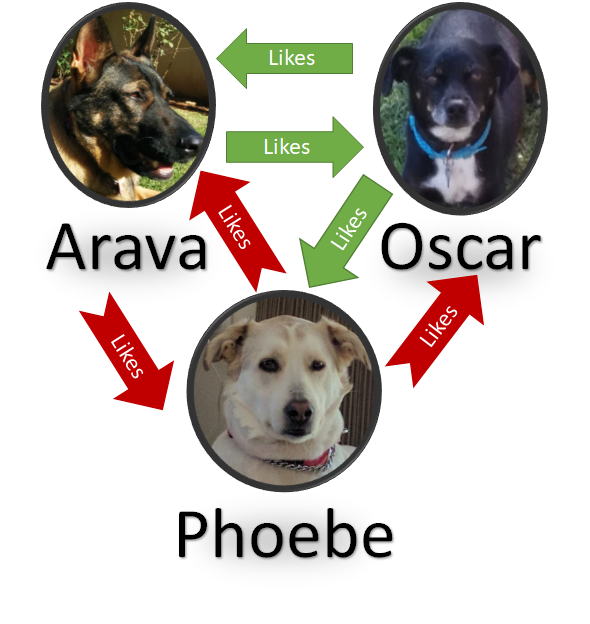
As a reminder, here is the graph:

image

And starting from Arava, I want to find a dog that likes Arava that also likes a dog that isn’t liked by Arava.

The LemonGraph query language isn’t very expressive, or at least I’m not familiar enough with it to make it work properly. I decided on the following query:

n(type="dog", value="arava")->
               @e(type="likes", value="yes")->
n(type="dog")->
               @e(type="likes", value="yes")->
n(type="dog")->
               @e(type="likes", value="no")->
@N(type="dog", value="arava")

This is a bit of a brute force method to do this. It encodes the path directly. There are a few minor things that might not be obvious here. The @ prefix means don’t return this to the user and the N() indicates that we shouldn’t filter already seen values. I can certainly see how this can be useful for certain things Smile. I wonder if LemonGraph has a better way to express such a query.

This is the first time I actually reviewed this kind of codebase, where some things are done in C and some in Python. It was quite interesting to see the interaction between them. The codebase itself is really interesting, but I found it really hard to follow at times. The love affair with tuples and dynamic behavior made the code non trivial and likely is going to cause maintenance issues down the line. It is also quite obvious that this is intended for internal consumption, with very little time or effort spent on “productization”. By that I meant things like better query errors and more obvious thing to do.

It has an interesting approach to solving the problem of graph queries and I’ve learned quite a few things from it.

time to read 7 min | 1300 words

After going over many layers inside LemonGraph, I think we are ready to get to the real deal. We know how LemonGraph starts to execute a query. It find the clause that is likely to have the least number of items and starts from there. These are the seeds of the query, but how is it going to actually process that?

Here is my graph:

image

And here is the query that I want to run on it: n()->e(type="likes", value="yes")->n()

LemonGraph detects that the cheapest source of seeds for this query is the edge and provides these to the MatchCTX class which does the actual processing. Let’s explore how it is working on a single seed.

The actual behavior starts from the matches() method, which starts here:

image

As usual for this codebase, the use of tuples for controlling behavior is prevalent and annoying. In this case, the idx argument controls the position of the target in the query, whatever this is the start, end or somewhere in the middle. The deltas define what direction the matches should go and the stops where you must stop searching, I think.

Now that we setup the ground rules, the execution is as follows:

image

In this case, because the seed of our query is the edge (which is in the middle) it determines that deltas are (1, –1) and stops are (2, 0). We’ll also go to the first clause in the if statement. The link variable there controls whatever we should follow links going in or out.

There is a lot of logic actually packed into the link initialization. The self.link is an array that has ‘next’ and ‘prev’ as its values, so the idea is that it find what property to look at, then use the dictionary syntax to get the relevant property and decide what kind of direction it should go.

We’ll focus on the _recurse() method for now. In this case, we are being passed:

  • idx = 1
  • delta = 1
  • stop = 2

Here is the actual method:

image

As you can see, we first validate that the match is valid (this is where we mostly check other properties of the value that we are currently checking, filtering them in place). Usually the do_seen will be set to True, which will ensure that we only traverse each node once. The main iteration logic is done in combination with the _next() method, shown below:

image

The first line there shows usage of delta, which control in what direction to move. I’m not quite sure why the filter is set in the if statements, since it is also being set immediately after. This looks like redundant code that snuck in somehow.

The bulk of the work is shelled out to iterlinks, so let’s check what is going on there… I know that we are running on an edge here, so we need to look at the Edge.iterlinks() method:

image

There isn’t really much to tell here, it checks the filters and return the incoming or outgoing edges, nothing more. On the other hand, the Node.iterlinks() implementation is a bit simpler:image

We’ll explore exactly how the edges are loaded for a node in a bit, however, I do want to note right now that the _next() method isn’t passing the types of the edge, even though it looks to me that it has this information. In that case, that would give a performance boost because it could filter a lot of edges in busy graphs.

Actually, I already looked at how iterators working in a previous post, so I won’t go over all of that again. This is basically calling this method

image

The graph_node_edges_in() and graph_node_edges_out() methods are pretty simple, basically just scanning the DB_TGTNODE_IDX or DB_SRCNODE_IDX indexes, respectively. The graph_node_edges() however, is really strange.

Here it is:

image

It took me a few reads to figure out that this is probably a case of someone unpacking a statement for debugging but forgetting to remove the packed statement. The second return statement is ignored and likely stripped out as unreachable, but it is pretty confusing to read.

The graph_iter_concat() answers a question I had about how graph_iter_t is used, here is how it looks like:

image

This is using C’s support for passing an unknown number of parameters to a method. This basically builds a simple linked list, which also answers the usage of _blarf() function and its behavior a few posts ago.

So we are back were we started, we understand how the data flows into the Python code, now let’s go back and look at _recurse() and _next() calls.

Now I know a lot more about the behavior of the code, so this make sense. The stop argument to the _recurse() control the depth of the number of links that would be traversed in a particular query. Now that I know how this particular clause work, I understand how LemonGraph goes from the edge to the node in e()->n(), but I don’t know how it goes to back to find the full path.

The key for that are the calls to push()  and pop() in the the MatchCtx._recurse() methods. These update the chain, like so:

image

In processing the query, we first append the edge to the chain:

image

The next step goes from the edge to it’s destination, giving us Oscar:

image

Remember that in the matches(), we got into this if clause:

image

This is when we start scanning an edge, which first add things to the right, then it scan things to the left in the _next() method. Look at the push() method there. By the time we get to the result(), we have iterated both sides of the connection, giving us:

image

That is a very clever way of doing things.

Let’s try doing things a little bit differently. I’m going to check a slightly different query: n(type=”dog”, value=”arava”)->e(type="likes", value="yes")->n()

If I understand things correctly, this is going to select the node as the starting point, because that is a lot more efficient. That will allow me to figure out the other side of this operation. I just run this through the debugger, and this is indeed how it actually works.

The usage of yield to pass control midway is not trivial to follow, but it ends up being quite a nice implementation. This is enough for this post. In my next one, I want to explore a few of the possible operations that exposed by LemonGraph.

time to read 6 min | 1089 words

I said before that I don’t want to get into the details of how LemonGraph is dealing with parsing the queries. Unfortunately, I can’t avoid that. There seems to be a lot of logic, magic and mystery in the MatchLGQL() class, which is critical to understanding how queries work.

The problem is that either my Python-fu is lacking or it is just really hard to figure out a non trivial codebase behavior in a dynamic language like python. I find it hard to figure out what data is stored where and how it is manipulated. Therefor, I decided to break with my usual custom and actually run the code in the debugger to try to follow what is going on there. I tried to run this on WSL, but it crashed horribly, so I had to spin up a VM and setup PyCharm on it. First time that I’m actually using that and the experience is pretty nice so far. Being able to inspect things directly means that it is much easier to figure out the behavior of the code.

In order to explore how queries work in LemonGraph, I created the following graph, which represents the relationships between my dogs:

image

Here is how this looks like in code:

This tells us to find all the dogs that like each other. And it finds:

  • Arava –> Oscar
  • Oscar –> Arava
  • Oscar –> Pheobe

Now that we have a query that we can sink our teeth into, let’s figure out how this work, shall we? Inside the dreaded MatchLGQL() class, there are all sorts of regular expressions running on the parse this thing, but eventually we get to the partially processed parsed query:

image

This screen shot might explain why I wasn’t happy with the code structure for figuring out what is going on without debugging. The number of tuples here is quite amazing, and they are used everywhere. This make static analysis (as in, just reading the code) too hard for me. But with the debugger, that is much easier. If you are familiar with ASTs, this should be pretty easy to figure out.

Here is a piece of code that we already looked at (and criticized), this is in munge_obj() method, where it is deciding how to optimize the query:

image

This piece of code is critical for the performance of the system. And it is really hard to understand. Here is what is going on.

The accel array tell a later piece of code how to accelerate the query, using the type or type and value to start from a particular source. The info is used to carry state about particular clause in the query. Before this code run there is some code that builds the dictionary d which is used to figure out the filters on the particular clause. This is fun, because it is using missing a key lookup in the dictionary for control flow.

Let’s follow the logic?

  • Line 2 - If the clause operates on a node, rank it as 6. If it is an edge, rank it as 7.
  • Line 6 – If the clause has a type specified, rank is as 4 if it is a node, 5 if it is an edge. Otherwise, abort the optimization.
    • You might not see the “abort this optimization” in line 6, because it relies on the dictionary to throw if the key isn’t found. This is a common pattern in this code and something that I personally greatly dislike.
  • Line 8 – it uses the length of the type as a metric for secondary ranking. I’m not quite sure why this is the case. I guess the code needed a tie breaker, but I can’t imagine why the length of a type would have any impact on performance.
    • Unless, of course, the code assumes that shorter types are more common, and therefor will prefer to use the rare longer types?
  • Line 10 – If there is a type and a value defined, that is even better. Note that again the is the ranking of node (2) and edge (3) which I find non obvious.

Here are the results of the matches after they have been munged, I marked the ranking:

image

Looking at this, this seems very strange, the rank2 value is 1 in the second element, but I expected it to be the length of the string. As it turns out, this is not working directly on the string, it is working on the tuple of possible values, so the secondary ranking here is not based on the length of the type or the value but on the number of possible types and values that were specified for each clause.

The code judges that the best place to start this query is with the second entry, since it is the most specific option. This in turn takes us the the seeds() method that we previously covered. In this case, the code is going to hit this branch:

image

This means that it is going to be iterating over all the edges of a particular type and filtering them in Python code. This is strange, because the on disk indexes actually support doing a direct query on the (type, value) directly and would probably be much cheaper in the case you have many values for a particular type of an edge.

In fact, just that is implemented for querying nodes by (type, value):

image

I’m guessing that they are either don’t have a lot of queries on (type, value) on edges or not a lot of different values for edge types that they can optimize in this manner.

That is enough for now, I have a pretty good grasp of how queries are parsed and how they fetch data from the underlying storage. The next post will talk about how LemonGraph takes the seeds of the query and execute the actual graph operations on them. The code that does this is tight and will require a full post to explore properly.

time to read 2 min | 244 words

Before going over the actual query implementation, I wanted to talk about something that I just realized. I said previously that I don’t understand why LemonGraph is using its integer encoding method, because it is less efficient than using variant sized integer. What I didn’t take into account is that the method LemonGraph is using gives short, but sortable, integers.

Here is the encoding method:

image

Now, let’s see what kind of binary output this will generate when given a few numbers:

image

The key here is that the number of bytes is stored as the first item. This means that when we compare two numbers using memcmp(), the number with more bytes is considered greater. This is indeed the case, because if you need more bytes to store a number, it is obviously larger.

What about two numbers that have the same number of bytes? This is handled by simple binary comparison of the values. If they are the same size, the fact that the encode() output them in big endian format means that we can compare them using memcmp() and be done with it.

This is a really nice way to both keep the values sorted and to avoid storing the full 8 bytes for numbers that are usually much smaller.

time to read 7 min | 1371 words

After figuring out how LemonGraph is storing data on disk, my next task is to figure out how queries are handled. Here are some queries:

image

A query starts in the Python’s Query class, where it is parsed by the MatchLGQL class. I scanned this code briefly, but this is basically doing query parsing into the in memory representation. This is typically ugly piece of code, and that holds true for this code as well. Python’s dynamic nature also means that there isn’t an easy to follow set of AST classes. I’ll skip the details of query parsing and just see how it is actually handling the queries, then.

I started to look into the query execution and got lost in details that I didn’t understand. In particular, there is a very strong tie between the query parsing and the execution. More so than I expected. What brought this home was this piece of code, which is used to rank the most efficient manner in which you should start executing the query.

image

At this point, I think that the idea here is that when you start running a query, you want to start from the smallest set of seed nodes. the ranking here seems to be a nice way to go about doing just that, but I’m not really sure yet how this is applied.

This is later used to figure out what the best starting location is in the Query.finalize() method.

image

This all come together for me inside the _adhoc() method on Query, where the query is actually being run:

image

The self.compiled is the set of already parsed matches. On each of them, we create a context (which will track already visited nodes / edges) and start by finding the seeds on the query. Seeds are handled using… an interesting approach:

image

It took me a few reads to get what this code is trying to do and I still thing that this is an obnoxious way to write things. This basically does the other side of the ranking. It is using the ranking to decide which method to call. I think that an enum would be about three time more readable. Especially since a bit lower you have:

image

I have to say that the modulus usage is the sign of true genius. Or madness. I’m not sure which, because I can’t figure out what the history of this code is. This was the same way from the initial commit, but I think that this code has history from before the public release. And it might have a reason for this kind of code. But I don’t like it and I think it would have been much easier to read if it wasn’t using magic numbers all over the place.

At any rate, let’s assume that we have the simplest query, for all the nodes. This would send us to txn.nodes() method. This would be rank 6, by the way. Here is how this looks like:

image

As you can see, we have two modes here. If the rank was 6, we aren’t sent a type. But if the rank was 4, we are getting a type. I’m going to start from the search for types, which seems more interesting.

Here is where we end up in the C code:

image

Yes, the graph_nodes_type() method is calling _graph_nodes_edges_type() method. That was confusing as well to me. The key here is the DB_NODE_IDX index there, which tell it to use a different tree for the lookups.

The graph_string_lookup() is something that we already run into, this is the __blob_resolve() method, which is searching for the string id for the given type. The code starts to get interesting when we see the graph_iter_new() call:

image

So we specify an iterator on the given prefix. From the previous post, you might recall that DB_NODE_IDX is specific as (type, val –> id). So this does a search on the first item that matches the prefix.  The _cleanse_beforeID() method will ensure that the beforeID is only valid if it represent a value that is between 1 and the max log id that was generated on the graph.

The iterator we got from the nodes() method just implement’s Python iteration interface, starting from the graph_iter_new() item, then calling graph_iter_next() until the end. This is implemented like so:

image

Here we see for the first time the actual usage of beforeID. I’m not sure what this does yet, so we’ll skip this for now and look at the _iter_idx_nextID() method and come back to it later. This method is quite interesting. We have the head of the iterator, which is set to true in the iterator init. I’m not sure what this means yet. What seems to be interesting is that _blarf() method, which I understand to be a cry of frustration (I had to look it up).

image

I’m not sure what the next pointer is doing there at all. We’ll look at that after I’ll inspect (with some measure of dread) the _blarf() function.

image

To start with, I love the use of goto instead of return statements. I understand that this may be a coding convention here and this is used to clearly mark when resources are supposed to be disposed, but still…

The iter_next_key() ends up moving the cursor (and validating that the prefix is still valid). The _parse_idx_logID() call is here:

image

And this is just a fancy way of saying, gimme the last value in this buffer.

To understand what is going on, let’s go back a bit and understand what is going on here. We are actually scanning the index DB_NODE_IDX. And that index has the value of (type, val, id). Since the iteration is done in sorted order, this means that you can iterate over all the matches that match the type you want. The use of beforeID for filtering here, however, is interesting. I wonder how common is the use of historical queries like this are. Because if you need to skip over a lot of items, this will result in an O(N) operation while you are scanning and discarding a lot of data.

Anyway, there doesn’t seem to be any use of the graph_iter_t.next in this code path, so I’ll leave it for now. The iteration over all the nodes is done with the exact same method, but without specifying any prefix, which means that it matches everything.

I have to admit that at this point, I don’t really get how it process the more complex queries. I had to give up the “let’s not run the code” and try a few things out. Surprisingly, on WSL, the code just cause segmentation fault. I tracked it down to something in cffi, but I didn’t care that much. I created a simple ubuntu machine and played with it for a bit. So far, we just looked at how we get the first seeds of the query. A lot of the smarts seems to be hidden in the MatchCTX class.  In particular, the matches() method seems to be doing a lot of magic.

I’m going to concentrate on that in my next post.

FUTURE POSTS

No future posts left, oh my!

RECENT SERIES

  1. API Design (10):
    29 Jan 2026 - Don't try to guess
  2. Recording (20):
    05 Dec 2025 - Build AI that understands your business
  3. Webinar (8):
    16 Sep 2025 - Building AI Agents in RavenDB
  4. RavenDB 7.1 (7):
    11 Jul 2025 - The Gen AI release
  5. Production postmorterm (2):
    11 Jun 2025 - The rookie server's untimely promotion
View all series

Syndication

Main feed ... ...
Comments feed   ... ...