Oren Eini

CEO of RavenDB

a NoSQL Open Source Document Database

Get in touch with me:

oren@ravendb.net +972 52-548-6969

Posts: 7,640
|
Comments: 51,260
Privacy Policy · Terms
filter by tags archive
time to read 1 min | 139 words

I got the following very interesting email:

image

You might have noticed that I have kept the email address of the sender public. That is an important clue.

The email was sent from a public email gateway, one of those places where you have a disposable email address.

I suspect that there isn’t actually a bug, but that the system is working as planned Smile

And there is this complaint:

image

time to read 1 min | 187 words

Originally posted at 1/7/2011

Because I keep getting asked, this feature is available for the following profilers:

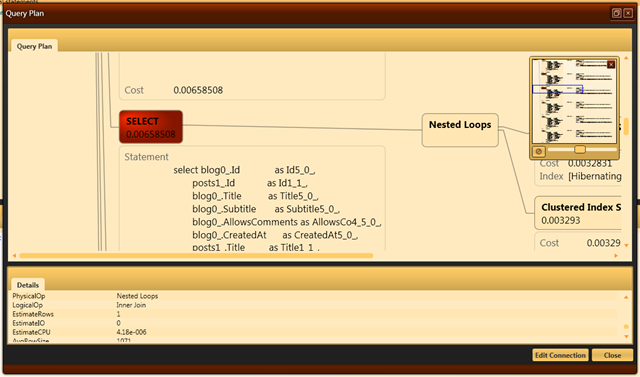
This feature is actually two separate ones. The first is the profiler detecting what is the most expensive part of the query plan and making it instantly visible. As you can see, in this fairly complex query, it is this select statement that is the hot spot.

image

Another interesting feature that only crops up whenever we are dealing with complex query plans is that the query plan can get big. And by that I mean really big. Too big for a single screen.

Therefore, we added zooming capabilities as well as the mini map that you see in the top right corner.

time to read 1 min | 143 words

Originally posted at 1/7/2011

This is another oft requested feature that we just implemented. The new feature is available for the full suite of Uber Profilers:

You can see the new feature below:

image

I think it is cute, and was surprisingly easy to do.

Uber Prof have recently passed the stage where it is mostly implemented using itself, so I just had to wire a few things together, and then I spent most of the time just making sure that things aligned correctly on the UI.

time to read 1 min | 56 words

I’ll be giving my Advanced NHibernate course in March 2011 in Dallas. We are talking about 3 days of intensive dive into NHibernate, how it works, fully utilizing its capabilities, and actually grokking the NHibernate’s zen.

You can register to the course here: http://dallas-nhibernate.eventbee.com

The early bird pricing ends in about three weeks.

time to read 2 min | 235 words

Originally posted at 1/6/2011

I love git, but as much as I like the command line, there are some things that are ever so much simple with a UI. Most specifically, due to my long years of using TortoiseSVN, I am very much used to the way TortoiseGit is working.

I still work from the command line a lot, and I found myself wanting to execute various actions on the UI from the command line. Luckily, it is very easy to do so with TortoiseGit. I simply wrote the following script (tgit.ps1):

param($cmd)
& "C:\Program Files\TortoiseGit\bin\TortoiseProc.exe" /command:$cmd /path:.

And now I can execute the following from the command line:

tgit log

tgit commit

And get the nice UI.

Please note that I am posting this mostly because I want to be able to look it up afterward. I am sure your git tools are superior to mine, but I like the way I am doing things, and am reluctant to change.

time to read 4 min | 762 words

The RavenDB’s Client API uses the session / unit of work model internally. That means that this code will only go to the database once:

session.Load<User>("users/1");

And that all three calls will return the same instance as well. This is just the identity map at work, and with NHibernate, it is also called the first level cache or the session level cache.

Having implemented that, a natural progression was to ask what about the second level cache. NHibernate’s second level cache is complicated (it takes an hour just to explain how exactly it works, and that is when skipping on all the actual implementation details).

For a while, my response was that we don’t actually need that, RavenDB is fast enough that we don’t need caching. Except that I forgot about the Fallacies of Distributed Computing, the first three rules of which state:

  • The network is reliable.
  • Latency is zero.
  • Bandwidth is infinite.

Most specifically, caching can help with the third rule, since when you are querying potentially large documents (or over a large set of documents), you are going to spend most of your time just on the network, sending bytes to and fro.

It is to avoid that that we actually need caching.

I was slightly depressed that I actually had to implement the same complicated logic as NHibernate for caching, so I dawdled in implementing this. And suddenly it dawned on me that as usual, I was being stupid.

RavenDB is REST based. One of the important parts of REST is that:

Cacheable
As on the World Wide Web, clients are able to cache responses. Responses must therefore, implicitly or explicitly, define themselves as cacheable or not to prevent clients reusing stale or inappropriate data in response to further requests. Well-managed caching partially or completely eliminates some client–server interactions, further improving scalability and performance.

RavenDB is an HTTP server, in the end. Why not use HTTP caching?

That required some thought, I’ll admit. It couldn’t be that simple, right?

HTTP Caching is a somewhat complex topic, if you think it is not, talk to me after reading this 24 pages document describing it. But in essence, I am actually using only a small bit of it.

Whenever RavenDB sends a response to a GET request (the only thing that can be safely cached), it adds an ETag header. The ETag header stands for Entity Tag, and it changes every time that the resource is changed.

RavenDB already generated ETags for documents and attachments, those are part of how we implement optimistic concurrency. But since we already had those, we could now move to the next stage, and that was to have the client remember the responses for all the GET requests and when a new request for a Url that we already GET before, it will generate a If-None-Match header for the request.

RavenDB then checks whatever the ETag that the client holds matches the ETag on the server, and if so, will generate a 304 Not Modified response. That instruct the client that it can use the cached response safely.

In order to fully implement caching on the client, that was all we had to do. On the server side, we had to modify a few endpoints to properly generate an ETag and 304 if the client sent us the current If-None-Match value. With RavenDB, this is handled very deep in the guts of the client api, directly on top of the HTTP layer. It is always on by default and it should drastically reduce the amount of data across the network when the data hasn’t been modified.

Please note that unlike NHibernate’s second level cache, we don’t need a distributed cache to ensure consistency. Each node has its own local cache, but all of them will always get valid results, thanks to RavenDB’s ETag checks. In fact, the biggest challenge was actually involved in figuring out how to cheaply generate a valid ETag without performing the actual work for the request Smile.

Git Subtree

time to read 8 min | 1525 words

Originally posted at 1/10/2011

I have no idea why, but yesterday I tried using the git-subtree project on a different machine, and it did not work. Today, I tried it on my main work machine, and It Just Worked.

At any rate, let us see where we are, shall we?

PS C:\Work\temp> git init R1
Initialized empty Git repository in C:/Work/temp/R1/.git/
PS C:\Work\temp> git init R2
Initialized empty Git repository in C:/Work/temp/R2/.git/
PS C:\Work\temp> git init Lic
Initialized empty Git repository in C:/Work/temp/Lic/.git/
PS C:\Work\temp> cd R1
PS C:\Work\temp\R1> echo "Hello Dolly" > Dolly.txt
PS C:\Work\temp\R1> git add --all
PS C:\Work\temp\R1> git commit -m "initial commit"
[master (root-commit) b507184] initial commit
 1 files changed, 0 insertions(+), 0 deletions(-)
 create mode 100644 Dolly.txt
PS C:\Work\temp\R1> cd ..\R2
PS C:\Work\temp\R2> echo "Hello Jane" > Jane.txt
PS C:\Work\temp\R2> git add --all
PS C:\Work\temp\R2> git commit -m "initial commit"
[master (root-commit) ec99676] initial commit
 1 files changed, 0 insertions(+), 0 deletions(-)
 create mode 100644 Jane.txt
PS C:\Work\temp\R2> cd ..\Lic
PS C:\Work\temp\Lic> echo "Copyright Ayende (C) 2011" > license.txt
PS C:\Work\temp\Lic> git add --all
PS C:\Work\temp\Lic> git commit -m "initial commit"
[master (root-commit) a3a9b48] initial commit
 1 files changed, 0 insertions(+), 0 deletions(-)
 create mode 100644 license.txt
PS C:\Work\temp\Lic> cd..
PS C:\Work\temp> git clone .\Lic Lic.Bare --bare
Cloning into bare repository Lic.Bare...
done.

Those are the current repositories, and we want to be able to share the Lic repository among the two projects. Note that we created a bare repository for Lic, because we can’t by default push to a remote repository if it is not bare.

Using git subtree, we can run:

PS C:\Work\temp> cd .\R1
PS C:\Work\temp\R1> git subtree add --prefix Legal C:\Work\temp\Lic.Bare master
git fetch C:\Work\temp\Lic.Bare master
warning: no common commits
remote: Counting objects: 3, done.
remote: Compressing objects: 100% (2/2), done.
remote: Total 3 (delta 0), reused 0 (delta 0)
Unpacking objects: 100% (3/3), done.
From C:\Work\temp\Lic.Bare
 * branch            master     -> FETCH_HEAD
Added dir 'Legal'
PS C:\Work\temp\R1> ls -recurse


    Directory: C:\Work\temp\R1


Mode                LastWriteTime     Length Name
----                -------------     ------ ----
d----         1/10/2011  11:59 AM            Legal
-a---         1/10/2011  11:58 AM         28 Dolly.txt


    Directory: C:\Work\temp\R1\Legal


Mode                LastWriteTime     Length Name
----                -------------     ------ ----
-a---         1/10/2011  11:59 AM         56 license.txt

We do the same in the R2 repository:

PS C:\Work\temp\R1> cd ..\R2
PS C:\Work\temp\R2> git subtree add --prefix Legal C:\Work\temp\Lic.Bare master
git fetch C:\Work\temp\Lic.Bare master
warning: no common commits
remote: Counting objects: 3, done.
remote: Compressing objects: 100% (2/2), done.
remote: Total 3 (delta 0), reused 0 (delta 0)
Unpacking objects: 100% (3/3), done.
From C:\Work\temp\Lic.Bare
 * branch            master     -> FETCH_HEAD
Added dir 'Legal'

Now let us see what happen when we modify things…

PS C:\Work\temp\R2> echo "Not for Jihad use" > .\Legal\disclaimer.txt
PS C:\Work\temp\R2> git add --all
PS C:\Work\temp\R2> git commit -m "adding disclaimer"
[master 3ac3e15] adding disclaimer
 1 files changed, 0 insertions(+), 0 deletions(-)
 create mode 100644 Legal/disclaimer.txt

Couple of things to note here:

  • We could add & commit from the root repository, because as far as Git is concerned, there is only one repository.
  • If we were to push our changes to the root repository location, it would include the changes just made.

This is a Good Thing, because if I want to create a branch / fork, I get everything, not just references.

Now, let us push our changes to the Lic repository:

PS C:\Work\temp\R2> git subtree push C:\Work\temp\Lic.Bare master --prefix Legal
git push using:  C:\Work\temp\Lic.Bare master
1/      4 (0)2/      4 (0)3/      4 (0)4/      4 (1)Counting objects: 4, done.
Delta compression using up to 4 threads.
Compressing objects: 100% (2/2), done.
Writing objects: 100% (3/3), 320 bytes, done.
Total 3 (delta 0), reused 0 (delta 0)
Unpacking objects: 100% (3/3), done.
To C:\Work\temp\Lic.Bare
   a3a9b48..10fea68  10fea680b0783e0cf6e5d3ba5130d154557ffbe5 -> master

And now let us see how we get those changes back in the R1 repository:

PS C:\Work\temp\R1> git subtree pull C:\Work\temp\Lic.Bare master --prefix Legal
remote: Counting objects: 4, done.
remote: Compressing objects: 100% (2/2), done.
remote: Total 3 (delta 0), reused 0 (delta 0)
Unpacking objects: 100% (3/3), done.
From C:\Work\temp\Lic.Bare
 * branch            master     -> FETCH_HEAD
Merge made by recursive.
 Legal/disclaimer.txt |  Bin 0 -> 40 bytes
 1 files changed, 0 insertions(+), 0 deletions(-)
 create mode 100644 Legal/disclaimer.txt
PS C:\Work\temp\R1> ls -recurse


    Directory: C:\Work\temp\R1


Mode                LastWriteTime     Length Name
----                -------------     ------ ----
d----         1/10/2011  12:04 PM            Legal
-a---         1/10/2011  11:58 AM         28 Dolly.txt


    Directory: C:\Work\temp\R1\Legal


Mode                LastWriteTime     Length Name
----                -------------     ------ ----
-a---         1/10/2011  12:04 PM         40 disclaimer.txt
-a---         1/10/2011  11:59 AM         56 license.txt

There is another important advantage for git subtree, it is only me that have to use this, everyone else can just work with the usual git tools, and not have to be aware that I am sharing code between projects in this manner.

time to read 5 min | 880 words

The builtin answer for sharing code between multiple projects is quite simple…

git submodule

But it introduces several problems along the way:

  • You can’t just git clone the repository, you need to clone the repository, then call git submodule init & git submodule update.
  • You can’t just download the entire source code from github.
  • You can’t branch easily with submodules, well, you can, but you have to branch in the related projects as well. And that assumes that you have access to them.
  • You can’t fork easily with submodules, well, you can, if you really feel like updating the associations all the time. Which is really nasty.

Let me present you with a simple scenario, okay? I have two projects that share a common license. Obviously I want all projects to use the same license and the whole thing to be under source control.

Here is our basic setup:

PS C:\Work\temp> git init R1
Initialized empty Git repository in C:/Work/temp/R1/.git/
PS C:\Work\temp> git init R2
Initialized empty Git repository in C:/Work/temp/R2/.git/
PS C:\Work\temp> git init Lic
Initialized empty Git repository in C:/Work/temp/Lic/.git/
PS C:\Work\temp> cd R1
PS C:\Work\temp\R1> echo "Hello Dolly" > Dolly.txt
PS C:\Work\temp\Lic> cd ..\R1
PS C:\Work\temp\R1> git add --all
PS C:\Work\temp\R1> git commit -m "initial commit"
[master (root-commit) 498ab77] initial commit
 1 files changed, 0 insertions(+), 0 deletions(-)
 create mode 100644 Dolly.txt
PS C:\Work\temp\R1> cd ..\R2
PS C:\Work\temp\R2> echo "Hello Jane" > Jane.txt
PS C:\Work\temp\R2> git add --all
PS C:\Work\temp\R2> git commit -m "initial commit"
[master (root-commit) deb45bc] initial commit
 1 files changed, 0 insertions(+), 0 deletions(-)
 create mode 100644 Jane.txt
PS C:\Work\temp\R2> cd ..\Lic
PS C:\Work\temp\Lic> echo "Copyright Ayende (C) 2011" > license.txt
PS C:\Work\temp\Lic> git add --all
PS C:\Work\temp\Lic> git commit -m "initial commit"
[master (root-commit) 8e8b1b4] initial commit
 1 files changed, 0 insertions(+), 0 deletions(-)
 create mode 100644 license.txt

This just gives us the basics. Now I want to share the license.txt file between the projects. I can do that with submodules, like so:

PS C:\Work\temp\R1> git submodule init
PS C:\Work\temp\R1> git submodule add C:\Work\temp\Lic Legal
Cloning into Legal...
done.
PS C:\Work\temp\R1> cd ..\R2
PS C:\Work\temp\R2> git submodule init
PS C:\Work\temp\R2> git submodule add C:\Work\temp\Lic Legal
Cloning into Legal...
done.

Now, this looks nice, and it works beautifully. Until you start sharing this with other people. Then it starts to become somewhat messy.

For example, let us say that I want to add a disclaimer in R1:

PS C:\Work\temp\R1\Legal> echo "Not for Jihad use" > Disclaimer.txt
PS C:\Work\temp\R1\Legal> git add .\Disclaimer.txt
PS C:\Work\temp\R1\Legal> git commit -m "adding disclaimer"
[master db3987c] adding disclaimer
 1 files changed, 0 insertions(+), 0 deletions(-)
 create mode 100644 Disclaimer.txt

And here is where the problems starts. Let us assume that I want to make a change that is local to just this project.

Well, guess what, you can’t. Not if you intend to share this with other people. You need to push your changes to the submodules somewhere, and that means that if you need to fork the original project, update references to the project. Of course, if there is an update to the original submodule, you need to have two stages to update that.

And we haven’t spoken yet on the fun of pushing the main repository but forgetting to push the submodule. It gives a new meaning to “it works on my machine”.

In short, git submodules looks like a good idea, but they aren’t really workable in the real world. I’ll have a new post shortly showing how to deal with the issue

time to read 2 min | 223 words

I am getting really sick of git submodules, and I am trying to find alternatives.

So far, I have discovered the following options:

PS C:\Work\RavenDB> braid add git@github.com:ravendb/raven.munin.git
F, [2011-01-09T18:41:09.788525 #224] FATAL -- : uninitialized constant Fcntl::F_SETFD (NameError)
C:/Ruby186/lib/ruby/gems/1.8/gems/open4-1.0.1/lib/open4.rb:20:in `popen4'
C:/Ruby186/lib/ruby/gems/1.8/gems/evilchelu-braid-0.5/lib/braid/operations.rb:103:in `exec'
C:/Ruby186/lib/ruby/gems/1.8/gems/evilchelu-braid-0.5/lib/braid/operations.rb:114:in `exec!'
C:/Ruby186/lib/ruby/gems/1.8/gems/evilchelu-braid-0.5/lib/braid/operations.rb:51:in `version'
C:/Ruby186/lib/ruby/gems/1.8/gems/evilchelu-braid-0.5/lib/braid/operations.rb:57:in `require_version'
C:/Ruby186/lib/ruby/gems/1.8/gems/evilchelu-braid-0.5/lib/braid/operations.rb:78:in `require_version!'
C:/Ruby186/lib/ruby/gems/1.8/gems/evilchelu-braid-0.5/lib/braid/command.rb:51:in `verify_git_version!'
C:/Ruby186/lib/ruby/gems/1.8/gems/evilchelu-braid-0.5/lib/braid/command.rb:10:in `run'
C:/Ruby186/lib/ruby/gems/1.8/gems/evilchelu-braid-0.5/bin/braid:58:in `run'
C:/Ruby186/lib/ruby/gems/1.8/gems/main-4.4.0/lib/main/program/class_methods.rb:155:in `run!'
C:/Ruby186/lib/ruby/gems/1.8/gems/main-4.4.0/lib/main/program/class_methods.rb:155:in `run'
C:/Ruby186/lib/ruby/gems/1.8/gems/main-4.4.0/lib/main/program/class_methods.rb:144:in `catch'
C:/Ruby186/lib/ruby/gems/1.8/gems/main-4.4.0/lib/main/program/class_methods.rb:144:in `run'
C:/Ruby186/lib/ruby/gems/1.8/gems/main-4.4.0/lib/main/factories.rb:18:in `run'
C:/Ruby186/lib/ruby/gems/1.8/gems/main-4.4.0/lib/main/factories.rb:25:in `Main'
C:/Ruby186/lib/ruby/gems/1.8/gems/evilchelu-braid-0.5/bin/braid:13
C:/Ruby186/bin/braid:19:in `load'
C:/Ruby186/bin/braid:19

Does anyone know about a good solution that will work on Windows? Most specifically, I am looking for something that is plug & play, I don’t want to write code or to understand how git works. I just wanna it to work

FUTURE POSTS

No future posts left, oh my!

RECENT SERIES

  1. API Design (10):
    29 Jan 2026 - Don't try to guess
  2. Recording (20):
    05 Dec 2025 - Build AI that understands your business
  3. Webinar (8):
    16 Sep 2025 - Building AI Agents in RavenDB
  4. RavenDB 7.1 (7):
    11 Jul 2025 - The Gen AI release
  5. Production postmorterm (2):
    11 Jun 2025 - The rookie server's untimely promotion
View all series

Syndication

Main feed ... ...
Comments feed   ... ...